

編輯:關於 Android 程式設計
在每一個 Android 應用中,AndroidManifest.xml 都是不可或缺的核心文件。它位於整個項目的根目錄,負責描述 package 中對外暴露的各種組件(如 activities、services 等)、它們各自的實現類、能夠處理的數據以及啟動位置。除了聲明應用中的 Activities、ContentProviders、Services 和 Intent Receivers 之外,它還承擔著指定 permissions 與 instrumentation(安全控制與測試)的職責。
一個典型的 AndroidManifest.xml 結構如下:
<?xml version="1.0" encoding="utf-8"?>
<manifest>
<application>
<activity>
<intent-filter>
<action/>
<category/>
</intent-filter>
</activity>
<activity-alias>
<intent-filter></intent-filter>
<meta-data/>
</activity-alias>
<service>
<intent-filter></intent-filter>
<meta-data/>
</service>
<receiver>
<intent-filter></intent-filter>
<meta-data/>
</receiver>
<provider>
<grant-uri-permission/>
<meta-data/>
</provider>
<uses-library/>
</application>
<uses-permission/>
<permission/>
<permission-tree/>
<permission-group/>
<instrumentation/>
<uses-sdk/>
<uses-configuration/>
<uses-feature/>
<supports-screens/>
</manifest>
下面我們由外向內,逐層剖析各節點的作用。
<manifest xmlns:android="https://schemas.android.com/apk/res/android"
package="com.woody.test"
android:sharedUserId="string"
android:sharedUserLabel="string resource"
android:versionCode="integer"
android:versionName="string"
android:installLocation=["auto" | "internalOnly" | "preferExternal"] >
</manifest>
xmlns:android:定義 android 命名空間,使標準屬性能在文件中使用。
package:指定本應用的 java 主程序包名,也是應用進程的默認名稱。
sharedUserId:表明數據權限。默認情況下 Android 給每個 APK 分配唯一 UserID,若將不同 APK 的 sharedUserId 設為相同,它們便可共享數據。
sharedUserLabel:一個共享的用戶名,僅在設置了 sharedUserId 時才有意義。
versionCode:供設備程序識別版本(升級)使用,必須是整數,代表 app 更新過多少次。
versionName:給用戶看的版本名稱,可設置為 1.1、1.2、2.0 等。
installLocation:安裝參數,是 Android 2.2 的新特性,可選 internalOnly、auto、preferExternal。需要後台監控的 APP 建議安裝在內部,較大的遊戲則可置於 SD 卡。
每個 AndroidManifest.xml 必須含有一個 application 標簽,它聲明了應用中的每一個組件及其屬性(如 icon、label、permission 等)。其常用屬性包括:
allowClearUserData:用戶是否能自行清除數據,默認 true。
allowTaskReparenting:是否允許 activity 更換所屬任務。
backupAgent:設置應用的備份類,是 Android 2.2 的新特性。
debuggable:設置為 true 時應用可在手機上被調試,默認 false。
enabled:系統是否能夠實例化該應用的組件。
hasCode:表示應用是否包含代碼,默認 true。
icon / label:聲明應用的圖標與名稱。
name:應用程序所實現的 Application 子類全名,在進程啟動時最先被實例化。
permission:為應用的所有組件設置許可的便捷方式。
persistent:應用是否應始終保持運行,默認 false,一般僅系統應用才設置。
process:應用運行的進程名,默認為 package 名。
taskAffinity:擁有相同 affinity 的 Activity 理論上屬於同一 Task。
theme:為所有 activity 定義默認主題風格。
activity 是應用中最常見的組件,其重要屬性包括:
alwaysRetainTaskState:是否保留狀態不變,比如返回 home 後重新打開仍處於最後狀態。
clearTaskOnLaunch:每次從桌面重新啟動任務時是否清除已有的 activity。
configChanges:當指定配置變化時是否調用 onConfigurationChanged()。常用於處理屏幕旋轉,避免 Activity 重建。
excludeFromRecents:是否顯示在最近打開的列表中。
launchMode:Activity 的加載模式,有四種:standard、singleTop、singleTask、singleInstance,默認為 standard。
screenOrientation:activity 的顯示方向,可選 unspecified、landscape、portrait、user、behind、sensor、nosensor 等。
noHistory:Activity 離開屏幕後是否從棧中清除並結束。
windowSoftInputMode:主窗口與軟鍵盤的交互模式,可避免輸入法面板遮擋問題。
其中 launchMode 值得重點說明:standard 每次都生成新實例;singleTop 在目標 Activity 位於棧頂時複用實例;singleTask 全局僅一個實例;singleInstance 則將該 Activity 單獨放入一個棧中,實現跨應用的共享。
intent-filter 用於聲明組機能夠響應的 Intent,內部可設置 action、data、category 三種資料,filter 會與 intent 中的這三種資料作比對。
action:只有 android:name 屬性,常見值為 android.intent.action.MAIN,表明此 activity 為應用入口。
category:同樣只有 android:name 屬性,常見值為 android.intent.category.LAUNCHER,決定應用是否顯示在程序列表中。
data:指定 URI 與數據類型,包含 scheme、host、port、path、mimeType 等屬性,對應 URI 的各個部分:scheme://host:port/path。
此外,intent-filter 上的 android:priority 屬性用於設置優先級,範圍為 -1000~1000,數值越大優先級越高,主要影響有序廣播的傳遞順序。
<meta-data>:可包含在 activity、activity-alias、service、receiver 中,用於存放鍵值型的元數據。
<activity-alias>:為 activity 創建快捷方式,透過 targetActivity 指向真正的 activity。
<service>:聲明後台服務,它無法自行啟動,退出應用後仍可在後台運行,比如播放音樂、後台下載等。
<receiver>:用於接收並響應廣播。
<provider>:聲明 ContentProvider,透過 authorities 標識,供外部應用訪問數據。
<uses-library>:聲明用戶庫。
<supports-screens>:Android 1.6 後的多屏幕支持機制,聲明是否支持大、中、小屏及不同密度。
<uses-configuration> 與 <uses-feature>:描述應用所需的硬件與軟件特性,防止應安裝在不支持的設備上。
<uses-sdk>:描述應用所需的 API level,可指定最小、目標與最大版本。
<instrumentation>:定義用於探測與分析應用性能的類,可監控程序。
最常用的當屬 <uses-permission>,當我們需要獲取某個權限時就必須在清單中聲明,它與 application 同級。通常我們無需為自己的應用聲明權限,除非你提供了供其他應用調用的代碼或數據,這時才需使用 <permission> 來自定義權限。而 <permission-group> 用於聲明一組權限的標簽,<permission-tree> 則為一組權限聲明一個命名空間。
 Android 在圖片上疊加可拖動文字:從需求變通到截圖合成
這個 Demo 的起點是個相當無奈的需求:用戶拍完照分享到微信,同時想附一段備註,而業務方希望能拿到用戶在微信彈窗裡輸入的內容,存進自己的資料庫。 問題在於,那段文字對
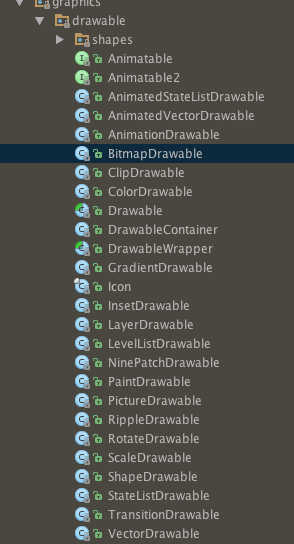 Android Drawable 全景圖鑑:從 XML 節點到實現類
為什麼要系統地認識 Drawable 日常開發中,我們絕大多數時候並不直接 new 出某個 Drawable 實現類,而是寫 XML。只有當需要在運行時動態修改 Draw
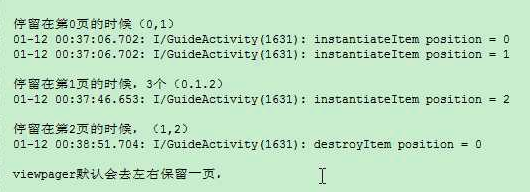 Android 智慧北京專案實戰:ViewPager 預加載、底部 Fragment 導航與事件傳遞機制全解析
本篇文章以「智慧北京」這個綜合性專案為載體,串起 Android 開發中幾個非常關鍵的知识点:ViewPager 的预加载机制、控件宽高的本质、客户端与服务端的 Json
 用 HorizontalScrollView 給 ListView 的頭部動態添加橫向滾動圖片
最近接到一個需求:在 ListView 頂部展示廣告位,而且圖片需要在運行時動態添加。最終的解法是把 HorizontalScrollView 用作 ListView 的
