

編輯:關於 Android 程式設計
本文示範一個實用的模式:在 UI Activity 中用 AsyncTask 開一條背景執行緒,於 onPause() 時備份 SQLite 資料庫、於 onResume() 時還原。這樣使用者每次離開再回到應用,資料都有了一份外部備份。
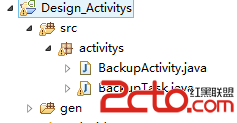
狀態碼用常數表達,便於 Activity 端判斷:
public static final int BACKUP_SUCCESS       = 1;
public static final int RESTORE_SUCCESS      = 2;
public static final int BACKUP_ERROR         = 3;
public static final int RESTORE_NOFILEERROR  = 4;

public static final String COMMAND_BACKUP  = "backupDatabase";
public static final String COMMAND_RESTORE = "restoreDatabase";
再設計一個 CompletionListener 介面把結果回傳給 Activity,後續要擴充別的完成後行為(例如上傳雲端)也方便:
public interface CompletionListener {
    void onBackupComplete();
    void onRestoreComplete();
    void onError(int errorCode);
}
核心邏輯全在 doInBackground() 裡,依傳入的指令決定備份還是還原:
if (command.equals(COMMAND_BACKUP)) {
    try {
        // 執行備份
    } catch (IOException e) {
        return BACKUP_ERROR;
    }
} else if (command.equals(COMMAND_RESTORE)) {
    try {
        // 執行還原
    } catch (IOException e) {
        return BACKUP_ERROR;
    }
} else {
    return BACKUP_ERROR;
}
package activitys;

import java.io.File;
import java.io.FileInputStream;
import java.io.FileOutputStream;
import java.io.IOException;
import java.nio.channels.FileChannel;

import android.content.Context;
import android.os.AsyncTask;
import android.os.Environment;

class BackupTask extends AsyncTask<String, Void, Integer> {

    public interface CompletionListener {
        void onBackupComplete();
        void onRestoreComplete();
        void onError(int errorCode);
    }

    public static final int BACKUP_SUCCESS      = 1;
    public static final int RESTORE_SUCCESS     = 2;
    public static final int BACKUP_ERROR        = 3;
    public static final int RESTORE_NOFILEERROR = 4;

    public static final String COMMAND_BACKUP  = "backupDatabase";
    public static final String COMMAND_RESTORE = "restoreDatabase";

    private Context mContext;
    private CompletionListener listener;

    public BackupTask(Context context) {
        mContext = context;
    }

    public void setCompletionListener(CompletionListener aListener) {
        listener = aListener;
    }

    @Override
    protected Integer doInBackground(String... params) {
        File dbFile = mContext.getDatabasePath("mydb");
        File exportDir = new File(Environment.getExternalStorageDirectory(), "myAppBackups");
        if (!exportDir.exists()) exportDir.mkdirs();
        File backup = new File(exportDir, dbFile.getName());

        String command = params[0];
        if (command.equals(COMMAND_BACKUP)) {
            try {
                backup.createNewFile();
                fileCopy(dbFile, backup);
                return BACKUP_SUCCESS;
            } catch (IOException e) {
                return BACKUP_ERROR;
            }
        } else if (command.equals(COMMAND_RESTORE)) {
            try {
                if (!backup.exists()) return RESTORE_NOFILEERROR;
                dbFile.createNewFile();
                fileCopy(backup, dbFile);
                return RESTORE_SUCCESS;
            } catch (IOException e) {
                return BACKUP_ERROR;
            }
        }
        return BACKUP_ERROR;
    }

    @Override
    protected void onPostExecute(Integer result) {
        switch (result) {
            case BACKUP_SUCCESS:
                if (listener != null) listener.onBackupComplete();
                break;
            case RESTORE_SUCCESS:
                if (listener != null) listener.onRestoreComplete();
                break;
            case RESTORE_NOFILEERROR:
                if (listener != null) listener.onError(RESTORE_NOFILEERROR);
                break;
            default:
                if (listener != null) listener.onError(BACKUP_ERROR);
        }
    }

    /** 用 FileChannel 做檔案拷貝,比逐位元組 read/write 有效率得多 */
    private void fileCopy(File source, File dest) throws IOException {
        FileChannel inChannel = new FileInputStream(source).getChannel();
        FileChannel outChannel = new FileOutputStream(dest).getChannel();
        try {
            inChannel.transferTo(0, inChannel.size(), outChannel);
        } finally {
            if (inChannel != null) inChannel.close();
            if (outChannel != null) outChannel.close();
        }
    }
}
備份與還原的時機分別放在 onPause() 與 onResume(),並先確認外部儲存空間已掛載:
public class BackupActivity extends Activity implements BackupTask.CompletionListener {

    @Override
    public void onCreate(Bundle savedInstanceState) {
        super.onCreate(savedInstanceState);
        setContentView(R.layout.main);
        SQLiteDatabase db = openOrCreateDatabase("mydb", Activity.MODE_PRIVATE, null);
        db.close();
    }

    @Override
    public void onResume() {
        super.onResume();
        if (Environment.getExternalStorageState().equals(Environment.MEDIA_MOUNTED)) {
            BackupTask task = new BackupTask(this);
            task.setCompletionListener(this);
            task.execute(BackupTask.COMMAND_RESTORE);
        }
    }

    @Override
    public void onPause() {
        super.onPause();
        if (Environment.getExternalStorageState().equals(Environment.MEDIA_MOUNTED)) {
            BackupTask task = new BackupTask(this);
            task.execute(BackupTask.COMMAND_BACKUP);
        }
    }

    @Override public void onBackupComplete() {
        Toast.makeText(this, "Backup Successful", Toast.LENGTH_SHORT).show();
    }

    @Override public void onRestoreComplete() {
        Toast.makeText(this, "Restore Successful", Toast.LENGTH_SHORT).show();
    }

    @Override
    public void onError(int errorCode) {
        if (errorCode == BackupTask.RESTORE_NOFILEERROR) {
            Toast.makeText(this, "No Backup to Restore", Toast.LENGTH_SHORT).show();
        } else {
            Toast.makeText(this, "Error: " + errorCode, Toast.LENGTH_SHORT).show();
        }
    }
}
AsyncTask 的定位是 UI 執行緒的輔助類,讓背景運算的結果能安全回到主執行緒,並不是通用的執行緒框架。四個方法由系統依序呼叫,開發者只負責實作:
onPreExecute():背景作業開始前於 UI 執行緒呼叫,適合顯示進度條或做初始化。可以省略。doInBackground(Params...):在背景執行緒跑,放耗時的工作;可呼叫 publishProgress() 回報進度。唯一的抽象方法,必須實作。onProgressUpdate(Progress...):publishProgress() 被呼叫後於 UI 執行緒觸發,用來更新介面。onPostExecute(Result):doInBackground 完成後於 UI 執行緒呼叫,把結果交給介面。onCancelled():任務被取消時呼叫。三個泛型參數依序是:傳入 doInBackground 的型別、傳入 onProgressUpdate 的型別、doInBackground 回傳並傳入 onPostExecute 的型別。本文的例子是 <String, Void, Integer>——輸入指令字串、不需要進度、輸出狀態碼。
使用上有四條硬性規則:Task 實例必須在 UI 執行緒建立;execute() 必須在 UI 執行緒呼叫;不要手動呼叫那幾個回呼方法;同一個 Task 只能執行一次,重複執行會拋例外。
一個帶進度回報的下載範例:
private class DownloadFilesTask extends AsyncTask<URL, Integer, Long> {
    protected Long doInBackground(URL... urls) {
        int count = urls.length;
        long totalSize = 0;
        for (int i = 0; i < count; i++) {
            totalSize += Downloader.downloadFile(urls[i]);
            publishProgress((int) ((i / (float) count) * 100));
            if (isCancelled()) break;   // 提早退出
        }
        return totalSize;
    }

    protected void onProgressUpdate(Integer... progress) {
        setProgressPercent(progress[0]);
    }

    protected void onPostExecute(Long result) {
        showDialog("Downloaded " + result + " bytes");
    }
}
FileChannel 是記憶體與磁碟檔案之間的通道,相比傳統串流有三個好處:支援多執行緒併發讀寫;由作業系統負責實際的 IO 排程,效能更好,也可當作共享記憶體使用以减少複製;寫入後何時落盤、暫存在何處都交由 OS 決定,應用崩潰時這段內容仍有機會寫得進去。
public class AcquireChannel {
    public static void main(String[] args) throws Exception {
        // 寫入
        FileChannel channel = new FileOutputStream("D:/a.txt").getChannel();
        channel.write(ByteBuffer.wrap("hello, NIO world in java!".getBytes()));
        channel.close();

        // 讀取
        channel = new FileInputStream("D:/a.txt").getChannel();
        ByteBuffer buff = ByteBuffer.allocate(16);  // 1 byte=8 bit
        channel.read(buff);
        buff.flip();                                 // 反轉以便讀出
        while (buff.hasRemaining()) {
            System.out.print((char) buff.get());
        }
        channel.close();
    }
}
注意緩衝區大小會直接影響讀到的內容——上例只配置 16 位元組,字串後半就被截斷了。
getExternalStorageState() 可能回傳的狀態:
| 常數 | 說明 |
|---|---|
| MEDIA_MOUNTED | 已掛載且具讀寫權限(備份前要確認的就是這個) |
| MEDIA_MOUNTED_READ_ONLY | 已掛載但僅供讀取 |
| MEDIA_REMOVED | SD 卡不存在 |
| MEDIA_SHARED | 透過 USB 大量儲存裝置共享中,此時不可寫入 |
| MEDIA_UNMOUNTED | 存在但未掛載 |
| MEDIA_UNMOUNTABLE | 存在但無法掛載 |
| MEDIA_CHECKING | 正在進行磁碟檢查 |
| MEDIA_NOFS | 空白,或使用了不支援的檔案系統 |
| MEDIA_BAD_REMOVAL | 卸載前已被移除 |
常用路徑方法:
| 方法 | 取得的位置 |
|---|---|
| getDataDirectory() | Android 資料目錄 |
| getDownloadCacheDirectory() | 下載/快取內容目錄 |
| getExternalStorageDirectory() | 外部儲存目錄,即 SDCard |
| getExternalStoragePublicDirectory(String type) | 存放特定類型檔案的公用外部目錄 |
| getExternalStorageState() | 外部儲存設備的當前狀態 |
| getRootDirectory() | Android 根目錄 |
 不靠 IDE:用命令列建立並執行 Android 應用
本文示範如何在不依賴 IDE 的情況下,建立第一個 Android 應用,並在裝置上執行可調試版本。流程適合想理解 Android 建置基礎的人。事前準備開始前,請先下載
 用 WebView 實作一個簡易瀏覽器:返回、前進、首頁、網址輸入
WebView 是 Android 內建的網頁檢視元件,包一層操作列就能做出一個雛形瀏覽器。本篇實作的功能包含:網址輸入與跳轉、返回上一頁、前進下一頁、回到首頁、退出,
 修改 XMind 預設樣式:讓 Relationship 線條不再擋住文字
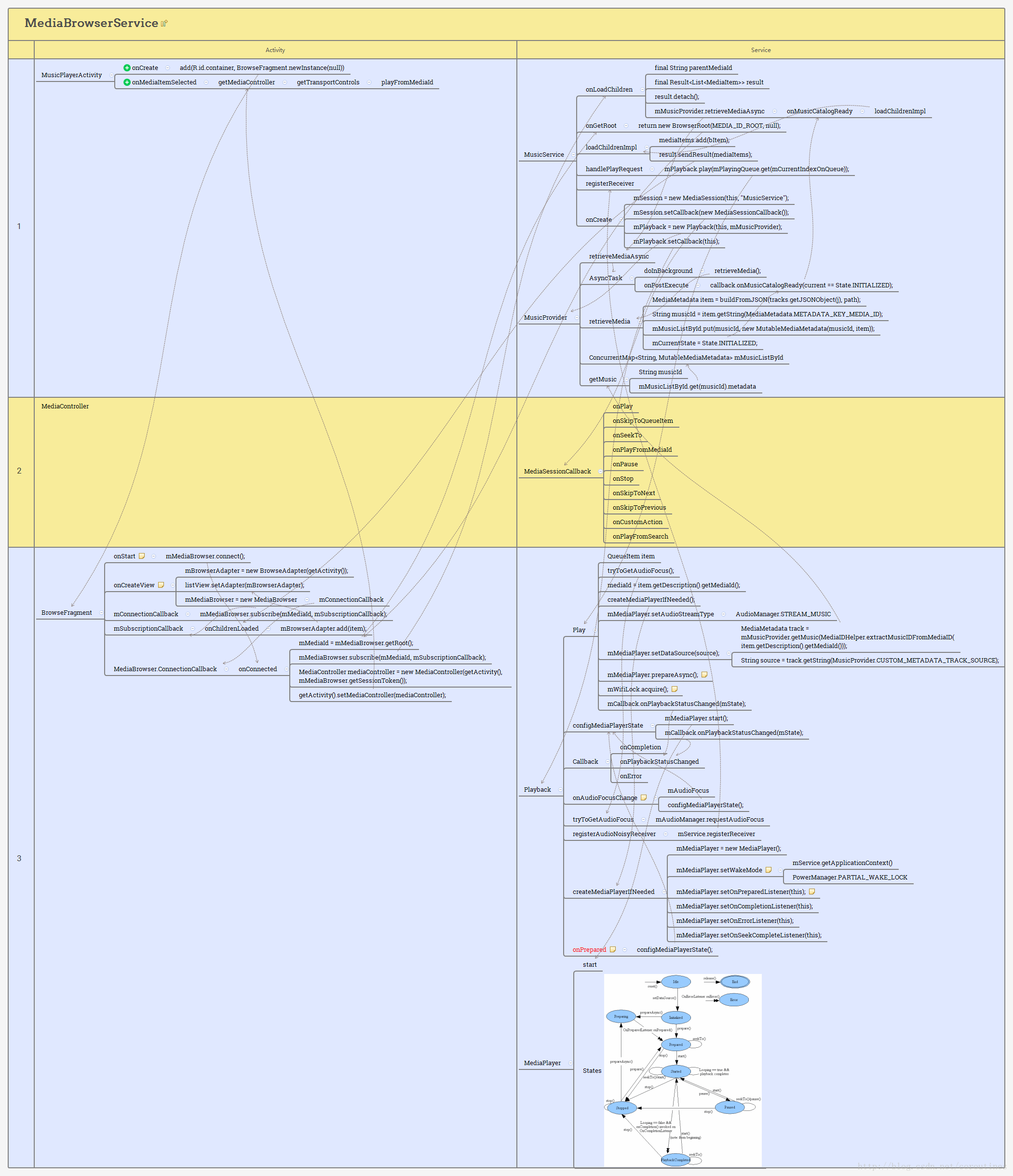
這幾天在讀 Google 關於 Android 媒體開發的 Sample。Media 相關的類別結構相當複雜、時序也不好理解,於是就拿出個人最順手的「讀程式碼」工具 XM
 用 OkHttp3 打造 Picasso 下載器與磁碟快取
在 Android 專案中,Picasso 常用於圖片載入。若希望更完整控制快取與下載行為,可將下載器替換成 OkHttp3。本文整理 Picasso 的快取分工、OkH