

編輯:關於 Android 程式設計
AlertDialog 建立後,其內部的 Button 是被 AlertController 持有的,外部拿不到參照,因此無法直接改樣式或控制顯示。本文記錄兩種繞過這個限制的做法。
final AlertDialog.Builder alert = new AlertDialog.Builder(CloudSyncActivity.this);
alert.setIcon(getResources().getDrawable(R.drawable.about));
alert.setTitle("標題");
alert.setMessage("輸入提示資訊");

alert.setPositiveButton("確認", new DialogInterface.OnClickListener() {
    @Override
    public void onClick(DialogInterface dialog, int which) {
        // 取得按鈕物件
        Button positiveButton = ((AlertDialog) dialog).getButton(AlertDialog.BUTTON_POSITIVE);
        // 對按鈕進行操作
        positiveButton.setVisibility(View.GONE);
    }
});

alert.setNegativeButton("取消", new DialogInterface.OnClickListener() {
    @Override
    public void onClick(DialogInterface dialog, int which) {
        // 取消時的處理
    }
});

alert.show();
關鍵是 ((AlertDialog) dialog).getButton(AlertDialog.BUTTON_POSITIVE)。這個方法(API 8 以後提供)能拿到 dialog 內部的按鈕 view,之後就能任意設定 visibility、enabled、文字或背景。
不過要注意:在 onClick() 裡取得按鈕時,dialog 正在關閉流程中,改樣式的視覺效果通常不明顯。更實用的做法是在 show() 之後才取得:
AlertDialog dialog = alert.create();
dialog.show();

Button positiveButton = dialog.getButton(AlertDialog.BUTTON_POSITIVE);
positiveButton.setOnClickListener(new View.OnClickListener() {
    @Override
    public void onClick(View v) {
        // 自訂點擊行為:例如先驗證輸入,不通過就不關閉
        if (!isValid()) {
            Toast.makeText(context, "請先填寫完整", Toast.LENGTH_SHORT).show();
            return;   // 不呼叫 dismiss,dialog 保持開啟
        }
        doSubmit();
        dialog.dismiss();
    }
});
這技巧常用於「輸入驗證不通過時不讓對話框關掉」的需求,因為覆寫 PositiveButton 的 OnClickListener 後,它就不再走預設的關閉流程了。
原始範例試著透過反射操作 mShowing 欄位來控制關閉:
try {
    Field field = dialog.getClass().getSuperclass().getDeclaredField("mShowing");
    field.setAccessible(true);
    field.set(dialog, false);   // 設為已關閉
    dialog.dismiss();
} catch (Exception e) {
    e.printStackTrace();
}
這段程式碼有幾個問題值得指出:
· 依賴內部實作。mShowing 是 Dialog 的 private 欄位,Android 版本升級後欄位名或結構都可能改變,屆時反射會靜默失敗(被 catch 吞掉),造成難以追蹤的 bug。
· 邏輯自相矛盾。範例中 PositiveButton 分支設為 false,NegativeButton 分支卻設為 true,但註解都寫「表示對話框已關閉」,顯然是複製貼上時改漏了。
· 在 onClick 裡操作為時已晚。點擊發生後 dialog 的關閉流程已經啟動,此時改 mShowing 沒有實際意義。
· 例外被完全吞掉。catch (Exception e) {} 這種空處理會讓問題隱形。
結論:用做法一的 getButton() 就够了,它是官方 API、穩定可靠,不必動用反射。
讓 PositiveButton 預設 disabled:
dialog.show();
dialog.getButton(AlertDialog.BUTTON_POSITIVE).setEnabled(false);
點擊後不自動關閉:在 show() 之後用 setOnClickListener 覆寫,並自行決定何時 dismiss()(如上所示)。
整體換樣式:若只是要改外觀,用 ContextThemeWrapper 搭配自訂 style 會比逐顆按鈕操作乾淨:
AlertDialog dialog = new AlertDialog.Builder(
        new ContextThemeWrapper(this, R.style.MyAlertDialogStyle)).create();
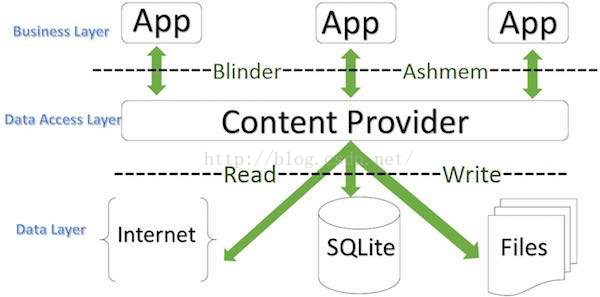 Android 安全開發實戰:Content Provider 組件的風險與防禦
在 Android 的四大組件裡,Content Provider 是唯一專為「跨應用共享數據」而生的角色。它與 Activity、Service 最大的不同在於:它天生
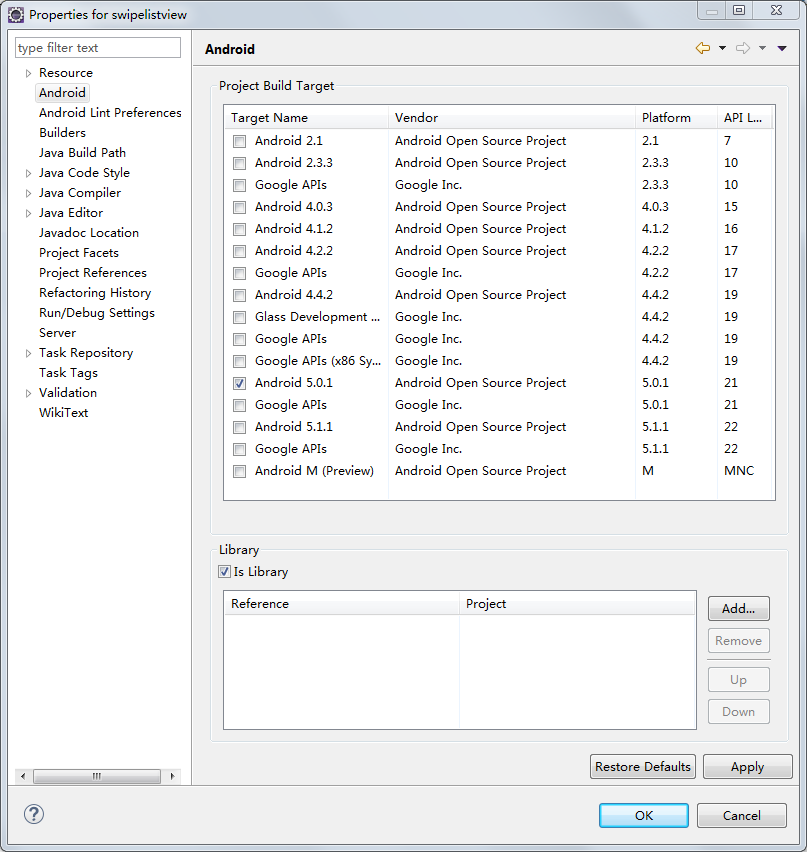 用 SwipeListView 實作類 QQ 的滑動刪除效果
QQ 的滑動刪除互動相當順手,想做出類似效果,可以借助 SwipeListView 這個開源庫。 1. 下載 com.fortysevendeg.swipelistvie
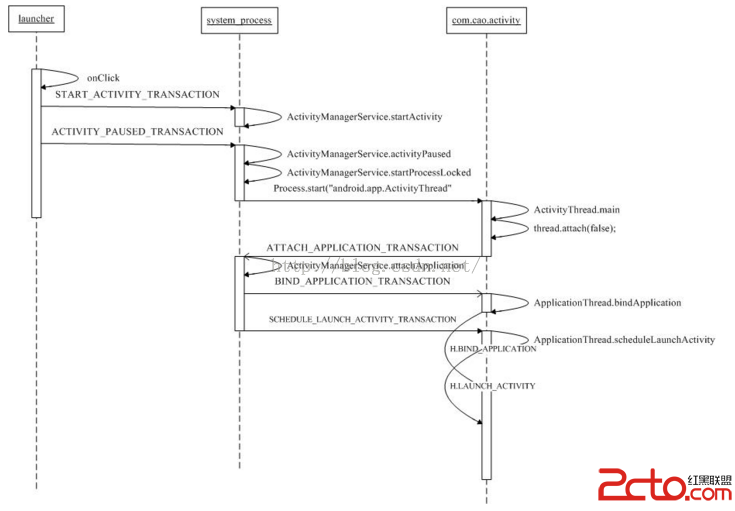 Android 加殼原理深度分析:從源碼視角看脫殼流程
0x00 閱讀本文前,建議先讀一读《Android 加殼原理》及參考文章《Android 中的 Apk 的加固(加殼)原理解析和實現》,否則本文理解起來會比較吃力。 0x
 Android進度條設計詳解:條形進度條與圓形Loading動畫
Android進度條可分為條形與圓形。條形進度條可用ProgressBar搭配自訂style與shape,透過layer-list設定背景、進度與圓角。 圓形Loadin