

編輯:關於 Android 程式設計
上一篇介紹了手機配對連接的三種方式,這篇則以一個完整的程式碼實例,示範如何搜尋周邊的藍牙裝置,並進行主動配對與連接。
package jason.com; import java.io.IOException; import java.lang.reflect.Method; import java.util.ArrayList; import java.util.List; import java.util.UUID; import android.app.Activity; import android.bluetooth.BluetoothAdapter; import android.bluetooth.BluetoothDevice; import android.bluetooth.BluetoothSocket; import android.content.BroadcastReceiver; import android.content.Context; import android.content.Intent; import android.content.IntentFilter; import android.os.Bundle; import android.util.Log; import android.view.View; import android.widget.AdapterView; import android.widget.ArrayAdapter; import android.widget.Button; import android.widget.ListView; import android.widget.Toast; import android.widget.ToggleButton; public class BlueToothTestActivity extends Activity { //該UUID表示串口服務 static final String SPP_UUID = "00001101-0000-1000-8000-00805F9B34FB"; Button btnSearch, btnDis, btnExit; ToggleButton tbtnSwitch; ListView lvBTDevices; ArrayAdapter adtDevices; List lstDevices = new ArrayList(); BluetoothAdapter btAdapt; public static BluetoothSocket btSocket; @Override public void onCreate(Bundle savedInstanceState) { super.onCreate(savedInstanceState); setContentView(R.layout.main); // Button 設置 btnSearch = (Button) this.findViewById(R.id.btnSearch); btnSearch.setOnClickListener(new ClickEvent()); btnExit = (Button) this.findViewById(R.id.btnExit); btnExit.setOnClickListener(new ClickEvent()); btnDis = (Button) this.findViewById(R.id.btnDis); btnDis.setOnClickListener(new ClickEvent()); // ToogleButton設置 tbtnSwitch = (ToggleButton) this.findViewById(R.id.tbtnSwitch); tbtnSwitch.setOnClickListener(new ClickEvent()); // ListView及其數據源 適配器 lvBTDevices = (ListView) this.findViewById(R.id.lvDevices); adtDevices = new ArrayAdapter(this, android.R.layout.simple_list_item_1, lstDevices); lvBTDevices.setAdapter(adtDevices); lvBTDevices.setOnItemClickListener(new ItemClickEvent()); btAdapt = BluetoothAdapter.getDefaultAdapter();// 初始化本機藍牙功能 if (btAdapt.isEnabled()) { tbtnSwitch.setChecked(false); } else { tbtnSwitch.setChecked(true); } // 注冊Receiver來獲取藍牙設備相關的結果 IntentFilter intent = new IntentFilter(); intent.addAction(BluetoothDevice.ACTION_FOUND);// 用BroadcastReceiver來取得搜索結果 intent.addAction(BluetoothDevice.ACTION_BOND_STATE_CHANGED); intent.addAction(BluetoothAdapter.ACTION_SCAN_MODE_CHANGED); intent.addAction(BluetoothAdapter.ACTION_STATE_CHANGED); registerReceiver(searchDevices, intent); } private BroadcastReceiver searchDevices = new BroadcastReceiver() { public void onReceive(Context context, Intent intent) { String action = intent.getAction(); Bundle b = intent.getExtras(); Object[] lstName = b.keySet().toArray(); // 顯示所有收到的消息及其細節 for (int i = 0; i < lstName.length; i++) { String keyName = lstName[i].toString(); Log.e(keyName, String.valueOf(b.get(keyName))); } BluetoothDevice device = null; // 搜索設備時,取得設備的MAC地址 if (BluetoothDevice.ACTION_FOUND.equals(action)) { device = intent.getParcelableExtra(BluetoothDevice.EXTRA_DEVICE); if (device.getBondState() == BluetoothDevice.BOND_NONE) { String str = "未配對|" + device.getName() + "|" + device.getAddress(); if (lstDevices.indexOf(str) == -1)// 防止重復添加 lstDevices.add(str); // 獲取設備名稱和mac地址 adtDevices.notifyDataSetChanged(); } }else if(BluetoothDevice.ACTION_BOND_STATE_CHANGED.equals(action)){ device = intent.getParcelableExtra(BluetoothDevice.EXTRA_DEVICE); switch (device.getBondState()) { case BluetoothDevice.BOND_BONDING: Log.d("BlueToothTestActivity", "正在配對......"); break; case BluetoothDevice.BOND_BONDED: Log.d("BlueToothTestActivity", "完成配對"); connect(device);//連接設備 break; case BluetoothDevice.BOND_NONE: Log.d("BlueToothTestActivity", "取消配對"); default: break; } } } }; @Override protected void onDestroy() { this.unregisterReceiver(searchDevices); super.onDestroy(); android.os.Process.killProcess(android.os.Process.myPid()); } class ItemClickEvent implements AdapterView.OnItemClickListener { @Override public void onItemClick(AdapterView arg0, View arg1, int arg2, long arg3) { if(btAdapt.isDiscovering()) btAdapt.cancelDiscovery(); String str = lstDevices.get(arg2); String[] values = str.split("\\|"); String address = values[2]; Log.e("address", values[2]); BluetoothDevice btDev = btAdapt.getRemoteDevice(address); try { Boolean returnValue = false; if (btDev.getBondState() == BluetoothDevice.BOND_NONE) { //利用反射方法調用BluetoothDevice.createBond(BluetoothDevice remoteDevice); Method createBondMethod = BluetoothDevice.class .getMethod("createBond"); Log.d("BlueToothTestActivity", "開始配對"); returnValue = (Boolean) createBondMethod.invoke(btDev); }else if(btDev.getBondState() == BluetoothDevice.BOND_BONDED){ connect(btDev); } } catch (Exception e) { e.printStackTrace(); } } } private void connect(BluetoothDevice btDev) { UUID uuid = UUID.fromString(SPP_UUID); try { btSocket = btDev.createRfcommSocketToServiceRecord(uuid); Log.d("BlueToothTestActivity", "開始連接..."); btSocket.connect(); } catch (IOException e) { // TODO Auto-generated catch block e.printStackTrace(); } } class ClickEvent implements View.OnClickListener { @Override public void onClick(View v) { if (v == btnSearch)// 搜索藍牙設備,在BroadcastReceiver顯示結果 { if (btAdapt.getState() == BluetoothAdapter.STATE_OFF) {// 如果藍牙還沒開啟 Toast.makeText(BlueToothTestActivity.this, "請先打開藍牙", 1000) .show(); return; } if (btAdapt.isDiscovering()) btAdapt.cancelDiscovery(); lstDevices.clear(); Object[] lstDevice = btAdapt.getBondedDevices().toArray(); for (int i = 0; i < lstDevice.length; i++) { BluetoothDevice device = (BluetoothDevice) lstDevice[i]; String str = "已配對|" + device.getName() + "|" + device.getAddress(); lstDevices.add(str); // 獲取設備名稱和mac地址 adtDevices.notifyDataSetChanged(); } setTitle("本機藍牙地址:" + btAdapt.getAddress()); btAdapt.startDiscovery(); } else if (v == tbtnSwitch) {// 本機藍牙啟動/關閉 if (tbtnSwitch.isChecked() == false) btAdapt.enable(); else if (tbtnSwitch.isChecked() == true) btAdapt.disable(); } else if (v == btnDis)// 本機可以被搜索 { Intent discoverableIntent = new Intent( BluetoothAdapter.ACTION_REQUEST_DISCOVERABLE); discoverableIntent.putExtra( BluetoothAdapter.EXTRA_DISCOVERABLE_DURATION, 300); startActivity(discoverableIntent); } else if (v == btnExit) { try { if (btSocket != null) btSocket.close(); } catch (IOException e) { e.printStackTrace(); } BlueToothTestActivity.this.finish(); } } } }
這份範例完整示範了:初始化本機藍牙、透過 BroadcastReceiver 接收搜尋與配對狀態廣播、以反射呼叫 createBond 進行主動配對,最後用 SPP_UUID 建立 RFCOMM Socket 完成連接。
 Android物聯網開發:byte字節數組與十六進制字串相互轉換
想起前段時間做的物聯網外包專案,經常需要處理透過WiFi接收的資料:有時要轉成十六進制字串,有時又要還原成十進制數據,一切都依照雙方約定的協議來進行。同理,我們發送出去的
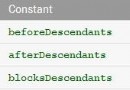 android:descendantFocusability 用法解析:解決 ListView item 點擊沒反應
這是一個開發中很常遇到的怪現象:自訂 ListView 的 item 裡放了 Button、ImageButton 或 CheckBox 這類子控件,結果點擊整列完全沒反
 Android 廣播機制完整整理:普通、有序與粘性廣播
廣播(Broadcast)是 Android 中在應用程式之間傳遞訊息的機制,常用於監聽系統事件(如開機完成、電量變化)或自訂的應用內事件。本文把廣播的三種型態、註冊方式
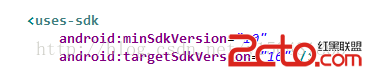 Android 應用如何選擇系統 API 版本號(uses-sdk 介紹)
在開發一個應用之前,特別是 Android 應用,首先要決定這個系統要運行在 Android 2.3、4.0,還是希望相容所有版本。有了這個決定之後,接著就要告訴系統你目