

編輯:關於 Android 程式設計
先說兩個前提。第一,Android 4.0 之後不能在 UI 執行緒進行網路作業,否則直接拋 NetworkOnMainThreadException。第二,需求本身其實很單純:給我一個 URL,把圖片取回來。
以下分享一個相當簡潔的實作方式:
private class DownLoadImage extends AsyncTask<String, Integer, Bitmap> {

    ImageSwitcher imageSwitcher;

    public DownLoadImage(ImageSwitcher is) {
        this.imageSwitcher = is;
    }

    @Override
    protected Bitmap doInBackground(String... urls) {
        System.out.println("異步加載圖片開始!");
        String url = urls[0];
        System.out.println(url);

        Bitmap tmpBitmap = null;
        try {
            InputStream is = new java.net.URL(url).openStream();
            tmpBitmap = BitmapFactory.decodeStream(is);
            is.close();
        } catch (Exception e) {
            e.printStackTrace();
            Log.i("KK下載圖片", e.getMessage());
        }
        return tmpBitmap;
    }

    @Override
    protected void onProgressUpdate(Integer... values) {
        super.onProgressUpdate(values);
        System.out.println("進程進度:" + values);
    }

    @Override
    protected void onPostExecute(Bitmap result) {
        // 把 Bitmap 轉成 Drawable 再設定給控制項
        Resources res = getResources();
        Drawable bd = new BitmapDrawable(res, result);
        imageSwitcher.setImageDrawable(bd);
        System.out.println("異步加載圖片完成!");
    }
}
在 UI 執行緒中這樣呼叫即可:
new DownLoadImage(switcher).execute(img_url);
方法裡的 ImageSwitcher 可以替換成 ImageView 或其他能顯示圖形的控制項,改動很小。
InputStream is = new java.net.URL(url).openStream();
tmpBitmap = BitmapFactory.decodeStream(is);
簡潔是簡潔,但問題也來了:我想加一個進度條顯示下載百分比,這個 InputStream 卻把細節完全封裝掉了,無從得知已讀多少位元組。
這讓我聯想到那張陰陽圖——要拿到進度,就得放棄簡潔,回到需要手寫 buffer 迴圈、自己計算 content-length 的做法。
思路是繞過 decodeStream,改成分段讀取:
@Override
protected Bitmap doInBackground(String... urls) {
    HttpURLConnection conn = null;
    InputStream is = null;
    try {
        URL url = new URL(urls[0]);
        conn = (HttpURLConnection) url.openConnection();
        conn.setConnectTimeout(5000);
        conn.setReadTimeout(5000);

        int totalSize = conn.getContentLength();   // 總長度,可能為 -1
        is = conn.getInputStream();

        // 先寫入暫存檔,同時回報進度
        File temp = new File(getCacheDir(), "temp_" + System.currentTimeMillis());
        FileOutputStream fos = new FileOutputStream(temp);

        byte[] buffer = new byte[4096];
        int len, readSize = 0;
        while ((len = is.read(buffer)) != -1) {
            fos.write(buffer, 0, len);
            readSize += len;
            if (totalSize > 0) {
                publishProgress((int) (readSize * 100 / totalSize));
            }
        }
        fos.close();

        // 全部讀完後再解碼,避免大圖佔用過多記憶體
        Bitmap bitmap = BitmapFactory.decodeFile(temp.getAbsolutePath());
        temp.delete();
        return bitmap;
    } catch (Exception e) {
        e.printStackTrace();
        return null;
    } finally {
        if (is != null) try { is.close(); } catch (IOException e) {}
        if (conn != null) conn.disconnect();
    }
}
關鍵在 getContentLength() 取得總大小,以及在迴圈中呼叫 publishProgress()——它會把進度送到 UI 執行緒的 onProgressUpdate(),那裡才是更新進度條的安全位置。
要注意兩點:伺服器若採用 chunked transfer encoding,content-length 會是 -1,這時進度條無法顯示百分比,只能改用不確定型態的轉圈動畫;另外先寫暫存檔再解碼的做法,能顯著降低大圖直接解碼造成的 OOM 風險。
懂得寫法要點的朋友,歡迎留言交流更好的做法。
 Android 自定義元件:一次定義,多處引用
開發中常會遇到同一組控制項在好幾個頁面重複出現,例如「客服專線」這一列。與其每頁重畫一次,不如把它包成自定義元件。 一、先寫元件的外觀 檔案:lyt_customer_
 Android Spinner 下拉列表使用大全
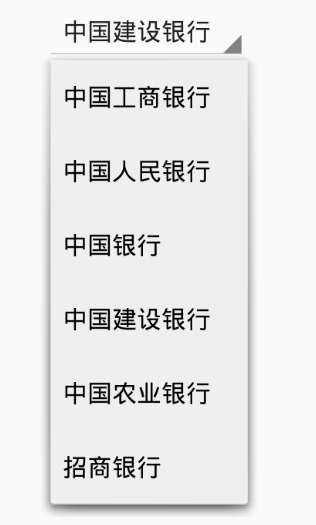
Android 中的下拉列表選擇提供了 Spinner 控件,本文做個小總結以備查用,從「Spinner 屬性」與「設置 Adapter」兩部分說起。 1. Spinne
 Android Studio 整合 J2V8:讓 Java 與 JavaScript 互通
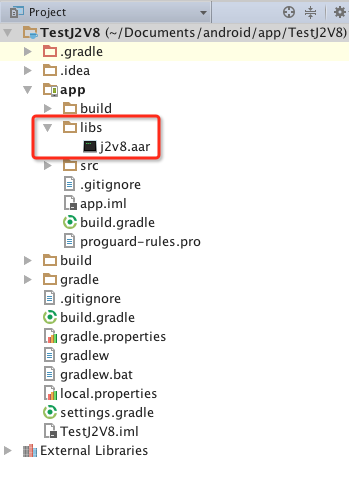
J2V8 是什麼 J2V8 是基於 Google V8 引擎的 Java 開源專案,主要用途是讓 Java 與 JavaScript 可以互相呼叫。它對 Android
 源碼剖析 ImageView 的 ScaleType:八種縮放模式的真實行為
做 Android 開發的人對系統控制項都不陌生,Button、TextView、ImageView 幾乎天天在用。但要說 ImageView 的用法,多數人的答案僅止於