

編輯:關於 Android 程式設計
fastboot 是 Android 開發與調試過程中不可或缺的一項工具,尤其在刷寫各類 img 映像檔時扮演著關鍵角色。以下整理它的常用指令與實務操作,幫助你快速上手。
Android 手機的儲存空間被劃分為多個分區,每個分區都對應一個 img 檔案,例如:開機啟動畫面區(splash1)、資料恢復區(recovery)、核心區(boot)、系統區(system)、快取區(cache)以及使用者資料區(userdata)。
直接輸入 fastboot 即可列出所有可用指令:
usage: fastboot [ <option> ] <command>
commands:
update <filename> reflash device from update.zip
flashall "flash boot" + "flash system"
flash <partition> [ <filename> ] write a file to a flash partition
erase <partition> erase a flash partition
getvar <variable> display a bootloader variable
boot <kernel> [ <ramdisk> ] download and boot kernel
flash:raw boot <kernel> [ <ramdisk> ] create bootimage and flash it
devices list all connected devices
reboot reboot device normally
reboot-bootloader reboot device into bootloader
options:
-w erase userdata and cache
-s <serial number> specify device serial number
-p <product> specify product name
-c <cmdline> override kernel commandline
-i <vendor id> specify a custom USB vendor id
fastboot erase {partition},例如 fastboot erase boot 或 fastboot erase system。
fastboot flash {partition} {*.img},例如 fastboot flash boot boot.img 或 fastboot flash system system.img。
fastboot flashall。此指令會自動搜尋當前目錄下的所有 img 檔案,將它們寫入對應分區後重新開機。
先建立一個包含 boot.img、system.img、recovery.img 的 zip 壓縮檔,接著執行 fastboot update {*.zip}。
fastboot flash splash1 開機畫面。
fastboot reboot。
在工程目錄下的 out/host/linux-86/bin 會產生 adb 與 fastboot 工具,其使用方式與環境設定和 adb 相同。
修改 /kernel/arch/arm/mach-sc8810/include/mach 下的 system.h 檔案。第一次仍須使用 researchdownload 燒錄完整的編譯映像檔,開機後再以 adb reboot bootloader 進入 fastboot mode,之後便可在 Ubuntu 環境下用 fastboot 刷寫指定 img。如此一來就能省去在 Windows 下反覆操作 researchdownload 的繁瑣流程,大幅節省調試時間。
需要注意的是,此做法目前僅適用於展訊平台,其關鍵在於 system.h 中的這段判斷:
else if(!strncmp(cmd, "bootloader", 9))
{
ANA_REG_SET(ANA_RST_STATUS, HWRST_STATUS_BOOTLOADER);
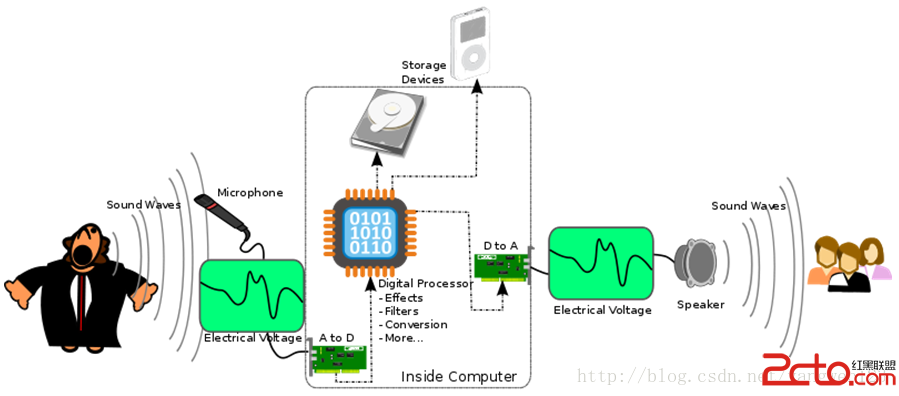 Android 系統 Audio 框架全解析
一、聲音的三個基本屬性 響度(Loudness)就是人耳感知到的聲音大小,也就是音量,它與聲波的振幅直接相關。 音調(Pitch)由頻率決定。頻率越高,聽起來越尖銳;頻率
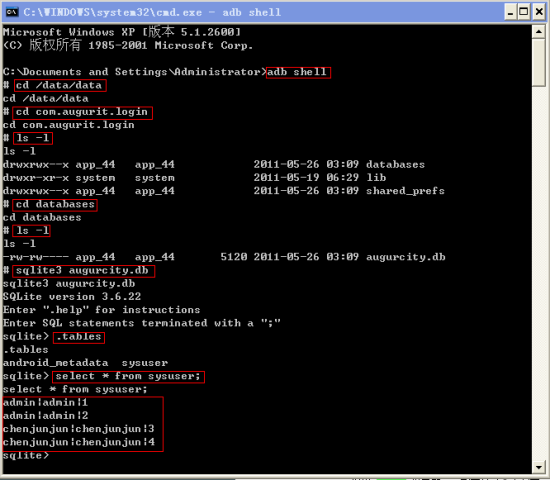 使用 SQLite3 命令列檢視 Android 內嵌資料庫
在 Android 開發中,SQLite 常用於儲存本機資料。若想直接檢查 App 內的資料庫內容,可以透過 adb shell 搭配 sqlite3 命令完成,而不必每
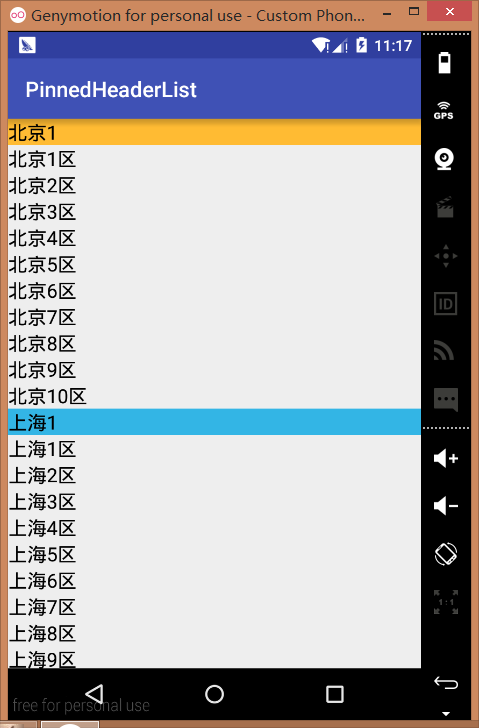 Android UI 實作:分組懸停式 ListView(Pinned Section List)
能讓分組標題懸停在頂部的列表,在實務專案中非常常見——通訊錄的好友分組、地區選擇器、商品分類,幾乎都會用到。本文記錄如何以開源的 PinnedSectionListVie
 Android 取得螢幕寬高的三種方式
取得螢幕寬高是 Android 開發中常見需求,例如置中元件、計算比例或動態調整版面。本文整理三種常用方式,並說明 px 與 dip 的差異。 方法一:Display