

編輯:關於 Android 程式設計
最近參與的一個專案需要呈現一個包含標題與內容的列表頁面。過去雖然用過 ListView,但當時的資料是從手機本地資料庫讀取的;這次資料來源換成了公司 PHP 網站的伺服器,原先使用的 SimpleCursorAdapter 似乎不再適用。翻了一些網路上的範例程式碼後,我心裡一直有個疑惑:他們寫的 ListActivity 子類幾乎都沒有呼叫 setContentView,那到底呈現的是什麼畫面呢?這讓我頗為不解。後來自己動手實驗才發現,原來不特別指定時,顯示的就是這個子類本身。
下面是一個使用 ListActivity 搭配 SimpleAdapter 的完整範例:
 package com.example.listview;

 import java.util.ArrayList;
 import java.util.HashMap;
 import java.util.List;
 import java.util.Map;
 import android.os.Bundle;
 import android.app.ListActivity;
 import android.widget.SimpleAdapter;

 public class MyListView3 extends ListActivity {
     @Override
     public void onCreate(Bundle savedInstanceState) {
         super.onCreate(savedInstanceState);
         SimpleAdapter adapter = new SimpleAdapter(this, getData(), R.layout.vlist,
                 new String[]{"title", "info"}, new int[]{R.id.title, R.id.info});
         setListAdapter(adapter);
     }

     private List<Map<String, Object>> getData() {
         List<Map<String, Object>> list = new ArrayList<Map<String, Object>>();
         Map<String, Object> map = new HashMap<String, Object>();
         map.put("title", "G1");
         map.put("info", "google 1");
         list.add(map);
         map = new HashMap<String, Object>();
         map.put("title", "G2");
         map.put("info", "google 2");
         list.add(map);
         map = new HashMap<String, Object>();
         map.put("title", "G3");
         map.put("info", "google 3");
         list.add(map);
         return list;
     }
 }
與之搭配的列表項佈局 vlist.xml 如下:
 <?xml version="1.0" encoding="utf-8"?>
 <LinearLayout xmlns:android="https://schemas.android.com/apk/res/android"
     android:layout_height="fill_parent"
     android:layout_width="fill_parent"
     android:orientation="horizontal">
     <TextView
         android:id="@+id/title"
         android:layout_height="wrap_content"
         android:layout_width="wrap_content"
         android:textSize="22px" />
     <TextView
         android:id="@+id/info"
         android:layout_height="wrap_content"
         android:layout_width="wrap_content"
         android:textSize="13px" />
 </LinearLayout>
運行效果如下圖所示:
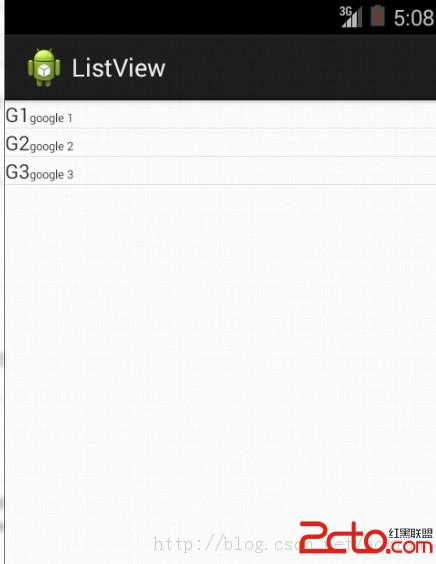
關鍵在於:由於 ListActivity 預設本身就帶有一個 ListView,因此只要透過 setListAdapter 綁定資料,無需再自行呼叫 setContentView 指定佈局,畫面便會自動呈現列表內容。
 Android ViewFlipper 實作教學:打造可手勢滑動的圖片輪播組件
在開發 App 的啟動頁、首頁廣告位或引導頁時,「圖片自動/手動輪播」幾乎是必備功能。Android 原生的 ViewFlipper 是一個專門用來在數个子 View
 破解中興 ZXA10 F460 V3.0 光貓開通自動撥號全記錄
春節返鄉,發現家裡的光貓換了新型號,雖然具備無線功能,但連上無線網路後仍得手動撥號才能上網,相當不便。依經驗判斷,只能透過超級管理員開通自動撥號功能。知己知彼,我們先得確
 Android Training 學習筆記:如何適配不同語言、螢幕與系統版本
Android 是開源且開放的平台,任何人都能在其上做出適合自己的定製,這也讓 Android 裝置的碎片化格外嚴重。形形色色的螢幕尺寸、解析度與系統版本,給開發帶來不小
 Android Binder 與遠程服務呼叫機制解析
為什麼要理解 Binder 在 Android 系統中,許多核心能力都依賴跨進程通信,例如 Activity 啟動、系統服務取得與底層資源管理。Binder 是 Andr