

編輯:關於 Android 程式設計
在開發 Android 的過程中,曾出現過幾次因日期時間導致的問題,且主要都是由時區引起的,因此一直想整理成一份良好的開發規範。
Unix 時間戳(Unix timestamp),又稱 Unix 時間、POSIX 時間,是一種時間表示方法,定義為從格林威治時間 1970 年 01 月 01 日 00 時 00 分 00 秒起至現在的總秒數。它不僅被使用在 Unix 系統、類 Unix 系統中,也被許多其他作業系統廣泛採用。
1、原子時:International Atomic Time (IAT),又稱國際原子時,是一種透過原子鐘得到的時間標準。原子鐘是世界上已知最精準的時間測量與頻率標準,在 37 億年的誤差不超過 1 秒。
2、世界時:Universal Time (UT),是一種以格林尼治子夜起算的平太陽時,以地球自轉為基準。其精度受地球自轉不均勻變化與極移的影響,為了解決這種影響,1955 年國際天文聯合會定義了 UT0、UT1 與 UT2 三個系統,它們三者是遞進關係,後者都是在發現前者度量差別後修正得到更均勻的時標。在格林尼治子午線上的平太陽時稱為世界時(UT0),又叫格林尼治平時(GMT)。
2、協調世界時:Coordinated Universal Time (UTC),又稱世界標準時間、世界統一時間。它是經過平均太陽時、地軸運動修正後的新時標,以及以「秒」為單位的國際原子時所綜合精算而成。若以「世界標準時間」的角度而言,UTC 比 GMT 更精準,其誤差值須保持在 0.9 秒以內,若大於 0.9 秒則由國際地球自轉事務中央局發布閏秒,使 UTC 與地球自轉週期一致。UTC 的本質在於比 GMT 更精確,並透過閏秒調整確保兩者相差不超過 0.9 秒,它被應用在大多數的電腦與網路標準中。
3、夏令時與冬令時:Daylight Saving Time (DST),又稱「日光節約時制」與「夏令時間」,是一種為節約能源而人為規定的地方時間制度。一般在夏季將時間提前一小時,使人早起早睡、減少照明量以充分利用光照資源,從而節約用電。目前全世界有近 110 個國家每年實行夏令時;自 2011 年 3 月 27 日起俄羅斯永久使用夏令時。簡單來說,即在夏季將時間撥快一小時,冬季再撥慢一小時。
4、CST:CST 同時代表澳洲、美國、中國、古巴四個國家的標準時間,時區分別為:澳洲中部時間 UT+9:30、北美中部標準時區 UT-6:00、北京時間 UT+8:00、古巴標準時間 UT-4:00。開發時需注意不同國家的時區,且 UTC 與 GMT 在電腦系統中使用並無明顯差別,可視為等同。
在實際開發中,當時間用於顯示時,非特殊要求下一般使用系統預設時區的時間作為顯示時間;而將時間作為資料儲存或傳遞給其他系統時(特別是跨平台呼叫),則最好使用標準的 UTC/GMT 時間(後文統稱 GMT),除非事先約定或標識了時間的類型。
1、Android 中表示日期時間的類型有 Date、Calendar,它們在未顯示設定時區時,取到的當前時間均為系統預設時區的時間;即使給定一個時間,同樣是按系統預設時區來換算,因此它們都是與時區相關的。
2、SimpleDateFormat 物件本身也是與時區相關的。當使用 parse 將字串格式的日期轉換為 Date 物件,或將 Date 物件轉換為字串日期時,該字串日期的時區以 SimpleDateFormat 關聯的時區為準;若透過 setTimeZone 修改了時區,則以修改後的時區為準。例如:
 // 2013-1-31 22:17:14
 Date date = new Date(1359641834000L);
 System.out.println(date);
 String dateStr = "2013-1-31 22:17:14";
 SimpleDateFormat dateFormat = new SimpleDateFormat("yyyy-MM-dd HH:mm:ss");
 dateFormat.setTimeZone(TimeZone.getTimeZone("GMT"));
 try {
     // 對於已設定為 GMT 的 dateFormat 來說,一切需轉換的字串日期都是 GMT 標準時間,
     // 轉換後返回的 Date 由於預設遵守系統預設時區,因此需要 +8(例如北京標準時區)
     Date dateTmp = dateFormat.parse(dateStr);
     System.out.println(dateTmp);
 } catch (ParseException e) {
     e.printStackTrace();
 }
 // Date 仍按系統預設時區,而 format 格式化出的字串是 GMT,所以要 -8
 String dateStrTmp = dateFormat.format(date);
 System.out.println(dateStrTmp);
3、Calendar 在未手動設定時區時,與系統預設時區相關。在手動修改時區後,不能使用 calendar.getTime 直接獲取 Date 日期,因為此時的日期與 setTime 時的值相同;想要正確獲取修改時區後的時間,應透過 calendar 的 get 方法。例如:
 Date date = new Date(1359641834000L);
 System.out.println(date);
 Calendar calendar = Calendar.getInstance();
 calendar.setTimeZone(TimeZone.getTimeZone("GMT"));
 // 或者可以 Calendar calendar = Calendar.getInstance(TimeZone.getTimeZone("GMT"));
 calendar.setTime(date);
 System.out.println(calendar.get(Calendar.HOUR_OF_DAY) + ":" + calendar.get(Calendar.MINUTE));
 Calendar calendar2 = Calendar.getInstance();
 calendar2.set(calendar.get(Calendar.YEAR), calendar.get(Calendar.MONTH),
         calendar.get(Calendar.DAY_OF_MONTH), calendar.get(Calendar.HOUR_OF_DAY),
         calendar.get(Calendar.MINUTE), calendar.get(Calendar.SECOND));
 System.out.println(calendar.getTime());
 System.out.println(calendar2.getTime());
4、TimeZone:開發中我們可以透過 TimeZone 物件獲取關於系統預設時區及其相關的詳細資訊。
以下是一個封裝了常用日期操作的工具類(未特別說明的均為系統預設時區下的時間),涵蓋時區獲取、字串與 Date 互轉、Unix 時間戳格式化、GMT 轉換、時差計算等常用方法:
 public class DateUtil {
     /** 1s == 1000ms */
     private final static int TIME_MILLISECONDS = 1000;
     /** 時間中的分、秒最大值均為 60 */
     private final static int TIME_NUMBERS = 60;
     /** 時間中的小時最大值 */
     private final static int TIME_HOURSES = 24;
     /** 格式化日期的標準字串 */
     private final static String FORMAT = "yyyy-MM-dd HH:mm:ss";

     /** 獲取時區資訊 */
     public static TimeZone getTimeZone() {
         return TimeZone.getDefault();
     }

     /** 將日期字串轉換為 Date 物件 */
     public static Date parseDate(String date) {
         return parseDate(date, FORMAT);
     }

     public static Date parseDate(String date, String format) {
         Date dt = null;
         SimpleDateFormat dateFormat = new SimpleDateFormat(format);
         try {
             dt = dateFormat.parse(date);
         } catch (ParseException e) {
             e.printStackTrace();
 }
         return dt;
     }

     /** 將 Date 物件轉換為指定格式的字串 */
     public static String formatDate(Date date) {
         return formatDate(date, FORMAT);
     }

     public static String formatDate(Date date, String format) {
         SimpleDateFormat dateFormat = new SimpleDateFormat(format);
         return dateFormat.format(date);
     }

     /** 格式化 Unix 時間戳 */
     public static String formatUnixTime(long unixTime) {
         return formatUnixTime(unixTime, FORMAT);
     }

     public static String formatUnixTime(long unixTime, String format) {
         SimpleDateFormat dateFormat = new SimpleDateFormat(format);
         return dateFormat.format(unixTime);
     }

     /** 將 GMT 日期格式化為系統預設時區的字串 */
     public static String formatGMTUnixTime(long gmtUnixTime) {
         return formatGMTUnixTime(gmtUnixTime, FORMAT);
     }

     public static String formatGMTUnixTime(long gmtUnixTime, String format) {
         SimpleDateFormat dateFormat = new SimpleDateFormat(format);
         return dateFormat.format(gmtUnixTime + TimeZone.getDefault().getRawOffset());
     }

     /** 獲取時間戳的 Date 表示形式 */
     public static Date getDate(long unixTime) {
         return new Date(unixTime);
     }

     /** 獲取 GMT 時間戳的 Date 表示形式(轉換後為系統預設時區下的時間) */
     public static Date getGMTDate(long gmtUnixTime) {
         return new Date(gmtUnixTime + TimeZone.getDefault().getRawOffset());
     }

     /** 將系統預設時區的 Unix 時間戳轉換為 GMT Unix 時間戳 */
     public static long getGMTUnixTime(long unixTime) {
         return unixTime - TimeZone.getDefault().getRawOffset();
     }

     /** 將 GMT Unix 時間戳轉換為系統預設時區的 Unix 時間戳 */
     public static long getCurrentTimeZoneUnixTime(long gmtUnixTime) {
         return gmtUnixTime + TimeZone.getDefault().getRawOffset();
     }

     /** 獲取當前時間的 GMT Unix 時間戳 */
     public static long getGMTUnixTimeByCalendar() {
         Calendar calendar = Calendar.getInstance();
         long unixTime = calendar.getTimeInMillis();
         long unixTimeGMT = unixTime - TimeZone.getDefault().getRawOffset();
         return unixTimeGMT;
     }

     /** 獲取當前時間的 Unix 時間戳 */
     public static long getUnixTimeByCalendar() {
         Calendar calendar = Calendar.getInstance();
         long unixTime = calendar.getTimeInMillis();
         return unixTime;
     }

     /** 獲取更改時區後的時間 */
     public static Date changeTimeZone(Date date, TimeZone oldZone, TimeZone newZone) {
         Date dateTmp = null;
         if (date != null) {
             int timeOffset = oldZone.getRawOffset() - newZone.getRawOffset();
             dateTmp = new Date(date.getTime() - timeOffset);
         }
         return dateTmp;
     }

     /** 將總秒數轉換為時分秒表達形式 */
     public static String formatTime(long seconds) {
         long hh = seconds / TIME_NUMBERS / TIME_NUMBERS;
         long mm = (seconds - hh * TIME_NUMBERS * TIME_NUMBERS) > 0
                 ? (seconds - hh * TIME_NUMBERS * TIME_NUMBERS) / TIME_NUMBERS : 0;
         long ss = seconds < TIME_NUMBERS ? seconds : seconds % TIME_NUMBERS;
         return (hh == 0 ? "" : (hh < 10 ? "0" + hh : hh) + "小時")
                 + (mm == 0 ? "" : (mm < 10 ? "0" + mm : mm) + "分")
                 + (ss == 0 ? "" : (ss < 10 ? "0" + ss : ss) + "秒");
     }

     /** 獲取當前時間距離指定日期時差的大致表達形式 */
     public static String getDiffTime(long date) {
         String strTime = "很久很久以前";
         long time = Math.abs(new Date().getTime() - date);
         if (time < TIME_NUMBERS * TIME_MILLISECONDS) {
             strTime = "剛剛";
         } else {
             int min = (int)(time / TIME_MILLISECONDS / TIME_NUMBERS);
             if (min < TIME_NUMBERS) {
                 if (min < 15) { strTime = "一刻鐘前"; }
                 else if (min < 30) { strTime = "半小時前"; }
                 else { strTime = "1小時前"; }
             } else {
                 int hh = min / TIME_NUMBERS;
                 if (hh < TIME_HOURSES) {
                     strTime = hh + "小時前";
                 } else {
                     int days = hh / TIME_HOURSES;
                     if (days <= 6) {
                         strTime = days + "天前";
                     } else {
                         int weeks = days / 7;
                         if (weeks < 3) { strTime = weeks + "周前"; }
                     }
                 }
             }
         }
         return strTime;
     }
 }
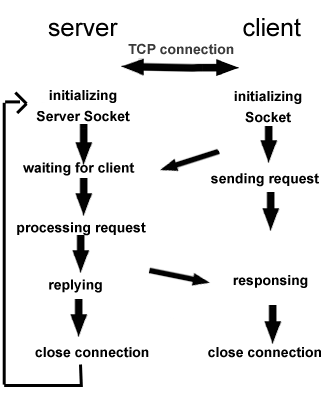 Android 中實作 TCP 與 UDP 傳輸的完整示例
從 TCP 到 UDP:Android 網路傳輸實作解析 TCP 與 UDP 是行動應用開發中最常見的傳輸層協定。在 Android 環境中,兩者的使用方式與 Java
 Android 調試技巧:手動配置 adb 的 USB 連接
問題背景 換了一台測試機,Android Studio 死活認不出設備,adb devices 列表空空如也。這類問題大多不是驅動壞了,而是 adb 並不知道該用哪個廠商
 Android 通知機制完整教學:從基本發送到 PendingIntent 點擊與音效震動
通知(Notification)是 Android 相當有特色的一項設計。當應用程式想提醒使用者某件事,而自己又不在前景執行時,通知就是最合適的管道:發出後,手機最上方的
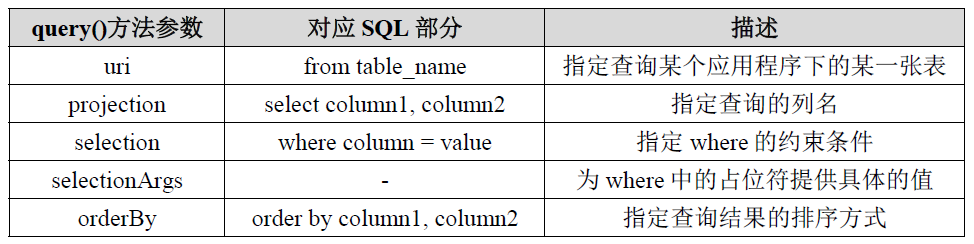 Android 內容提供器 ContentProvider 詳解(一):讀取與共享跨應用資料
本文為《第一行代碼 Android》的讀書筆記與摘錄。 一、Content Provider 簡介 內容提供器(Content Provider)主要用於在不同應用程式之