

編輯:關於 Android 程式設計
以下是在 MTK 專案中看到的一個文件操作工具類,貼出來供大家使用、節省開發時間。
import java.io.File;
import java.io.FileNotFoundException;
import java.io.FileOutputStream;
import java.io.IOException;
import java.io.InputStream;
import com.android.videoeditor.R;
import android.content.Context;
import android.graphics.Bitmap;
import android.graphics.BitmapFactory;
import android.graphics.Bitmap.CompressFormat;
import android.media.videoeditor.MediaProperties;
import android.os.Environment;
import android.util.Log;

/**
 * File utilities
 */
public class FileUtils {
    private static final String TAG = "FileUtils";

    /** 不可實例化此類 */
    private FileUtils() { }

    /**
     * 取得所有專案的根路徑
     *
     * @return 代表專案根目錄的 File,若外部存儲未掛載則返回 null
     */
    public static File getProjectsRootDir(Context context) throws FileNotFoundException, IOException {
        final File dir = MtkUtils.getExternalFilesDir(context);
        if (dir != null && !dir.exists()) {
            if (!dir.mkdirs()) {
                throw new FileNotFoundException("Cannot create folder: " + dir.getAbsolutePath());
            } else {
                // 建立隱藏媒體檔案的 .nomedia
                if (!new File(dir, ".nomedia").createNewFile()) {
                    throw new FileNotFoundException("Cannot create file .nomedia");
                }
            }
        }
        return dir;
    }

    /**
     * 取得指定 raw 資源 id 的遮罩檔名,若檔案不存在則建立
     */
    public static String getMaskFilename(Context context, int maskRawResourceId) throws FileNotFoundException, IOException {
        final String filename;
        switch (maskRawResourceId) {
            case R.raw.mask_contour: { filename = "mask_countour.jpg"; break; }
            case R.raw.mask_diagonal: { filename = "mask_diagonal.jpg"; break; }
            default: { throw new IllegalArgumentException("Invalid mask raw resource id"); }
        }
        final File mf = new File(context.getFilesDir(), filename);
        if (!mf.exists()) {
            Bitmap bitmap = null;
            FileOutputStream fos = null;
            InputStream is = null;
            try {
                is = context.getResources().openRawResource(maskRawResourceId);
                bitmap = BitmapFactory.decodeStream(is);
                if (bitmap == null) {
                    throw new IllegalStateException("Cannot decode raw resource mask");
                }
                fos = context.openFileOutput(filename, Context.MODE_WORLD_READABLE);
                if (!bitmap.compress(CompressFormat.JPEG, 100, fos)) {
                    throw new IllegalStateException("Cannot compress bitmap");
                }
            } finally {
                if (is != null) { is.close(); }
                if (bitmap != null) { bitmap.recycle(); }
                if (fos != null) { fos.flush(); fos.close(); }
            }
        }
        return mf.getAbsolutePath();
    }

    /**
     * 取得遮罩檔案對應的 raw id
     */
    public static int getMaskRawId(String path) {
        final String filename = new File(path).getName();
        if (filename.equals("mask_countour.jpg")) {
            return R.raw.mask_contour;
        } else if (filename.equals("mask_diagonal.jpg")) {
            return R.raw.mask_diagonal;
        } else {
            throw new IllegalArgumentException("Unknown file: " + path);
        }
    }

    /**
     * 取得指定 raw 資源 id 的配樂檔名,若不存在則建立
     */
    public static String getAudioTrackFilename(Context context, int rawResourceId) throws FileNotFoundException, IOException {
        final String filename;
        switch (rawResourceId) {
            case R.raw.theme_travel_audio_track: { filename = "theme_travel.m4a"; break; }
            case R.raw.theme_surfing_audio_track: { filename = "theme_surfing.m4a"; break; }
            case R.raw.theme_film_audio_track: { filename = "theme_film.m4a"; break; }
            case R.raw.theme_rockandroll_audio_track: { filename = "theme_rockandroll.m4a"; break; }
            default: { throw new IllegalArgumentException("Invalid audio track raw resource id"); }
        }
        final File mf = new File(context.getFilesDir(), filename);
        if (!mf.exists()) {
            FileOutputStream fos = null;
            InputStream is = null;
            try {
                is = context.getResources().openRawResource(rawResourceId);
                fos = context.openFileOutput(filename, Context.MODE_WORLD_READABLE);
                final byte[] buffer = new byte[1024];
                int bytesRead;
                while ((bytesRead = is.read(buffer)) > 0) {
                    fos.write(buffer, 0, bytesRead);
                }
            } finally {
                if (is != null) { is.close(); }
                if (fos != null) { fos.flush(); fos.close(); }
            }
        }
        return mf.getAbsolutePath();
    }

    /**
     * 建立新的專案目錄
     */
    public static String createNewProjectPath(Context context) throws FileNotFoundException, IOException {
        final File file = new File(getProjectsRootDir(context), StringUtils.randomString(10));
        if (Log.isLoggable(TAG, Log.DEBUG)) {
            Log.d(TAG, "New project: " + file.getAbsolutePath());
        }
        return file.getAbsolutePath();
    }

    /**
     * 取得唯一的影片檔名
     */
    public static String createMovieName(int fileType) {
        final String filename;
        switch (fileType) {
            case MediaProperties.FILE_MP4: { filename = "movie_" + StringUtils.randomStringOfNumbers(6) + ".mp4"; break; }
            case MediaProperties.FILE_3GP: { filename = "movie_" + StringUtils.randomStringOfNumbers(6) + ".3gp"; break; }
            default: { throw new IllegalArgumentException("Unsupported file type: " + fileType); }
        }
        final File moviesDirectory = new File(MtkUtils.getMovieExportPath());
        if (!moviesDirectory.exists()) {
            moviesDirectory.mkdirs();
        }
        final File f = new File(moviesDirectory, filename);
        return f.getAbsolutePath();
    }

    /**
     * 刪除指定資料夾中的所有檔案及資料夾本身
     */
    public static boolean deleteDir(File dir) {
        if (dir.isDirectory()) {
            final String[] children = dir.list();
            for (int i = 0; i < children.length; i++) {
                final File f = new File(dir, children[i]);
                if (!deleteDir(f)) {
                    Log.e(TAG, "File cannot be deleted: " + f.getAbsolutePath());
                    return false;
                }
            }
        }
        // 資料夾已清空,刪除它
        return dir.delete();
    }

    /**
     * 取得檔案名稱
     */
    public static String getSimpleName(String filename) {
        final int index = filename.lastIndexOf('/');
        if (index == -1) {
            return filename;
        } else {
            return filename.substring(index + 1);
        }
    }
}
這個工具類涵蓋了專案根目錄獲取、raw 資源檔案(遮罩圖、配樂)的提取與創建、影片檔名生成、遞迴刪除資料夾、取得檔名等多項常用操作,可直接整合到需要頻繁處理文件的專案中。
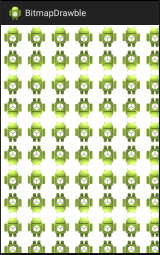 Android Drawable 全解析:六種常見派生類的用法
一、Drawable 簡介 Android 中的 Drawable 種類繁多。它可以是一張位圖,也可以是由顏色和形狀構造出來的圖形,因此有時候它並沒有明確的「尺寸」概念。
 優步電話加密服務什麼時候上線?隱號通話方案介紹
優步電話加密服務與隱號通話方案 優步在全球多個城市提供即時用車服務。為保障車主與乘客隱私,優步在部分城市上線電話加密功能,並採用雲之訊的隱號通話方案。 該功能在乘客與車
 Android 網路請求實戰:POST 與 GET 的實作與差異
Android 應用幾乎都離不開與伺服器互動,而互動的本質就是手機客戶端送出網路請求。下面先釐清最常見的兩種請求方式——POST 與 GET——的差別,再分別用它們實作一
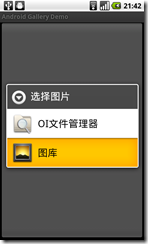 Android 從系統圖庫選圖並裁剪後回傳的實作
「從相冊挑一張圖、裁一塊下來、拿回自己的 App 用」——頭像上傳、商品封面、簽名背景都是這個流程。本文用一個最小範例把它跑通。 先來看效果 畫面上只有一顆大按鈕,點下