

編輯:關於 Android 程式設計
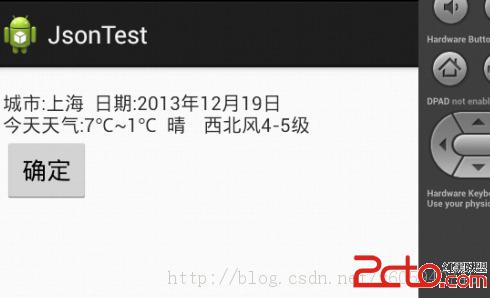
本實例示範如何向中國天氣網發送 GET 請求、獲取 JSON 資料並解析顯示。
package com.android.xiong.jsontest;

import java.util.concurrent.Callable;
import java.util.concurrent.ExecutionException;
import java.util.concurrent.FutureTask;
import org.apache.http.HttpResponse;
import org.apache.http.client.HttpClient;
import org.apache.http.client.methods.HttpGet;
import org.apache.http.impl.client.DefaultHttpClient;
import org.apache.http.util.EntityUtils;

public class HttUtil {
    // 創建 HttpClient 物件
    public static HttpClient httpClient = new DefaultHttpClient();

    /**
     * @param url 請求地址
     * @return 伺服器響應的字串
     */
    public static String getRequest(final String url) throws InterruptedException, ExecutionException {
        FutureTask<String> task = new FutureTask<String>(new Callable<String>() {
            @Override
            public String call() throws Exception {
                HttpGet get = new HttpGet(url);            // 創建 HttpGet 物件
                HttpResponse httpResponse = httpClient.execute(get); // 發送 get 請求
                if (httpResponse.getStatusLine().getStatusCode() == 200) {
                    // 獲取伺服器響應的字串
                    return EntityUtils.toString(httpResponse.getEntity());
                }
                return null;
            }
        });
        new Thread(task).start();
        return task.get();
    }
}
透過子執行緒發送請求,並以廣播接收器接收返回的資料後解析 JSON 顯示:
package com.android.xiong.jsontest;

import java.util.concurrent.ExecutionException;
import org.json.JSONException;
import org.json.JSONObject;
import android.os.Bundle;
import android.app.Activity;
import android.content.BroadcastReceiver;
import android.content.Context;
import android.content.Intent;
import android.content.IntentFilter;
import android.view.Menu;
import android.widget.TextView;

public class ActivityMian extends Activity {
    public final static String RECI_COAST = com.android.xiong.HTTUTIL;
    TextView show;

    @Override
    protected void onCreate(Bundle savedInstanceState) {
        super.onCreate(savedInstanceState);
        setContentView(R.layout.activity_mian);
        show = (TextView) findViewById(R.id.show);
        // 注冊廣播
        IntentFilter filter = new IntentFilter(RECI_COAST);
        BroadcastReceiver myrecive = new MyRecive();
        registerReceiver(myrecive, filter);
        new Thread() {
            @Override
            public void run() {
                Intent intent = new Intent(RECI_COAST);
                try {
                    // 獲取伺服器返回的資訊
                    String reslut = HttUtil.getRequest("https://m.weather.com.cn/data/101020100.html");
                    intent.putExtra("weatherinfo", reslut);
                    sendBroadcast(intent); // 發送廣播
                } catch (InterruptedException e) {
                    e.printStackTrace();
                } catch (ExecutionException e) {
                    e.printStackTrace();
                }
            }
        }.start();
    }

    // 定義 BroadcastReceiver 接收返回的資訊
    private class MyRecive extends BroadcastReceiver {
        @Override
        public void onReceive(Context context, Intent intent) {
            try {
                // 獲取 JSONObject 物件
                JSONObject jsonobject = new JSONObject(intent.getStringExtra("weatherinfo"));
                JSONObject jsoncity = new JSONObject(jsonobject.getString("weatherinfo"));
                show.setText("城市:" + jsoncity.getString("city") + " 日期:"
                        + jsoncity.getString("date_y") + " 今天天氣:"
                        + jsoncity.getString("temp1") + jsoncity.getString("weather1")
                        + jsoncity.getString("wind1"));
            } catch (JSONException e) {
                e.printStackTrace();
            }
        }
    }

    @Override
    public boolean onCreateOptionsMenu(Menu menu) {
        getMenuInflater().inflate(R.menu.activity_mian, menu);
        return true;
    }
}
透過 FutureTask 封裝 GET 請求,在子執行緒中取得天氣網返回的 JSON,再以廣播機制將資料傳回主執行緒解析並顯示城市、日期與天氣資訊。
轉載請注明出處:https://blog.csdn.net/x605940745
源代碼下載地址:https://download.csdn.net/detail/x605940745/6739893
 ListView 使用總結:優化、封裝與進階效果
即使 RecyclerView 已成為現代 Android 開發的常見選擇,ListView 仍然是理解列表控制項、Adapter 與效能優化的好教材。掌握 ListVi
 Android 非同步 HTTP 框架解析與原理實作
前面幾篇已經談過 Android 提交資料到伺服器的幾種方式,包括 get、post 以及使用 HttpClient。本文換個角度,介紹以 android-async-h
 Android SQLite 實戰:判斷資料表是否存在與基礎 CRUD
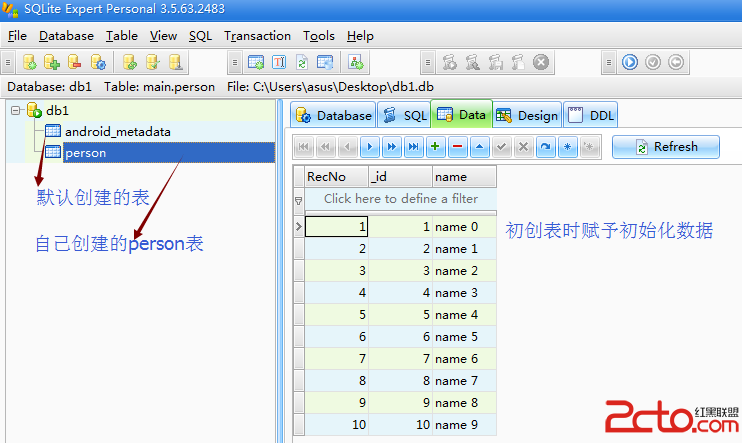
本文示範如何在 Android 的 SQLiteDatabase 中判斷某張表是否已存在,並順手把資料庫的基本操作跑一遍。關於 SQLite 更完整的用法,可參考 And
 20 行打造 Android CircleImageView:PorterDuffXfermode 圓形頭像
圓形頭像不一定需要依賴第三方庫。自訂 ImageView,在 onDraw 中利用 PorterDuffXfermode 的 DST_IN 模式,就能把方形圖片裁切成圓形