

編輯:關於 Android 程式設計
1、設置佈局 layout/main.xml:
<?xml version="1.0" encoding="utf-8"?>
<LinearLayout
    android:layout_width="fill_parent"
    android:layout_height="fill_parent"
    android:orientation="vertical">
    <EditText
        android:id="@+id/et_username"
        android:layout_width="match_parent"
        android:layout_height="wrap_content"
        android:hint="請輸入用戶名" >
    </EditText>
    <EditText
        android:id="@+id/et_password"
        android:layout_width="match_parent"
        android:layout_height="wrap_content"
        android:hint="請輸入密碼" />
    <Button
        android:id="@+id/button1"
        android:layout_width="wrap_content"
        android:layout_height="wrap_content"
        android:onClick="login"
        android:text="get登陸" />
</LinearLayout>
2、在 Activity 中獲取登錄的用戶名與密碼:
public class LoginActivity extends Activity {
    private EditText et_username;
    private EditText et_password;
    private EditText et_file_path;

    @Override
    public void onCreate(Bundle savedInstanceState) {
        super.onCreate(savedInstanceState);
        setContentView(R.layout.main);
        et_password = (EditText) this.findViewById(R.id.et_password);
        et_username = (EditText) this.findViewById(R.id.et_username);
        et_file_path = (EditText) this.findViewById(R.id.et_file_path);
    }

    /**
     * 以 get 方式提交數據到伺服器
     */
    public void login(View view) {
        String password = et_password.getText().toString().trim();
        String username = et_username.getText().toString().trim();
        if (TextUtils.isEmpty(password) || TextUtils.isEmpty(username)) {
            Toast.makeText(this, "用戶名和密碼不能為空", 0).show();
            return;
        } else {
            // 獲取在 res/values/strings.xml 中定義的服務端請求路徑
            String path = getResources().getString(R.string.serverurl);
            // 調用向服務端發送請求的方法
            String result = NetService.sendDataByGet(path, username, password);
        }
    }
}
3、GET 方式向伺服器發送數據的請求方法:
/*
 * 1. 拼裝 url,把參數進行 url 編碼 URLEncoder.encode()
 * 2. 通過 http 的 get 請求發送數據到服務器
 *    (中文亂碼問題)把數據按 tomcat 的 iso-8859-1 方式轉碼;android 下默認採用 utf-8 編碼
 */
public static String sendDataByGet(String path, String username,
        String password) throws Exception {
    // ?name=zhangsan&password=123
    // 解決姓名或密碼裡的空格或非法字串的問題
    String urlstr = path + "?name=" + URLEncoder.encode(username)
            + "&password=" + URLEncoder.encode(password);
    URL url = new URL(urlstr);
    HttpURLConnection conn = (HttpURLConnection) url.openConnection();
    conn.setRequestMethod("GET");
    conn.setConnectTimeout(5000);

    if (conn.getResponseCode() == 200) {
        InputStream is = conn.getInputStream();       // 獲取服務端的數據流
        byte[] result = StreamTools.getBytes(is);     // 通過工具類將流轉成字節
        return new String(result);
    }
    return null;
}
4、記得設置連接網路的權限。
5、服務端向客戶端響應數據時,要以流的形式並設置 utf-8 編碼:
response.getOutputStream().write("登陸成功".getBytes("utf-8"));
1、預設情況下 Android 的字元編碼是 UTF-8,所以服務端響應的數據要以 utf-8 格式返回客戶端。
2、以 GET 方式請求時,對 URL 中的請求數據要進行 URL 編碼,以保證空格和中文的正確傳輸:
String urlstr = path + "?name=" + URLEncoder.encode(username);
public static String sendDataByPost(String path, String username,
        String password) throws Exception {
    URL url = new URL(path);
    HttpURLConnection conn = (HttpURLConnection) url.openConnection(); // 連接伺服器
    conn.setRequestMethod("POST");                    // 設置請求方式
    conn.setConnectTimeout(5000);
    conn.setDoOutput(true);                           // 允許客戶端寫數據給伺服器
    // 拼接數據
    String content = "name=" + URLEncoder.encode(username) + "&password="
            + URLEncoder.encode(password);
    byte[] buffer = content.getBytes();
    conn.setRequestProperty("Content-Type", "application/x-www-form-urlencoded"); // 請求頭 Content-Type
    conn.setRequestProperty("Content-Length", content.length() + "");            // 請求頭 Content-Length
    OutputStream os = conn.getOutputStream();         // 得到 http 的輸出流
    os.write(buffer);                                 // 把內容寫給伺服器

    if (conn.getResponseCode() == 200) {
        InputStream is = conn.getInputStream();
        byte[] result = StreamTools.getBytes(is);
        return new String(result);
    }
    return null;
}
POST 請求注意事項:POST 方式提交的數據沒有大小限制;需指定 POST 請求位址與請求方式;需指定請求頭中的 Content-Type 與 Content-Length;設定 conn.setDoOutput(true);利用 conn.getOutputStream().write() 寫入;最後獲取伺服器返回的響應。
1、GET 方式透過組拼 URL 的方式提交數據到伺服器。
2、POST 方式透過組拼提交的鍵值對,以流的方式寫給伺服器,且請求頭中必須有 Content-Type 和 Content-Length。
 Android 自動化構建之 Ant 多渠道打包實踐(上)
前言 Ant 是一款歷史悠久的自動化構建工具,Android 開發者可以透過它實現自動化構建,也能完成多渠道打包。關於 apk 打包的方式一般有 Ant、Python、G
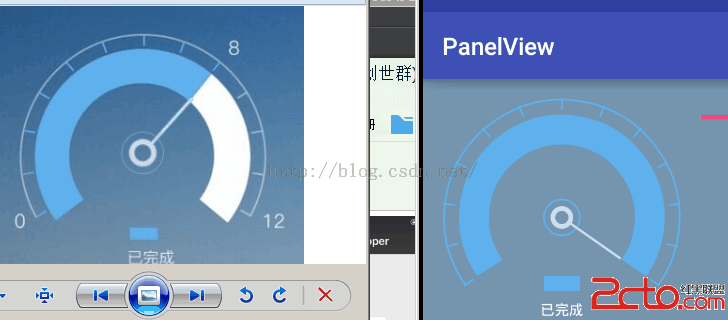 手把手實作:畫一個時尚儀表盤(Android 自定義 View)
拿到美工的設計圖,程序員的任務就是一比一還原。為了不被唄,只能多練。 前面幾篇如果你覺得輕鬆,那今天這個稍微有點份量。 先看效果圖(左邊是 UI 稿,右邊是實作結果):
 Android 仿餓了麼加入購物車的伸縮旋轉按鈕
這個效果以純自定義 View 實作,不依賴多層 ViewGroup 組合。它可以在數量為 0 時顯示提示文字,點擊後展開加號與減號,並在增減數量時播放旋轉、位移與透明
 Android 自定義 View 實作仿一號店垂直滾動廣告條
先上效果圖,GIF 稍微有點卡,耐心看,原程序其實是很流暢的: 實現步驟: 聲明變量 初始化畫筆、文本大小和坐標 onMeasure() 適配 wrap_conten