

編輯:關於 Android 程式設計
音樂播放器是理解 Android 四大元件協作的好題目。這個範例把職責切成兩半:Service 負責真正播放(持有 MediaPlayer,不受畫面切換影響),Activity 負責介面與互動,兩邊靠 Broadcast 進行雙向溝通。這種切法比把 MediaPlayer 直接塞在 Activity 裡要健康得多。
Activity → Service 這條線用 startService 搭配不同 action 字串下達指令(播放、暫停、上一首、下一首、循環、拖動進度);Service → Activity 這條線用 sendBroadcast 回報狀態(總長度、目前進度、播放/暫停狀態、循環開關),Activity 端用動態註冊的 BroadcastReceiver 接收並更新 UI。
package com.siyehuazhilian.musicplay;

import java.util.ArrayList;
import java.util.HashMap;

import android.app.Activity;
import android.app.AlertDialog;
import android.content.BroadcastReceiver;
import android.content.Context;
import android.content.DialogInterface;
import android.content.Intent;
import android.content.IntentFilter;
import android.database.Cursor;
import android.graphics.Color;
import android.os.Bundle;
import android.provider.MediaStore;
import android.view.KeyEvent;
import android.view.View;
import android.widget.ImageButton;
import android.widget.ListView;
import android.widget.SeekBar;
import android.widget.SimpleAdapter;
import android.widget.TextView;

public class MainActivity extends Activity implements View.OnClickListener {

    private ListView listView;
    private SimpleAdapter adapter;
    private ArrayList<HashMap<String, String>> list;

    private int currentPositionMusic = -1;

    private ImageButton lastImageButton;
    private ImageButton playImageButton;
    private ImageButton nextImageButton;
    private ImageButton loopImageButton;
    private SeekBar playSeekBar;
    private TextView currentPlayingSong;

    private boolean ifFirstIn = true;
    private Intent intent;

    @Override
    protected void onCreate(Bundle savedInstanceState) {
        super.onCreate(savedInstanceState);
        setContentView(R.layout.activity_main);

        listView           = (ListView) findViewById(R.id.listview);
        lastImageButton    = (ImageButton) findViewById(R.id.imagebutton_previous);
        playImageButton    = (ImageButton) findViewById(R.id.imagebutton_play);
        nextImageButton    = (ImageButton) findViewById(R.id.imagebutton_next);
        loopImageButton    = (ImageButton) findViewById(R.id.imagebutton_loops);
        playSeekBar        = (SeekBar) findViewById(R.id.seekbar_play);
        currentPlayingSong = (TextView) findViewById(R.id.textview_songinformation);

        list = new ArrayList<HashMap<String, String>>();
        adapter = new SimpleAdapter(this, list, R.layout.list_item,
                new String[] { "title" }, new int[] { R.id.textview_item });
        listView.setAdapter(adapter);

        listView.setOnItemClickListener(new android.widget.AdapterView.OnItemClickListener() {
            @Override
            public void onItemClick(android.widget.AdapterView<?> parent, View v, int position, long id) {
                currentPositionMusic = position;
                playMusic();
            }
        });

        lastImageButton.setOnClickListener(this);
        playImageButton.setOnClickListener(this);
        nextImageButton.setOnClickListener(this);
        loopImageButton.setOnClickListener(this);

        // 拖動進度條 → 通知 Service 跳轉
        playSeekBar.setOnSeekBarChangeListener(new SeekBar.OnSeekBarChangeListener() {
            @Override public void onStopTrackingTouch(SeekBar seekBar) { }
            @Override public void onStartTrackingTouch(SeekBar seekBar) { }

            @Override
            public void onProgressChanged(SeekBar seekBar, int progress, boolean fromUser) {
                if (fromUser) {
                    intent = new Intent("changed");
                    intent.putExtra("seekbarprogress", progress);
                    startService(intent);
                }
            }
        });
    }

    private void playMusic() {
        intent = new Intent("play");
        intent.putExtra("uri", list.get(currentPositionMusic).get("path"));
        intent.putExtra("title", list.get(currentPositionMusic).get("title"));
        startService(intent);

        playImageButton.setImageResource(R.drawable.play);
        currentPlayingSong.setTextColor(Color.GREEN);
        currentPlayingSong.setText(list.get(currentPositionMusic).get("title"));
    }

    @Override
    protected void onResume() {
        super.onResume();

        // 只在首次進入時掃描媒體庫,避免每次回到畫面都重新查詢
        if (ifFirstIn) {
            ifFirstIn = false;
            scanMusic();
        }

        IntentFilter filter = new IntentFilter();
        filter.addAction("seekbarmaxprogress");
        filter.addAction("seekbarprogress");
        filter.addAction("playNextSong");
        filter.addAction("pause");
        filter.addAction("setplay");
        filter.addAction("stoploop");
        filter.addAction("startloop");
        registerReceiver(broadcastReceiver, filter);
    }

    @Override
    protected void onDestroy() {
        super.onDestroy();
        startService(new Intent("stopnotification"));
        stopService(intent);
        unregisterReceiver(broadcastReceiver);
    }

    @Override
    public boolean onKeyDown(int keyCode, KeyEvent event) {
        if (keyCode == KeyEvent.KEYCODE_BACK) {
            new AlertDialog.Builder(this)
                    .setTitle("你確定要退出嗎?")
                    .setPositiveButton("確定", new DialogInterface.OnClickListener() {
                        @Override public void onClick(DialogInterface d, int w) { finish(); }
                    })
                    .setNegativeButton("取消", new DialogInterface.OnClickListener() {
                        @Override public void onClick(DialogInterface d, int w) { }
                    })
                    .show();
            return true;
        }
        return super.onKeyDown(keyCode, event);
    }

    /** 掃描媒體庫中的所有音訊 */
    private void scanMusic() {
        new Thread() {
            public void run() {
                Cursor cursor = getContentResolver().query(
                        MediaStore.Audio.Media.EXTERNAL_CONTENT_URI,
                        null, null, null,
                        MediaStore.Audio.Media.DEFAULT_SORT_ORDER);

                while (cursor.moveToNext()) {
                    String title = cursor.getString(
                            cursor.getColumnIndexOrThrow(MediaStore.Audio.Media.TITLE));
                    String path  = cursor.getString(
                            cursor.getColumnIndexOrThrow(MediaStore.Audio.Media.DATA));
                    String size  = cursor.getString(
                            cursor.getColumnIndexOrThrow(MediaStore.Audio.Media.SIZE));

                    // 只收 1MB 以上的檔案,過濾鈴聲與短音效
                    if (Long.parseLong(size) > 1024 * 1024) {
                        HashMap<String, String> map = new HashMap<String, String>();
                        map.put("title", title);
                        map.put("path", path);
                        list.add(map);
                    }
                }
                cursor.close();
            }
        }.start();
    }

    @Override
    public void onClick(View v) {
        switch (v.getId()) {
            case R.id.imagebutton_previous: playLastSong(); break;
            case R.id.imagebutton_play:
                startService(new Intent("clickplay"));
                break;
            case R.id.imagebutton_next: playNextSong(); break;
            case R.id.imagebutton_loops:
                startService(new Intent("loops"));
                break;
        }
    }

    private void playNextSong() {
        if (currentPositionMusic == -1) return;
        currentPositionMusic = (currentPositionMusic == list.size() - 1) ? 0 : currentPositionMusic + 1;
        playMusic();
    }

    private void playLastSong() {
        if (currentPositionMusic == -1) return;
        currentPositionMusic = (currentPositionMusic == 0) ? list.size() - 1 : currentPositionMusic - 1;
        playMusic();
    }

    /** 接收 Service 狀態回報並更新 UI */
    private final BroadcastReceiver broadcastReceiver = new BroadcastReceiver() {
        @Override
        public void onReceive(Context context, Intent intent) {
            String action = intent.getAction();
            if ("seekbarmaxprogress".equals(action)) {
                playSeekBar.setMax(intent.getIntExtra("seekbarmaxprogress", 100));
            } else if ("seekbarprogress".equals(action)) {
                playSeekBar.setProgress(intent.getIntExtra("seekbarprogress", 0));
            } else if ("playNextSong".equals(action)) {
                playNextSong();
            } else if ("pause".equals(action)) {
                playImageButton.setImageResource(R.drawable.pause);
            } else if ("setplay".equals(action)) {
                playImageButton.setImageResource(R.drawable.play);
            } else if ("stoploop".equals(action)) {
                loopImageButton.setImageResource(R.drawable.loop_false);
            } else if ("startloop".equals(action)) {
                loopImageButton.setImageResource(R.drawable.loop_true);
            }
        }
    };
}
這裡有兩個刻意為之的細節:ifFirstIn 旗標用來避免每次 onResume 都重跑一次媒體庫查詢(否則使用者從其他頁面切回來就會卡一下);scanMusic 開了子線程,因為 ContentResolver 查詢在大量資料時並不便宜,放主線程會觸發 ANR。
package com.siyehuazhilian.service;

import android.app.Notification;
import android.app.NotificationManager;
import android.app.PendingIntent;
import android.app.Service;
import android.content.Intent;
import android.media.MediaPlayer;
import android.os.Handler;
import android.os.IBinder;
import android.os.Message;
import android.widget.Toast;

public class PlayMusicService extends Service {

    private MediaPlayer mediaPlayer;

    private static final int SET_SEEKBAR_MAX = 3;
    private static final int UPDATE_PROGRESS  = 1;
    private static final int LOADING_DATA     = 2;

    private NotificationManager notificationManager;
    private Notification notification;
    private Intent intent;

    @Override
    public IBinder onBind(Intent intent) {
        return null;      // 用 startService 模式,不提供綁定
    }

    @Override
    public int onStartCommand(Intent intent, int flags, int startId) {

        notificationManager = (NotificationManager) getSystemService(NOTIFICATION_SERVICE);
        String action = intent.getAction();

        if ("play".equals(action)) {
            try {
                playMusic(intent.getStringExtra("uri"));
                showNotification(intent.getStringExtra("title"));
            } catch (Exception e) {
                e.printStackTrace();
            }

        } else if ("changed".equals(action)) {
            if (mediaPlayer != null) {
                mediaPlayer.seekTo(intent.getIntExtra("seekbarprogress", 0));
            }

        } else if ("clickplay".equals(action)) {
            if (mediaPlayer != null) {
                if (mediaPlayer.isPlaying()) {
                    mediaPlayer.pause();
                    sendBroadcast(new Intent("pause"));
                } else {
                    mediaPlayer.start();
                    sendBroadcast(new Intent("setplay"));
                }
            }

        } else if ("loops".equals(action)) {
            if (mediaPlayer != null) {
                if (mediaPlayer.isLooping()) {
                    mediaPlayer.setLooping(false);
                    sendBroadcast(new Intent("stoploop"));
                } else {
                    mediaPlayer.setLooping(true);
                    sendBroadcast(new Intent("startloop"));
                }
            }

        } else if ("stopnotification".equals(action)) {
            notificationManager.cancelAll();
        }

        return super.onStartCommand(intent, flags, startId);
    }

    @Override
    public void onDestroy() {
        super.onDestroy();
        handler.removeMessages(UPDATE_PROGRESS);
        if (mediaPlayer != null) {
            mediaPlayer.stop();
            mediaPlayer.release();
            mediaPlayer = null;
        }
    }

    private void playMusic(String path) throws Exception {
        if (mediaPlayer == null) {
            mediaPlayer = new MediaPlayer();
        }
        mediaPlayer.reset();
        mediaPlayer.setDataSource(path);
        mediaPlayer.prepareAsync();

        mediaPlayer.setOnPreparedListener(new MediaPlayer.OnPreparedListener() {
            @Override
            public void onPrepared(MediaPlayer mp) {
                mp.start();
                handler.sendEmptyMessage(SET_SEEKBAR_MAX);
                handler.sendEmptyMessage(UPDATE_PROGRESS);
            }
        });

        mediaPlayer.setOnCompletionListener(new MediaPlayer.OnCompletionListener() {
            @Override
            public void onCompletion(MediaPlayer mp) {
                if (mp.isLooping()) {
                    mp.start();
                } else {
                    sendBroadcast(new Intent("playNextSong"));
                }
            }
        });
    }

    private final Handler handler = new Handler() {
        public void handleMessage(Message msg) {
            switch (msg.what) {
                case UPDATE_PROGRESS:
                    sendBroadcast(new Intent("seekbarprogress")
                            .putExtra("seekbarprogress", mediaPlayer.getCurrentPosition()));
                    // 每秒回報一次,直到 onDestroy 移除
                    handler.sendEmptyMessageDelayed(UPDATE_PROGRESS, 1000);
                    break;

                case SET_SEEKBAR_MAX:
                    sendBroadcast(new Intent("seekbarmaxprogress")
                            .putExtra("seekbarmaxprogress", mediaPlayer.getDuration()));
                    // 總長度只需設定一次
                    break;
            }
        }
    };

    private void showNotification(String title) {
        notification = new Notification(R.drawable.app_icon, "百度音樂", System.currentTimeMillis());
        notification.flags |= Notification.FLAG_ONGOING_EVENT;

        Intent click = new Intent(this, com.siyehuazhilian.musicplay.MainActivity.class);
        click.setAction(Intent.ACTION_MAIN);
        click.addCategory(Intent.CATEGORY_LAUNCHER);

        PendingIntent pi = PendingIntent.getActivity(this, 0, click, 0);
        notification.setLatestEventInfo(this, "正在播放", title, pi);
        notificationManager.notify(1, notification);
    }
}
這裡有兩個關鍵設計。進度條的刷新靠 Handler 每秒自我排程(sendEmptyMessageDelayed),而不是開一條 while 迴圈的線程去 busy loop;Service 銷毀時用 removeMessages 把排程清掉,避免洩漏。總長度只送一次,因為它不會變,反覆送只是浪費廣播。通知列使用 FLAG_ONGOING_EVENT,讓使用者能在通知區直接點回 App,也讓系統知道這個 Service 正在做事。
<?xml version="1.0" encoding="utf-8"?>
<manifest xmlns:android="https://schemas.android.com/apk/res/android"
    package="com.siyehuazhilian.musicplay"
    android:versionCode="1"
    android:versionName="1.0" >

    <uses-sdk android:minSdkVersion="8" android:targetSdkVersion="18" />

    <application>
        <activity android:name=".MainActivity">
            <intent-filter>
                <action android:name="android.intent.action.MAIN" />
                <category android:name="android.intent.category.LAUNCHER" />
            </intent-filter>
        </activity>

        <service android:name="com.siyehuazhilian.service.PlayMusicService" />
    </application>
</manifest>
這個範例足以說明元件協作的概念,但放在真實產品上仍有幾處要改進:
"play"、"changed" 這類魔法字串毫無編譯期保護,打錯字不會報錯,只會安靜地什麼都不發生。改用 LocalBroadcastManager 或自訂的 callback 介面(透過 bindService)都更安全。startForegroundService() 並掛上常駐通知。MediaSessionCompat,讓系統與外部裝置有統一的媒體控制通道。setLatestEventInfo() 在 API 11 之後即被棄用,新版應使用 Notification.Builder 搭配 Channel(API 26+)。 Android 仿天貓下拉刷新自定義控制項深度解析
一、概述 本控制項以 android-Ultra-Pull-to-Refresh 為基礎,針對其 header 進行客製化擴充。它繼承自 PtrFrameLayout,
 Android 手把手教你繪製圓形頭像
自從騰訊 QQ 的圓形頭像流行開來,越來越多應用的個人主頁或資料面板也開始採用圓形頭像,它讓整體布局顯得更加優雅而得體。本文就來動手實現一個圓形(圓角)頭像。 第一步,創
 Android 對稱加密與 Base64 加密實戰
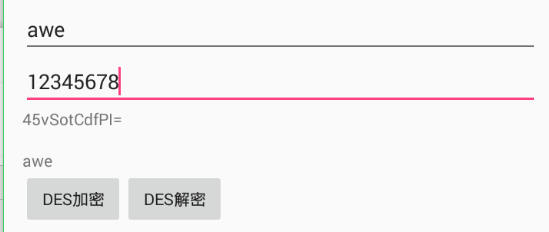
對稱加密是最快速、最簡單的一種加密方式,它的加密(encryption)與解密(decryption)使用的是同一把密鑰(secret key)。常用的對稱加密方式有 D
 Android 簽名機制深度解析
一、Android 為什麼要簽名所有 Android 應用都要求開發者用一個證書進行數字簽名,系統不會安裝未簽名的程序。我們平時的程序能在模擬器上安裝運行,是因為開發期間