

編輯:關於 Android 程式設計
已經遇到過很多次內存溢出了,必須好好總結吸取教訓!下面整理一些行之有效的 OOM 應對手段。
Bitmap 常常是造成 OOM 的罪魁禍首,必須優先處理。原則是:作用域能小就小,用完就趕緊 recycle 掉。我一般會在 onDestroy 裡統一回收:
//回收圖片資源
if(bitmaps != null && bitmaps.length > 0){
int length = bitmaps.length;
for(int i=0; i<length; i++){
if(bitmaps[i] != null && !bitmaps[i].isRecycled()){
bitmaps[i].recycle();
}
}
}
如果用到 ListView、GridView 等 ViewGroup 子類,記得移除它的 ChildView,並把相關集合置空,因為這些也很佔內存:
int listViewCount = dataList.size();
if(listView != null && (dataList != null && listViewCount>0)){
for(int i=0; i<listViewCount; i++){
dataList.removeAll(dataList);
adapter.notifyDataSetChanged();
}
}
listView = null;
dataList = null;
這兩段代碼我都直接放在 onDestroy 裡執行,效果還不錯,至少不容易崩。
解決 OOM 的方法還有很多,下面再補充兩種。
WeakReference(弱引用):把可能被回收的對象用弱引用包裹,GC 時它不會阻止對象被回收,從而降低內存壓力:
String abc = new String("abc");
WeakReference<String> abcWeakRef = new WeakReference<String>(abc);
abc = null;
System.out.println("before gc: " + abcWeakRef.get());
System.gc();
System.out.println("after gc: " + abcWeakRef.get());
壓縮 Bitmap:通過 inSampleSize 對圖片進行抽樣縮放,能顯著降低加載大圖時的內存佔用:
BitmapFactory.Options opts = new BitmapFactory.Options();
opts.inSampleSize = 4;
opts.inJustDecodeBounds = false;
Bitmap bitmap = BitmapFactory.decodeFile(filepath, opts);
把這些方法結合使用,就能在很大程度上避免 OOM。Good Luck!
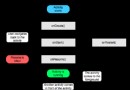 Android Activity 生命週期詳解:回呼時機與實測驗證
子曰:溫故而知新,可以為師矣。《論語》讀技術也一樣。想靠一遍就把官方文件或經典書籍讀通,基本上不太可能,所以每隔一段時間回頭重讀,才能慢慢體會作者真正想傳達的意思。最近把
 小米手機通話自動錄音怎麼開?MIUI 設定圖解
小米手機自帶通話錄音功能,但預設情況下得在通話中手動點擊錄音才會開始錄。講事情講到一半才想起來按錄音,前面那段就補不回來了。MIUI 其實提供了自動錄音設定,可以省下這個
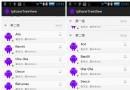 Android 自製 IphoneTreeView:為 ExpandableListView 加上懸浮分組指示器
早前我曾經實作過一次類似的效果,但那個版本在細節處理上相當粗糙。這一回,我參考了系統聯絡人中的 PinnedHeaderListView,並綜合社群裡各方公開的程式碼,重
 Paint API 之 ColorFilter:PorterDuffColorFilter 用法實戰
本節引言 本來打算今天偷個懶不寫的,想想難得空閒,還是記錄一下吧。這次要聊的是 ColorFilter 的第三個子類——PorterDuffColorFilter。 看到