

編輯:關於 Android 程式設計
在 Android 開發中,經常會有「從圖庫選一張圖片當頭像」這樣的需求。這就需要我們從自己的應用中激活系統的圖庫應用並獲取選中的圖片。好在 Android 已經為我們提供了相應接口。
先來看看系統圖庫的源碼。打開 android源碼\packages\apps,找到 gallery 文件夾,打開其清單文件,會看到這樣一段:
<activity android:name="com.android.camera.ImageGallery"
android:label="@string/gallery_label"
android:configChanges="orientation|keyboardHidden"
android:icon="@drawable/ic_launcher_gallery">
<intent-filter>
<action android:name="android.intent.action.PICK" />
<category android:name="android.intent.category.DEFAULT" />
<data android:mimeType="image/*" />
<data android:mimeType="video/*" />
</intent-filter>
</activity>
從這個意圖過濾器可以發現,我們能通過 android.intent.action.PICK 這個 action 來激活圖庫並選擇圖片或視頻。
為了知道圖庫返回的 key 值,我們還得看 com.android.camera.ImageGallery 類。在源碼裡搜索 setResult,會發現圖庫會把圖片的 URL 路徑和縮略圖一起返回給我們:
Intent result = new Intent(null, img.fullSizeImageUri());
if (myExtras != null && myExtras.getBoolean("return-data")) {
Bitmap bitmap = img.fullSizeBitmap(IImage.UNCONSTRAINED, 100 * 1024);
if (bitmap != null) {
result.putExtra("data", bitmap);
}
}
setResult(RESULT_OK, result);
public class MainActivity extends Activity {
private ImageView iv_image;
@Override
protected void onCreate(Bundle savedInstanceState) {
super.onCreate(savedInstanceState);
setContentView(R.layout.activity_main);
this.iv_image = (ImageView) this.findViewById(R.id.iv_image);
}
public void load(View view) {
// 激活系統圖庫,選擇一張圖片
Intent intent = new Intent();
intent.setAction(Intent.ACTION_PICK);
intent.setType("image/*");
startActivityForResult(intent, 0);
}
@Override
protected void onActivityResult(int requestCode, int resultCode, Intent data) {
if (data != null) {
// 得到圖片的全路徑
Uri uri = data.getData();
// 通過路徑加載圖片
//注意:這裡省去了圖片縮放,若圖片過大可能導致內存洩漏
this.iv_image.setImageURI(uri);
// 獲取縮略圖,可能為空
// Bitmap bitmap = data.getParcelableExtra("data");
// this.iv_image.setImageBitmap(bitmap);
}
super.onActivityResult(requestCode, resultCode, data);
}
}
<LinearLayout xmlns:android="https://schemas.android.com/apk/res/android"
android:layout_width="match_parent"
android:layout_height="match_parent"
android:orientation="vertical" >
<Button
android:layout_width="wrap_content"
android:layout_height="wrap_content"
android:onClick="load"
android:text="獲取圖庫圖片" />
<ImageView
android:id="@+id/iv_image"
android:layout_width="wrap_content"
android:layout_height="wrap_content" />
</LinearLayout>
核心要點:用 Intent.ACTION_PICK 加上 image/* 類型激活圖庫,再在 onActivityResult 裡通過 data.getData() 拿到圖片的 URI。若直接加載原圖,建議先做縮放以避免內存溢出。
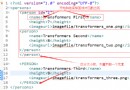 Android XML 資料解析實戰:SAX、DOM 與 PULL 的選擇之道
XML 基礎入門 今天我們來認識另一種非常重要的資料交換格式 —— XML。XML 是 Extensible Markup Language 的縮寫,意為「可擴充的標記語
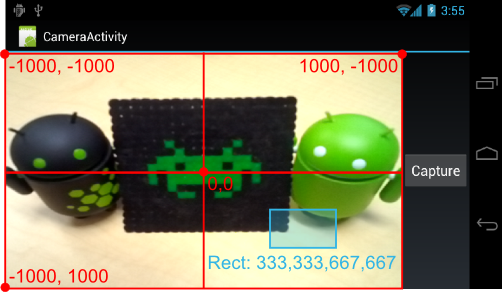 Android Camera 開發基礎知識全解:從調用系統相機到自研相機應用
概述 Android 框架原生支持拍照與錄像。你可以直接調用系統相機完成拍攝(很多社交應用的「拍照上傳」就是這種做法),也可以基于系統提供的 API 自己造一個相機應用(
 Android 網絡編程:HttpURLConnection、HttpClient 與 AsyncTask 全解析
一、HttpURLConnection UrlConnection 常用於通過網絡發送和獲取數據,數據可以是任意類型、任意長度。而 HttpURLConnection 專
 用 JNI 與 inotify 實作 App 自我卸載偵測
前言 這個需求在一般專案中幾乎遇不到,只有少數特殊場景才會需要。問題在於 Android 的 Java 層並沒有提供「監聽自身被移除」的接口,因此只能往 Native 層