

編輯:關於 Android 程式設計
用 XML 描述版面時,凡是自訂的 View,都離不開 AttributeSet 與 defStyle 這兩個參數。搞懂它們的取值優先順序,自訂屬性才不會出現「設了卻沒生效」的怪現象。
public class myButton extends Button {

    public myButton(Context context, AttributeSet attrs, int defStyle) {
        super(context, attrs, defStyle);

        TypedArray a = context.obtainStyledAttributes(
                attrs, R.styleable.ActionBar, defStyle, 0);
    }
}
關鍵在 obtainStyledAttributes():它會回傳一個 TypedArray,後續所有屬性都從這個物件讀取。這個方法有多個重載版本,真正的實作落在 Resources.Theme 類別中:
obtainStyledAttributes(AttributeSet set, int[] attrs, int defStyleAttr, int defStyleRes) : TypedArray
obtainStyledAttributes(int resid, int[] attrs) : TypedArray
obtainStyledAttributes(int[] attrs) : TypedArray
第一個版本最常用,它透過 attrs 決定要讀取哪些屬性,再依序用其餘三個參數取值。取值優先級由高到低是:
set——XML 標籤上直接寫死的值。defStyleAttr——一個 reference,指向目前 Theme 中的某個 style。style 本質上就是屬性的集合;若它為 0 或在 Theme 中找不到對應 style,才會往下走。defStyleRes——一個 style 的 id,為 0 時無效。後兩個重載版本分別代表「只從 style 取值」與「只從 Theme 取值」。
TypedArray a = context.obtainStyledAttributes(attrs, R.styleable.ActionBar, defStyle, 0);
屬性定義在 /res/values/attrs.xml。除了系統內建的屬性,我們完全可以自訂,然後在版面中引用:
<?xml version="1.0" encoding="utf-8"?>
<resources>
    <declare-styleable name="ActionBar">
        <attr name="title" format="string" />
        <attr name="type" format="reference|color" />
    </declare-styleable>
</resources>
declare-styleable 標籤的 name 值,對應的就是程式碼中傳入的 attrs 參數。Android 會自動在 R 檔案中產生對應的陣列,這個 name 可以是任意字串,不一定要是 View 的類別名稱。
屬性集合中需逐一宣告名稱與型別,常見的有 reference、string、color、dimension、boolean 等。若允許並存多種類型,用 | 分隔,例如 reference | color。
另外還有一種寫法:當 attr 宣告時不指定 format,表示它已在別處定義過:
<attr name="gravity" />
如此一來就能建立一個集合,把系統既有屬性(例如 android:gravity)重新打包,再透過 obtainStyledAttributes 一次讀出。
xmlns:app="https://schemas.android.com/apk/res/your_package_name"
或使用 appcompat 之後更簡便的寫法:xmlns:app="https://schemas.android.com/apk/res-auto"。
編譯後的 R 檔案裡會出現兩個內部類別,用途完全不同:
R.styleable.Xxx_yyy:屬性集合的索引,作為 obtainStyledAttributes 的參數。R.attr.xxx:單一屬性在版面中的 id。而 AttributeSet 本身也有兩個容易混淆的方法:
int getAttributeNameResource(int index);
int getAttributeResourceValue(int index, int defaultValue);
前者取得的是屬性名稱的 id(也就是 R.attr 中的那個數值),後者取得的才是真正的屬性值。
版面中使用:
<com.jeason.jeasonactionbar.myactionbar
    android:layout_alignParentTop="true"
    android:layout_height="@dimen/gd_action_bar_height"
    android:layout_width="fill_parent"
    bar:title="Campus Map"
    bar:type="normal"
    xmlns:bar="https://schemas.android.com/apk/res/com.jeason.jeasonmapraiders" />
對應的 Java 實作:
public class MyActionBar extends LinearLayout {

    private CharSequence mTitle;
    private MyActionBar.Type mType;

    public enum Type { Normal, Dashboard, Empty }

    public MyActionBar(Context context, AttributeSet attrs, int defStyle) {
        super(context, attrs);

        TypedArray a = context.obtainStyledAttributes(
                attrs, R.styleable.ActionBar, defStyle, 0);

        mTitle = a.getString(R.styleable.ActionBar_title);

        int layoutID;
        int type = a.getInteger(R.styleable.ActionBar_type, -1);
        switch (type) {
            case 2:
                mType = Type.Empty;
                layoutID = R.layout.gd_action_bar_empty;
                break;
            case 1:
                mType = Type.Dashboard;
                layoutID = R.layout.gd_action_bar_dashboard;
                break;
            case 0:
            default:
                mType = Type.Normal;
                layoutID = R.layout.gd_action_bar_normal;
                break;
        }

        LayoutInflater.from(context).inflate(layoutID, this);
        a.recycle();
    }
}
最後,別忘了在 values/attrs.xml 中對應宣告:
<declare-styleable name="ActionBar">
    <attr name="title" format="string" />
    <attr name="type" format="integer">
        <enum name="normal" value="0" />
        <enum name="dashboard" value="1" />
        <enum name="empty" value="2" />
    </attr>
</declare-styleable>
讀完屬性後一定要呼叫 a.recycle(),否則 TypedArray 會持續佔用資源,在列表大量重複建立 View 時尤其明顯。另外,透過 <enum> 定義枚舉型別,比讓 XML 直接寫死整數可讀性更好,也不容易出錯。
 微信小程序首頁資料初始化失敗怎麼辦?加一個臨時引導頁就好
一、問題是什麼 使用者第一次進入小程序時,我們通常得先拿到 openid / unionid 作為唯一識別,再跟後端換取使用者資料來初始化首頁。但當請求需要使用者先點擊「
 React Native 新聞客戶端(06):把輪播圖做成 ListView 的頭部視圖
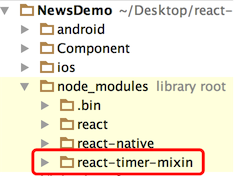
進度來到第六篇,這次要解決的是首頁頂部的輪播圖。前面幾篇已經用 ScrollView 把輪播效果跑通了,現在要把它掛到 ListView 的頭部視圖上,讓它隨列表一起滾動
 Android Activity(活動)全面詳解
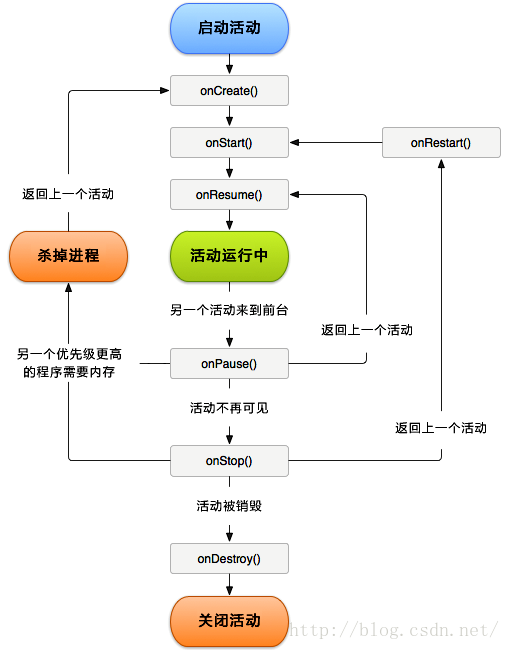
Activity 是 Android 四大元件之一,幾乎每一個可見的應用介面背後都有一個 Activity 在支撐。本文將從專案結構、日誌工具一路談到 Activity
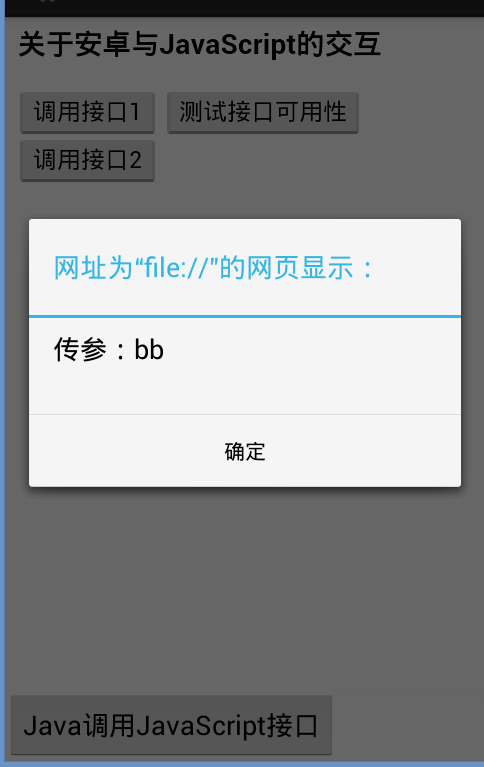 WebView 中介紹 JavaScript 與 Java 雙向調用的完整實踐
混合開發中經常需要網頁調用原生能力,比如拍照、選相冊、錄音。Android 的 WebView 基於 WebKit 內核,內建了 JS 與 Java 互調的接口,接入並不