

編輯:關於 Android 程式設計
系統原生的 Toast 有個惱人的問題:連續呼叫時訊息容易相互覆蓋、閃現不流暢。以下這份 ToastUtils 透過單例重用與主執行緒 Handler 的搭配,實現了訊息無覆蓋、無阻塞的效果,是替換系統 Toast 相當好用的封裝方案。
import android.content.Context;
import android.os.Handler;
import android.os.Looper;
import android.widget.Toast;

/**
 * Toast 工具類
 */
public class ToastUtils {
    private static Handler handler = new Handler(Looper.getMainLooper());
    private static Toast toast = null;
    private static Object synObj = new Object();

    /** 發送訊息,預設 Toast.LENGTH_SHORT */
    public static void showMessage(final Context act, final String msg) {
        showMessage(act, msg, Toast.LENGTH_SHORT);
    }

    /** 發送訊息,預設 Toast.LENGTH_LONG */
    public static void showMessageLong(final Context act, final String msg) {
        showMessage(act, msg, Toast.LENGTH_LONG);
    }

    /** 發送訊息,預設 Toast.LENGTH_SHORT */
    public static void showMessage(final Context act, final int msg) {
        showMessage(act, msg, Toast.LENGTH_SHORT);
    }

    /** 發送訊息,預設 Toast.LENGTH_LONG */
    public static void showMessageLong(final Context act, final int msg) {
        showMessage(act, msg, Toast.LENGTH_LONG);
    }

    /** 發送訊息 */
    public static void showMessage(final Context act, final int msg, final int len) {
        new Thread(new Runnable() {
            public void run() {
                handler.post(new Runnable() {
                    @Override
                    public void run() {
                        synchronized (synObj) {
                            if (toast != null) {
                                toast.cancel();
                                toast.setText(msg);
                                toast.setDuration(len);
                            } else {
                                toast = Toast.makeText(act, msg, len);
                            }
                            toast.show();
                        }
                    }
                });
            }
        }).start();
    }

    /** 發送訊息 */
    public static void showMessage(final Context act, final String msg, final int len) {
        new Thread(new Runnable() {
            public void run() {
                handler.post(new Runnable() {
                    @Override
                    public void run() {
                        synchronized (synObj) {
                            if (toast != null) {
                                toast.cancel();
                                toast.setText(msg);
                                toast.setDuration(len);
                            } else {
                                toast = Toast.makeText(act, msg, len);
                            }
                            toast.show();
                        }
                    }
                });
            }
        }).start();
    }

    /** 關閉當前 Toast */
    public static void cancelCurrentToast() {
        if (toast != null) {
            toast.cancel();
        }
    }
}
封裝的精髓在於:始終重用同一個 Toast 實例,並在顯示前先 cancel 掉舊訊息,再切回主執行緒更新內容,如此一來便能徹底避免訊息堆疊覆蓋,帶來順暢的提示體驗。
 Android 性能優化:用 LeakCanary 揪出並解決內存洩漏
前言: 最近公司 C 輪融資成功,行動團隊準備擴編,需要招募 Android 開發工程師。面試過程中聊到性能優化裡如何避免內存洩漏時,很少有應聘者能全面回答上來。於是決定
 微信第三方登入 Android 端實作解析
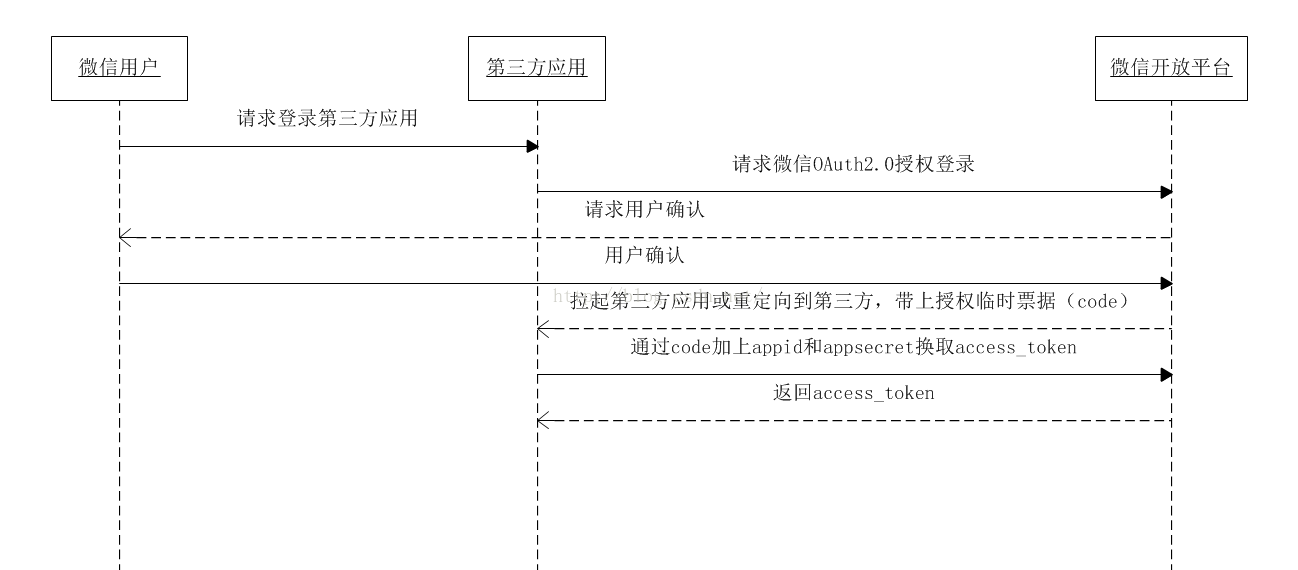
微信第三方登入讓使用者能快速進入 App,也減少重複註冊的成本。在 Android 端實作時,重點是取得授權碼,再交由伺服器完成後續驗證。 前置準備 首先需要在微信開放平
 Android 逆向工程安全透視:從哈皮妹案例看防竄改設計
從案例看 Android 安全邊界 本文以一款互動娛樂應用為例,討論 Android 逆向工程可能帶來的風險。該應用部分內容需要付費解鎖,若缺乏保護機制,容易被重新打包或
 Android 入門:畫圖機制與 Bitmap、Canvas、Paint 詳解
前面介紹了不少常用控件,這次來談手機開發中經常需要的畫圖。要掌握 Android 的畫圖,先把四個基本角色弄清楚: 1. Bitmap——圖片的儲存空間,可以來自資源或