

編輯:關於 Android 程式設計
在 Android 開發中,監聽 Home 鍵的按壓是一個實用的技巧。實作的核心思路有兩個:
onResume() 中註冊廣播,在 onPause() 中取消註冊。Intent.ACTION_CLOSE_SYSTEM_DIALOGS 這個 Action,透過取得 Reason 欄位來判斷是長按還是單擊 Home 鍵。
package com.way.common.util;

import android.content.BroadcastReceiver;
import android.content.Context;
import android.content.Intent;
import android.content.IntentFilter;

/**
 * Home 鍵監聽封裝
 *
 * @author way
 */
public class HomeWatcher {
    static final String TAG = "HomeWatcher";
    private Context mContext;
    private IntentFilter mFilter;
    private OnHomePressedListener mListener;
    private InnerRecevier mRecevier;

    // 回呼介面
    public interface OnHomePressedListener {
        public void onHomePressed();
        public void onHomeLongPressed();
    }

    public HomeWatcher(Context context) {
        mContext = context;
        mRecevier = new InnerRecevier();
        mFilter = new IntentFilter(Intent.ACTION_CLOSE_SYSTEM_DIALOGS);
    }

    /**
     * 設定監聽
     */
    public void setOnHomePressedListener(OnHomePressedListener listener) {
        mListener = listener;
    }

    /**
     * 開始監聽,註冊廣播
     */
    public void startWatch() {
        if (mRecevier != null) {
            mContext.registerReceiver(mRecevier, mFilter);
        }
    }

    /**
     * 停止監聽,取消註冊廣播
     */
    public void stopWatch() {
        if (mRecevier != null) {
            mContext.unregisterReceiver(mRecevier);
        }
    }

    /**
     * 廣播接收者
     */
    class InnerRecevier extends BroadcastReceiver {
        final String SYSTEM_DIALOG_REASON_KEY = "reason";
        final String SYSTEM_DIALOG_REASON_GLOBAL_ACTIONS = "globalactions";
        final String SYSTEM_DIALOG_REASON_RECENT_APPS = "recentapps";
        final String SYSTEM_DIALOG_REASON_HOME_KEY = "homekey";

        @Override
        public void onReceive(Context context, Intent intent) {
            String action = intent.getAction();
            if (action.equals(Intent.ACTION_CLOSE_SYSTEM_DIALOGS)) {
                String reason = intent.getStringExtra(SYSTEM_DIALOG_REASON_KEY);
                if (reason != null) {
                    L.i(TAG, "action:" + action + ",reason:" + reason);
                    if (mListener != null) {
                        if (reason.equals(SYSTEM_DIALOG_REASON_HOME_KEY)) {
                            // 短按 home 鍵
                            mListener.onHomePressed();
                        } else if (reason.equals(SYSTEM_DIALOG_REASON_RECENT_APPS)) {
                            // 長按 home 鍵
                            mListener.onHomeLongPressed();
                        }
                    }
                }
            }
        }
    }
}
在 onResume 中啟動監聽:
@Override
protected void onResume() {
    super.onResume();
    mHomeWatcher = new HomeWatcher(this);
    mHomeWatcher.setOnHomePressedListener(this);
    mHomeWatcher.startWatch();
}
在 onPause 中取消監聽:
@Override
protected void onPause() {
    super.onPause();
    mHomeWatcher.setOnHomePressedListener(null);
    mHomeWatcher.stopWatch();
}
最後,讓 Activity 實作 OnHomePressedListener 介面,即可在對應的回呼方法中執行程式邏輯。
原理小結:當使用者按下或長按 Home 鍵時,系統會送出帶有 ACTION_CLOSE_SYSTEM_DIALOGS 的廣播,並在 reason 欄位中標明觸發來源——homekey 代表短按,recentapps 代表長按喚出近期任務。掌握這個關鍵,就能準確判斷使用者的操作意圖。
 機器學習入門筆記:線性回歸、損失函數與梯度下降
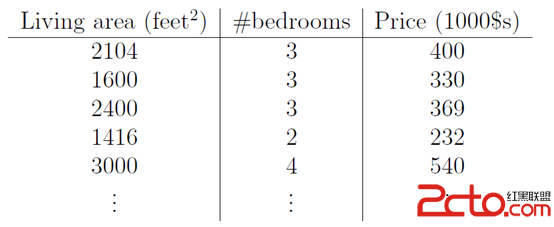
本系列整理自 Andrew Ng 的機器學習公開課,這一篇聚焦在回歸問題裡最基礎也最重要的一塊:線性回歸。 從一個例子說起 假設手上有一份二手房成交資料,欄位包含房屋面積
 Android 內存優化實戰:從 5R 思路到落地
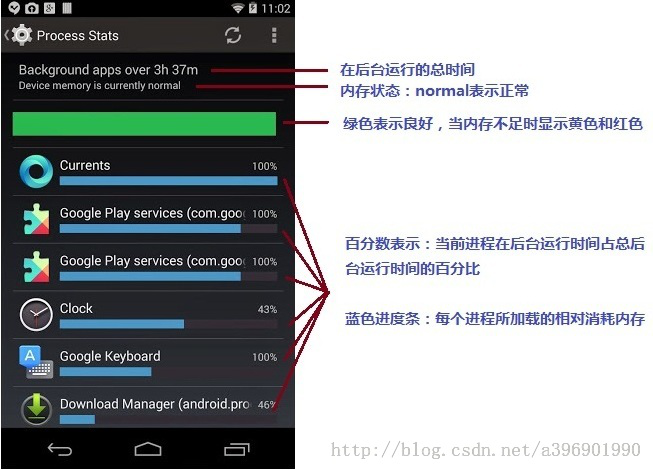
內存問題看似不起眼,卻是很多 App 體驗崩壞的根源。一旦內存洩露失控,通常會引發連鎖反應:應用變得卡頓、響應遲緩(當佔用過高時,虛擬機會頻繁觸發 GC);進程更容易在後
 Android ORM 框架 ActiveAndroid 入門實戰
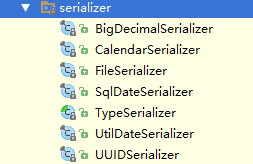
ActiveAndroid 是一款輕量級的 ORM 框架,接入簡單、上手快,足以應對大多數對數據庫操作要求不高的應用場景。下面從配置到數據操作,帶你快速跑通它。 一、配置
 Android ListView 載入動畫的實作方式
ListView 是 Android 開發中最常使用的控制項之一,但千篇一律的外觀難免讓人覺得單調。若能為列表加入載入動畫,不僅能提升視覺層次,也能帶來更流暢的使用者體驗