

編輯:關於 Android 程式設計
快取清理、檔案管理這類需求,通常會需要「刪掉指定檔案」「清空某目錄」「判斷檔案在不在」以及「用別的 App 打開它」這幾個能力。整理成一個工具類比較好維護。
public class FileUtils {

    /**
     * 刪除指定檔案(可傳多個路徑)
     */
    public static void deleteFiles(String... fileNames) {
        if (fileNames.length <= 0) return;
        for (int i = 0; i < fileNames.length; i++) {
            File file = new File(fileNames[i]);
            if (file.exists()) {
                file.delete();
            }
        }
    }

    /**
     * 刪除指定資料夾下過期的檔案(超過 3 天)
     */
    public static boolean delAllFile(String path) {
        boolean flag = false;
        File file = new File(path);
        if (!file.exists()) return flag;
        if (!file.isDirectory()) return flag;

        String[] tempList = file.list();
        if (tempList == null) return flag;

        File temp = null;
        for (int i = 0; i < tempList.length; i++) {
            if (path.endsWith(File.separator)) {
                temp = new File(path + tempList[i]);
            } else {
                temp = new File(path + File.separator + tempList[i]);
            }

            if (temp.isFile()) {
                long lastModeify = temp.lastModified();
                long current = new Date().getTime();
                Log.e("檔案建立時間", "current=" + current + " lastModeify=" + lastModeify);

                // 超過 3 天則刪除
                if (current - lastModeify > (1000L * 60 * 60 * 24 * 3)) {
                    temp.delete();
                }
            }

            if (temp.isDirectory()) {
                delAllFile(path + "/" + tempList[i]); // 先清裡面的檔案
                flag = true;
            }
        }
        return flag;
    }

    /** 判斷檔案是否存在 */
    public static boolean isExists(String nativePath) {
        File file = new File(nativePath);
        return file.exists();
    }

    /** 用其他應用開啟檔案 */
    public static void openFile(File f, Context context) {
        if (!f.exists()) {
            Toast.makeText(context, "檔案尚未下載,無法查看,請先下載檔案!",
                    Toast.LENGTH_SHORT).show();
            return;
        }

        Intent intent = new Intent();
        intent.addFlags(Intent.FLAG_ACTIVITY_NEW_TASK);
        intent.setAction(android.content.Intent.ACTION_VIEW);

        // 取得 MIME 類型
        String type = getMIMEType(f);

        // 設定檔案與類型
        intent.setDataAndType(Uri.fromFile(f), type);
        context.startActivity(intent);
    }

    /** 依副檔名判斷 MIME 類型 */
    private static String getMIMEType(File f) {
        String type = "";
        String fName = f.getName();
        // 取副檔名並轉小寫
        String end = fName.substring(fName.lastIndexOf(".") + 1, fName.length()).toLowerCase();

        if (end.equals("m4a") || end.equals("mp3") || end.equals("mid")
                || end.equals("xmf") || end.equals("ogg") || end.equals("wav")
                || end.equals("wma")) {
            type = "audio";
        } else if (end.equals("3gp") || end.equals("mp4")) {
            type = "video";
        } else if (end.equals("jpg") || end.equals("gif") || end.equals("png")
                || end.equals("jpeg") || end.equals("bmp")) {
            type = "image";
        } else if (end.equals("apk")) {
            // 需要 android.permission.INSTALL_PACKAGES
            type = "application/vnd.android.package-archive";
        } else {
            type = "*";
        }

        // 除了 apk,其餘都補上 /* 讓系統挑選合適的應用
        if (!end.equals("apk")) {
            type += "/*";
        }
        return type;
    }
}
從 Android 7.0(API 24)開始,把 file:// 形式的 Uri 傳給其他應用會拋 FileUriExposedException。正確做法是用 FileProvider:
Uri uri = FileProvider.getUriForFile(context,
        context.getPackageName() + ".fileprovider", f);
intent.setDataAndType(uri, type);
intent.addFlags(Intent.FLAG_GRANT_READ_URI_PERMISSION);
同時要在 res/xml/file_paths.xml 中宣告可共享的路徑,並在 Manifest 註冊 provider。這是這個工具類裡最關鍵的一段修正。
setDataAndType(uri, "audio/*") 在部分系統上匹配不到任何應用。建議回傳具體類型,例如 audio/mpeg、video/mp4、image/png。若無法判斷,回傳 */* 讓系統跳出完整選擇清單。
delAllFile() 顧名思義是「刪除所有檔案」,實際做的卻是「刪除超過 3 天的檔案」。建議改名為 cleanExpiredFiles(),並把 3 天這個門檻抽成參數。
file.delete() 回傳 boolean,失敗時(權限不足、檔案被佔用)不會拋例外,只是安靜地回 false。至少應該記錄下來,否則問題很難查。
遞迴刪除如果目標路徑傳錯(例如空字串或根目錄),後果會很嚴重。建議加上白名單校驗,只允許清理 App 自己的快取目錄。
Android 10 起導入分區儲存(Scoped Storage),Android 11 之後更嚴格。若只是管理自家 App 的檔案,應改用 getCacheDir() / getFilesDir(),完全不需要 WRITE_EXTERNAL_STORAGE;若確實要存取共享空間,則得走 MediaStore 或 SAF(Storage Access Framework)。
這個工具類的骨架依然好用——把檔案操作集中一處、對外只暴露少數靜態方法,是很值得沿用的整理方式。只要把 Uri 分享換成 FileProvider、把路徑來源換成 App 專用目錄,它在新版系統上仍然完全可用。
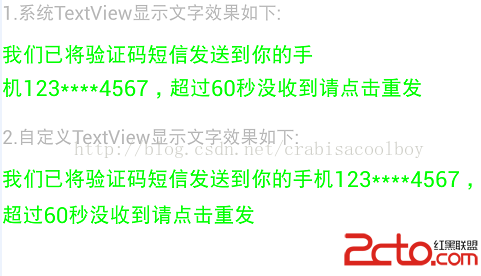 Android TextView 中文數字混排不對齊?自定義 AlignTextView 解決
用 TextView 顯示中文與數字混雜的文字時,常常會出現一個惱人的現象:文字還沒到螢幕右邊就換行了,右側留出一塊空白,左邊卻擠成一團,整體視覺相當凌亂。 這是因
 手機進水最佳處理方法
手機進水後的正確處理方法 手機進水後,處理方式會直接影響能否恢復。首先要避免甩動手機,以免水分在內部擴散。 自然晾干 可將手機按落水姿態垂直或水平放置,等待自然晾干。此
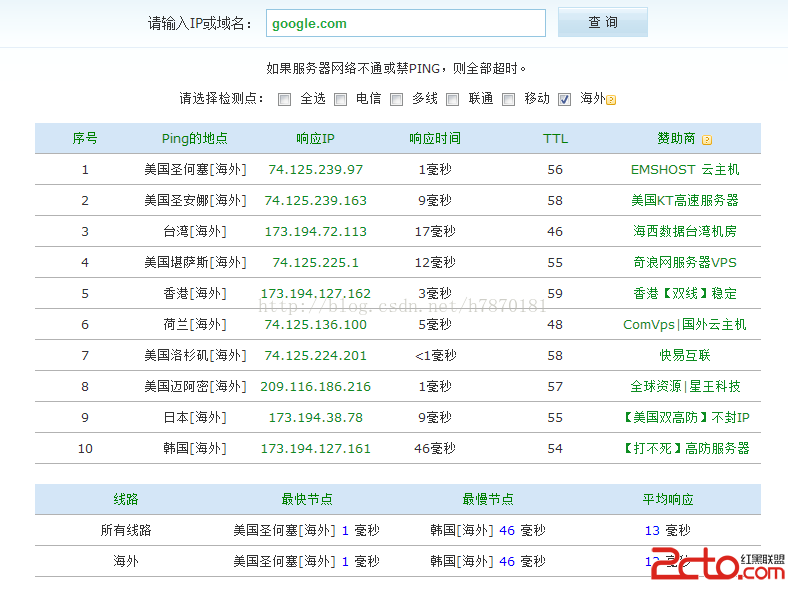 善用 hosts 檔解決 SDK 更新超時:原理、設定方式與 IP 失效的排查
做 Android 開發的人大概都遇過這件事:打開 SDK Manager 等半天,進度條卡在 0%;想看官方文件,頁面轉了兩分鐘還是白屏。這類問題的成因通常不是網路壞了
 Android 應用前後台切換的判斷與實作要點
在動手之前,先把 Activity 與 Task 的關係理清楚,後面的判斷邏輯才有依據。 一、Activity 與 Task 的基礎 一個 Activity 可以啟動另