

編輯:關於 Android 程式設計
TabHost 是早期 Android 做分頁切換的經典元件。它有一個很實用的特性:以 TabHost 為根的布局檔裡,可以同時存在 FrameLayout 形式的內容容器與自訂的頂部/底部區域,自由度比想像中高。
<?xml version="1.0" encoding="utf-8"?>
<TabHost xmlns:android="https://schemas.android.com/apk/res/android"
    android:id="@+id/tabhost"
    android:layout_width="fill_parent"
    android:layout_height="fill_parent">

    <RelativeLayout
        android:layout_width="fill_parent"
        android:layout_height="wrap_content" >

        <LinearLayout
            android:id="@+id/tab_top"
            android:background="@color/red"
            android:orientation="horizontal"
            android:layout_width="fill_parent"
            android:layout_height="20dp"
            android:layout_alignParentTop="true" >
        </LinearLayout>

        <FrameLayout
            android:id="@android:id/tabcontent"
            android:layout_width="fill_parent"
            android:background="@color/green"
            android:layout_height="wrap_content"
            android:layout_above="@id/tabs"
            android:layout_below="@id/tab_top" >
        </FrameLayout>

        <TabWidget
            android:id="@+id/tabs"
            android:layout_width="fill_parent"
            android:background="@color/blue"
            android:layout_height="20dp"
            android:layout_alignParentBottom="true" >
        </TabWidget>

    </RelativeLayout>
</TabHost>這個布局由上而下分成三塊,用 RelativeLayout 做定位:
layout_below 與 layout_above 同時夾住上下兩塊,自動填滿剩餘空間。TabHost 之所以能運作,是因為它會去尋找兩個約定好的 ID:
@android:id/tabs 對應 TabWidget,用來放各分頁的標籤。@android:id/tabcontent 對應 FrameLayout,用來裝各分頁的實際內容。這兩個 ID 是寫死在框架裡的,必須原封不動地使用 android: 命名空間下的資源,不能自取名字。上述布局中 TabWidget 寫成 @+id/tabs 之所以仍能運作,是因為 TabHost 在 setup 時會以字串比對,但為了避免版本差異帶來的問題,建議還是統一寫成 @android:id/tabs。
程式碼中的標準三步驟是:取得 TabHost → 呼叫 setup() → 用 addTab() 逐一加入分頁,每個分頁透過 TabSpec 指定標籤與要放進內容區的 Intent。
坦白說,TabHost 早已被標記為 deprecated。新專案請改用 TabLayout 搭配 ViewPager2,或是以 BottomNavigationView 實作底部導覽。TabHost 的價值在於維護老專案時能看懂它的 ID 約定與 TabSpec 模型。
 Android 動畫與圖形(二):屬性動畫完整指南
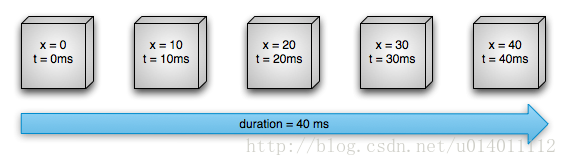
Android 的動畫體系有兩套:早期只有 View Animation(視圖動畫),3.0 之後才加入功能強大得多的 Property Animation(屬性動畫)。
 Android 獲取 App 應用程序大小的方法(反射 + AIDL)
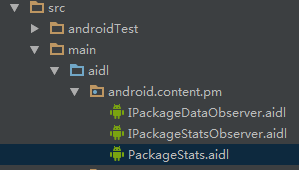
Android 對獲取應用大小的方法進行了封裝,但我們沒有直接調用的權限,因此只能通過 AIDL,再利用 Java 反射機制去調用系統級方法。下面是核心代碼(注釋較為詳細
 動手打造屬於自己的Http網絡框架(一):基於AsyncTask的實現思路
一、開篇說明 近段時間我一直在鑽研Http網絡請求框架的實現原理。這篇文章記錄的是我從零開始搭建的一個簡易框架,它目前主要面向學習與理解用途;若真要投入實際項目,還需要在
 用 PopupWindow 自定義 Android ActionBar Overflow 菜單
為什麼使用 PopupWindow 實作 Overflow當 ActionBar 上的操作按鈕過多時,系統會自動將部分項目收進 Overflow 選單。若想做出更客製化的