

編輯:關於 Android 程式設計
在實際的 App 運維過程中,「版本更新」幾乎是每個上架應用都必須具備的能力。當伺服器端發布了新版本,我們希望使用者開啟應用時能被友善地提示,並能一鍵下載、安裝最新的 APK。本文整理了一份可直接落地的 UpdateManager 完整實作,涵蓋版本提示、下載進度顯示到自動跳轉安裝的全流程。
整個更新流程可以拆成三個環節:先向伺服器確認是否有新版本;若有,彈出提示對話框讓使用者決定是否更新;使用者確認後,開啟帶有進度條的下載視窗,在後台線程中拉取 APK,下載完成後自動觸發系統安裝器。為了避免更新過程被中斷造成檔案損毀,這裡還設計了一個 interceptFlag 標記,用來回應使用者的「取消」操作。
根據網上的然後小改 import java.io.File; import java.io.FileOutputStream; import java.io.IOException; import java.io.InputStream; import java.net.HttpURLConnection; import java.net.MalformedURLException; import java.net.URL; import android.app.AlertDialog; import android.app.AlertDialog.Builder; import android.app.Dialog; import android.content.Context; import android.content.DialogInterface; import android.content.DialogInterface.OnClickListener; import android.content.Intent; import android.net.Uri; import android.os.Handler; import android.os.Message; import android.util.Log; import android.view.LayoutInflater; import android.view.View; import android.widget.ProgressBar; public class UpdateManager { private Context mContext; private final String updateMsg = "親,有新版本,要更新嗎!"; //下載消息提示 private Dialog noticeDialog; //下載提示對話框 private Dialog downloadDialog; //下載進度對話框 private ProgressBar mProgressBar; //進度條 private Boolean interceptFlag = false; //標記用戶是否在下載過程中取消下載 private Thread downloadApkThread = null; //下載線程 private final String apkUrl = "https://www.xxx/xxx.apk"; //apk的URL地址 private final String savePath = "/sdcard/UpdateDemo/"; //下載的apk存放的路徑 private final String saveFileName = savePath + "xxx.apk"; //下載的apk文件 private int progress = 0; //下載進度 private final int DOWNLOAD_ING = 1; //標記正在下載 private final int DOWNLOAD_OVER = 2; //標記下載完成 private final String TAG="版本更新"; //日志打印標簽 private Handler mhandler = new Handler() { //更新UI的handler @Override public void handleMessage(Message msg) { super.handleMessage(msg); switch (msg.what) { case DOWNLOAD_ING: // 更新進度條 mProgressBar.setProgress(progress); break; case DOWNLOAD_OVER: downloadDialog.dismiss(); installApk(); //安裝 break; default: break; } } }; /* * 構造方法 */ public UpdateManager(Context context) { this.mContext = context; } /* * 檢查是否有需要更新,具體比較版本xml */ public void checkUpdate() { // 到服務器檢查軟件是否有新版本 //如果有則 showNoticeDialog(); } /* * 顯示版本更新對話框 */ private void showNoticeDialog() { AlertDialog.Builder builder = new Builder(mContext); builder.setTitle("版本更新"); builder.setMessage(updateMsg); builder.setPositiveButton("更新", new OnClickListener() { public void onClick(DialogInterface dialog, int which) { noticeDialog.dismiss(); showDownloadDialog(); } }); builder.setNegativeButton("以後再說", new OnClickListener() { public void onClick(DialogInterface dialog, int which) { noticeDialog.dismiss(); } }); noticeDialog = builder.create(); noticeDialog.show(); } /* * 彈出下載進度對話框 */ private void showDownloadDialog() { AlertDialog.Builder builder = new Builder(mContext); builder.setTitle("軟件更新"); final LayoutInflater inflater = LayoutInflater.from(mContext); View v = inflater.inflate(R.layout.progress, null); mProgressBar = (ProgressBar) v.findViewById(R.id.updateProgress); builder.setView(v); builder.setNegativeButton("取消", new OnClickListener() { public void onClick(DialogInterface dialog, int which) { downloadDialog.dismiss(); interceptFlag = true; } }); downloadDialog = builder.create(); downloadDialog.show(); downloadLatestVersionApk(); } /* * 下載最新的apk文件 */ private void downloadLatestVersionApk() { downloadApkThread = new Thread(downloadApkRunnable); downloadApkThread.start(); } //匿名內部類,apk文件下載線程 private Runnable downloadApkRunnable = new Runnable() { public void run() { try { URL url = new URL(apkUrl); HttpURLConnection conn = (HttpURLConnection) url .openConnection(); conn.setConnectTimeout(5*1000); conn.connect(); int length = conn.getContentLength(); Log.e(TAG, "總字節數:"+length); InputStream is = conn.getInputStream(); File file = new File(savePath); if (!file.exists()) { file.mkdir(); } File apkFile = new File(saveFileName); FileOutputStream out = new FileOutputStream(apkFile); int count = 0; int readnum = 0; byte[] buffer = new byte[1024]; do { readnum = is.read(buffer); count += readnum; progress = (int) (((float) count / length) * 100); Log.e(TAG, "下載進度"+progress); mhandler.sendEmptyMessage(DOWNLOAD_ING); if (readnum <= 0) { // 下載結束 mhandler.sendEmptyMessage(DOWNLOAD_OVER); break; } out.write(buffer,0,readnum); } while (!interceptFlag); is.close(); out.close(); } catch (MalformedURLException e) { e.printStackTrace(); } catch (IOException e) { e.printStackTrace(); } } }; /* * 安裝下載的apk文件 */ private void installApk() { File file= new File(saveFileName); if(!file.exists()){ return; } Intent intent= new Intent(Intent.ACTION_VIEW); intent.setDataAndType(Uri.parse("file://"+file.toString()), "application/vnd.android.package-archive"); mContext.startActivity(intent); } }
下載任務一定要放在子線程中執行,避免阻塞主執行緒導致 ANR;而進度條的更新則透過 Handler 把訊息送回 UI 執行緒處理,這是 Android 更新介面的標準做法。此外,新版系統對 file:// 形式的 URI 有較嚴格的限制,實際上線時建議改用 FileProvider 來共享檔案,並記得在 AndroidManifest.xml 中申請網路與外部儲存權限。
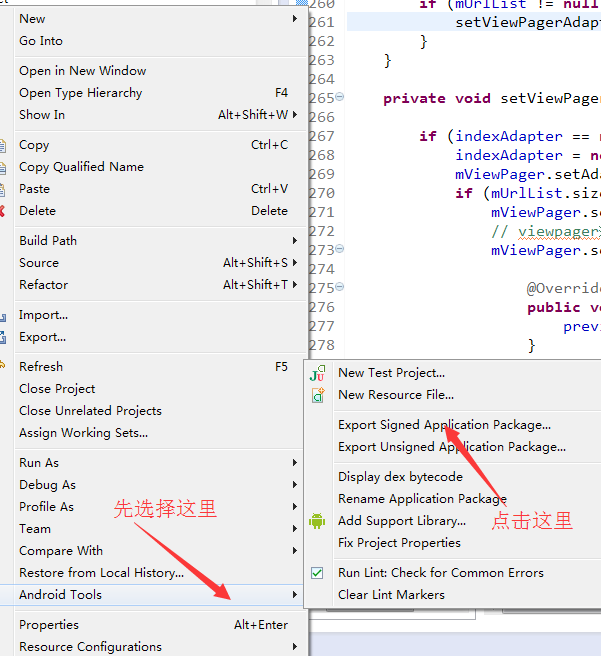 使用 Eclipse 打包 App 及 Android Studio 與 Eclipse 簽名修改(SHA1 與 MD5)
一、使用 Eclipse 打包 App 1. 先在 Eclipse 中建立一個新的 keystore。 2. 接下來設置打包所需的必要參數。 3. 設定好內容後點擊下一步
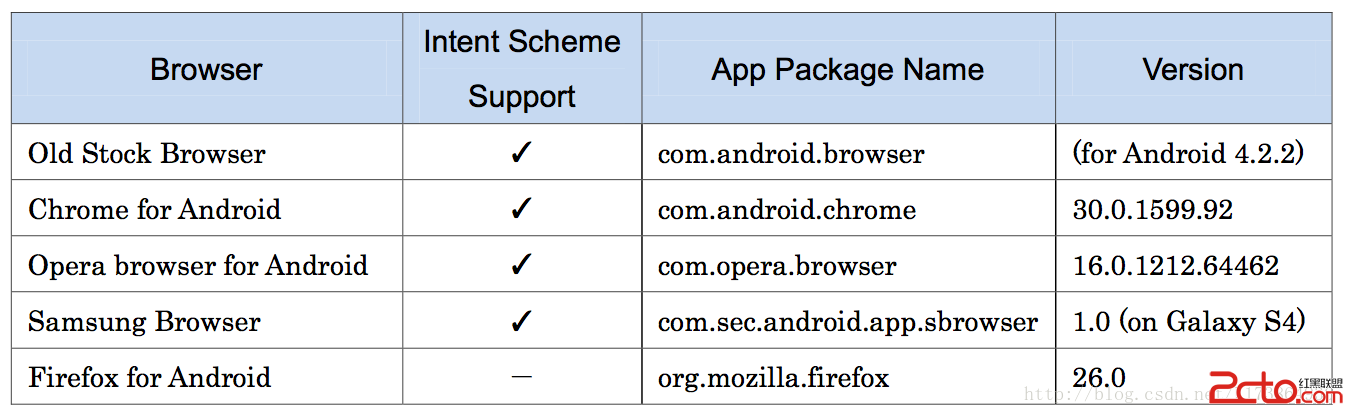 Android Intent Scheme URL 攻擊手法與防禦解析
本文分析的是一類已被公開揭露並修補的 Android 瀏覽器安全性問題,重點放在「攻擊為何成立」以及「防禦端該怎麼寫」。理解這個案例,對撰寫任何會解析外部輸入的元件都有直
 Android View 事件分發機制源碼解析(上)
一直想寫事件分發機制,那就老老實實把源碼讀一遍,再寫下心得。本篇先從一個可打印日誌的簡單案例出發,逐步追進原始碼。 一、案例準備 自訂一個 MyButton 繼承 Bu
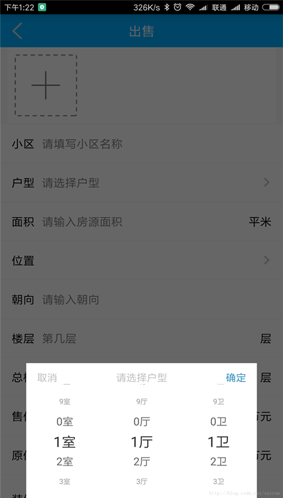 Android 自定義滾動選擇器(Picker)完整實例代碼
本文分享一個自定義滾動選擇器的完整實現,先看看效果:它的核心思路是:用一個自定義 View,把數據列表循環排列,通過手指滑動改變偏移量,再用拋物線函數計算每個選項的字號與