

編輯:關於 Android 程式設計
前陣子做一個小應用時,需要在 Service 中啟動(呼叫)一個 Activity,沒想到卻老是出現 ANR(Application Not Responding)。上網查了各種說法,實際嘗試後發現問題其實不難解決,只要加上一行程式碼即可。
public class XXXService extends Service {
    public void onCreate() {
        super.onCreate();
        // 撥打電話
        Intent call = new Intent("android.intent.action.CALL", Uri.parse("tel:110"));
        startActivity(call);
    }
}
關鍵就在於為 Intent 加上 FLAG_ACTIVITY_NEW_TASK 這個旗標:
public class XXXService extends Service {
    public void onCreate() {
        super.onCreate();
        // 撥打電話
        Intent call = new Intent("android.intent.action.CALL", Uri.parse("tel:110"));
        call.setFlags(Intent.FLAG_ACTIVITY_NEW_TASK);
        startActivity(call);
    }
}
關鍵語句就是 call.setFlags(Intent.FLAG_ACTIVITY_NEW_TASK);。之所以需要它,背後的原因與 Android 系統的穩定性設計有關。
查看官方對 startActivity() 方法的說明,其中提到:
Note that if this method is being called from outside of an Activity Context, then the Intent must include the FLAG_ACTIVITY_NEW_TASK launch flag. This is because, without being started from an existing Activity, there is no existing task in which to place the new activity and thus it needs to be placed in its own separate task.
大致意思是:如果這個方法是被一個「非 Activity 的 Context」呼叫(例如 Service),那麼 Intent 就必須包含 FLAG_ACTIVITY_NEW_TASK 旗標。這是因為待建立的 Activity 並不是從一個已存在的 Activity 啟動的,任務堆疊中並沒有現成的任務可以容納它,因此它需要被放進一個屬於自己的、獨立的任務裡。
換句話說,Service 本身就沒有「任務堆疊」的概念,若直接把 Activity 塞進去,系統無所適從便會引發 ANR。加上這個旗標,等於明確告訴系統「請幫我開一個新任務來放這個 Activity」,問題自然迎刃而解。
 Android 圖像處理入門:Bitmap 與 BitmapDrawable 的關係與實作
在 Android 裡處理圖片,Bitmap 與 BitmapDrawable 這對搭檔幾乎無可迴避。理解兩者的分工,是寫好任何圖像相關功能的第一步。本文從最單純的載入方
 Android 6.0 來電號碼與通訊錄聯系人匹配流程分析
當系統接到來電時,如何在通訊錄中匹配出對應的聯系人並顯示姓名?本文以 Android 6.0 的 Telecom 框架為切入點,梳理從來電連接到號碼查詢、再到結果回填的完
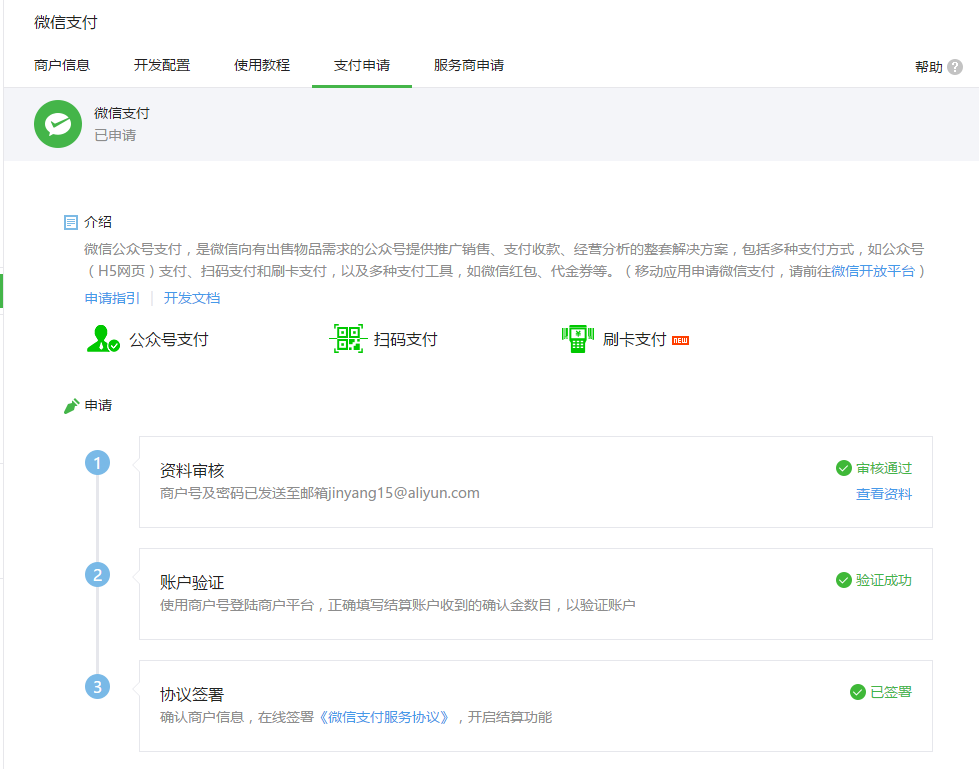 微信支付 JSAPI 公眾號支付完整接入實戰教程
開始之前:你需要準備些什麼 這份教程面向已經具備一定基礎的開發者。在動手之前,請確認你已經滿足以下幾個前提條件:拥有一個通過微信認證的服務號,並且該服務號已成功開通微信支
 用 User Agent 區分 Android 手機與平板的正確做法
Android 設備種類越來越多,手機和平板是兩大主流形態。網站在做自適應時,需要根據 User Agent(以下簡稱 UA)判斷對方是哪一類,才能給出合適的版式。這件事