

編輯:關於 Android 程式設計
Android 提供的本地持久化手段主要有幾種,各自適用不同場景。下面逐一說明並附上可運行的程式碼。
最適合使用者名稱、密碼、開關狀態這類零散的小資料。它本質上是一個 XML 檔,以 key-value 形式儲存。
package com.google.datastore.sharep;

import android.app.Activity;
import android.content.Context;
import android.content.SharedPreferences;
import android.os.Bundle;
import android.view.View;
import android.view.View.OnClickListener;
import android.widget.Button;
import android.widget.EditText;
import com.google.datastore.R;

public class SharePreferences extends Activity {

    private EditText editUsername = null;
    private EditText editPassword = null;
    private Button bt = null;
    SharedPreferences userInfo = null;

    @Override
    protected void onCreate(Bundle savedInstanceState) {
        super.onCreate(savedInstanceState);
        setContentView(R.layout.sharepreferences);

        editUsername = (EditText) findViewById(R.id.username);
        editPassword = (EditText) findViewById(R.id.password);
        bt = (Button) findViewById(R.id.bt);

        initData();

        bt.setOnClickListener(new OnClickListener() {
            @Override
            public void onClick(View v) {
                SharedPreferences.Editor editor = userInfo.edit();
                editor.putString("name", editUsername.getText().toString());
                editor.putString("password", editPassword.getText().toString());
                editor.commit();
            }
        });
    }

    private void initData() {
        userInfo = getSharedPreferences("user_info", Context.MODE_PRIVATE);
        String username = userInfo.getString("name", "");
        String password = userInfo.getString("password", "");
        editUsername.setText(username);
        editPassword.setText(password);
    }
}把資料存到遠端伺服器。需要注意的是,從 Android 3.0 起主線程禁止網路訪問,所以下面把下載動作放進子線程。範例中的 tvNet.setText(msg) 已註解掉,正是因為跨線程更新 UI 必須透過 Handler。
package com.google.datastore.net;

import java.io.BufferedInputStream;
import java.io.InputStream;
import java.net.HttpURLConnection;
import java.net.URL;
import org.apache.http.util.ByteArrayBuffer;
import android.app.Activity;
import android.os.Bundle;
import android.util.Log;
import android.widget.TextView;
import com.google.datastore.R;

public class Net extends Activity {

    private TextView tvNet;

    @Override
    protected void onCreate(Bundle savedInstanceState) {
        super.onCreate(savedInstanceState);
        setContentView(R.layout.netget);
        tvNet = (TextView) findViewById(R.id.textNet);
        new Thread(download).start();
    }

    Runnable download = new Runnable() {
        @Override
        public void run() {
            String msg = "";
            try {
                URL url = new URL("https://linux.chinaitlab.com/command/723482.html");
                HttpURLConnection conn = (HttpURLConnection) url.openConnection();
                conn.setReadTimeout(6 * 1000);
                conn.setConnectTimeout(5 * 1000);

                InputStream is = conn.getInputStream();
                BufferedInputStream bis = new BufferedInputStream(is);
                ByteArrayBuffer baf = new ByteArrayBuffer(100);

                int current = 0;
                while ((current = bis.read()) != -1) {
                    baf.append((byte) current);
                }
                msg = new String(baf.toByteArray(), "UTF-8");
                Log.d("lixp", "msg ========" + msg);
            } catch (Exception e) {
                msg = e.getMessage();
                Log.e("lixp", "e ===" + e);
            }
            // tvNet.setText(msg); 需在主線程透過 Handler 更新
        }
    };
}檔案存儲分內部私有儲存與外部 SD 卡兩種。內部檔案預設只有本應用可讀寫;SD 卡則需先確認已掛載並申請讀寫權限。
package com.google.datastore.filestore;

import android.app.Activity;
import android.os.Bundle;
import android.os.Environment;
import android.util.Log;
import android.view.View;
import android.widget.Button;
import android.widget.EditText;
import android.widget.Toast;
import com.google.datastore.R;

public class FileActivity extends Activity {

    private EditText name;
    private EditText age;
    private FileService fileService;
    private Button saveButton;
    private Button readButton;
    private Button saveToSd;

    @Override
    protected void onCreate(Bundle savedInstanceState) {
        super.onCreate(savedInstanceState);
        setContentView(R.layout.file);

        name = (EditText) findViewById(R.id.filename);
        age = (EditText) findViewById(R.id.content);
        saveButton = (Button) findViewById(R.id.save);
        readButton = (Button) findViewById(R.id.read);
        saveToSd = (Button) findViewById(R.id.saveToSdCard);

        fileService = new FileService(FileActivity.this);

        saveButton.setOnClickListener(listener);
        saveToSd.setOnClickListener(listener);
        readButton.setOnClickListener(listener);
    }

    private View.OnClickListener listener = new View.OnClickListener() {
        @Override
        public void onClick(View v) {
            Button btn = (Button) v;
            String filename = name.getText().toString();
            String content = age.getText().toString();

            switch (btn.getId()) {
                case R.id.save:
                    try {
                        fileService.save(filename, content);
                        Toast.makeText(FileActivity.this, R.string.fileSaveSuccess,
                                Toast.LENGTH_LONG).show();
                    } catch (Exception e) {
                        e.printStackTrace();
                        Toast.makeText(FileActivity.this, R.string.fileSaveException,
                                Toast.LENGTH_LONG).show();
                    }
                    break;

                case R.id.saveToSdCard:
                    if (Environment.getExternalStorageState().equals(
                            Environment.MEDIA_MOUNTED)) {
                        try {
                            fileService.saveToSd(filename, content);
                            Toast.makeText(FileActivity.this, R.string.fileSaveSuccess,
                                    Toast.LENGTH_LONG).show();
                        } catch (Exception e) {
                            e.printStackTrace();
                            Toast.makeText(FileActivity.this, R.string.fileSaveException,
                                    Toast.LENGTH_LONG).show();
                        }
                    } else {
                        Log.e("lixp", "SD 卡未掛載");
                    }
                    break;

                case R.id.read:
                    FileService fs = new FileService(getApplicationContext());
                    String fileName = getIntent().getStringExtra("fileName");
                    Log.d("lixp", "read = " + fs.read(fileName));
                    break;

                default:
                    break;
            }
        }
    };
}
負責實際讀寫的工具類:
package com.google.datastore.filestore;

import java.io.ByteArrayOutputStream;
import java.io.File;
import java.io.FileInputStream;
import java.io.FileOutputStream;
import android.content.Context;
import android.os.Environment;
import android.util.Log;

public class FileService {

    private Context context;

    public FileService(Context context) {
        super();
        this.context = context;
    }

    /** 保存文件到應用私有目錄 */
    public void save(String fileName, String content) {
        try {
            // 以私有方式讀寫數據,創建出來的文件只能被該應用訪問
            FileOutputStream fos =
                    context.openFileOutput(fileName, Context.MODE_WORLD_READABLE);
            fos.write(content.getBytes());
            fos.close();
        } catch (Exception e) {
            Log.e("lixp", "save() e ====" + e);
        }
    }

    /** 保存文件到 sdcard */
    public void saveToSd(String fileName, String content) {
        try {
            // 考慮不同版本 SD 卡路徑不同,使用系統 API 獲取而不是硬編碼 /mnt/sdcard
            File file = new File(Environment.getExternalStorageDirectory(), fileName);
            FileOutputStream fos = new FileOutputStream(file);
            fos.write(content.getBytes());
            fos.close();
        } catch (Exception e) {
            Log.e("lixp", "saveToSd() e ====" + e);
        }
    }

    /** 讀取文件內容 */
    public String read(String fileName) {
        byte[] data = null;
        try {
            FileInputStream fis = context.openFileInput(fileName);
            // 把每次讀取的內容寫入內存,最後再從內存中取出
            ByteArrayOutputStream bos = new ByteArrayOutputStream();
            byte[] buffer = new byte[1024];
            int len = 0;
            // 只要沒讀完,不斷的讀取
            while ((len = fis.read(buffer)) != -1) {
                bos.write(buffer, 0, len);
            }
            data = bos.toByteArray();
        } catch (Exception e) {
            Log.e("lixp", "read() e ====" + e);
        }
        // 根據二進制數據轉換成對應的字符串
        return new String(data);
    }
}SQLiteOpenHelper 是一個輔助類,用於建立數據庫並管理其版本。它是抽象類,使用時需繼承並實作其中的方法:
onCreate(SQLiteDatabase):數據庫第一次建立時呼叫,通常在這裡建表。onUpgrade(SQLiteDatabase, int, int):數據庫需要升級時由系統主動呼叫,通常在此刪除舊表並建立新表,是否還要做資料搬遷則視需求而定。onOpen(SQLiteDatabase):打開數據庫時的回呼,一般較少用到。在程式中呼叫 getWritableDatabase() 或 getReadableDatabase() 時,若數據庫尚不存在,系統會自動建立。用完記得呼叫 close() 釋放資源。
package com.google.datastore.sqllite;

import android.content.Context;
import android.database.sqlite.SQLiteDatabase;
import android.database.sqlite.SQLiteDatabase.CursorFactory;
import android.database.sqlite.SQLiteOpenHelper;

public class DbOpenHelper extends SQLiteOpenHelper {

    public static final String TABLE_NAME = "fb";
    public static final String ID = "_id";
    public static final String COUNTRY = "country";
    public static final String CODE = "code";

    public DbOpenHelper(Context context, String name, CursorFactory factory, int version) {
        super(context, name, factory, version);
    }

    @Override
    public void onCreate(SQLiteDatabase db) {
        db.execSQL("CREATE TABLE IF NOT EXISTS"
                + TABLE_NAME + "("
                + ID + " INTEGER PRIMARY KEY,"
                + COUNTRY + " VARCHAR,"
                + CODE + " INTEGER)");
    }

    // 升級數據庫
    @Override
    public void onUpgrade(SQLiteDatabase db, int oldVersion, int newVersion) {
        db.execSQL("DROP TABLE IF EXISTS " + TABLE_NAME);
        onCreate(db);
    }
}
取得 SQLiteDatabase 實例後,增刪改查有兩種寫法——方法式 API 與原生 SQL:
DbOpenHelper helper = new DbOpenHelper(this, DB_NAME, null, DB_VERSION);
// 如果沒有數據庫,會自動創建
SQLiteDatabase db = helper.getWritableDatabase();

// ---- 插入數據(ContentValues 方式)----
ContentValues values = new ContentValues();
values.put(DbOpenHelper.COUNTRY, "中國");
values.put(DbOpenHelper.CODE, 86);
db.insert(DbOpenHelper.TABLE_NAME, DbOpenHelper.ID, values);

// ---- 修改數據 ----
db.insert(DbOpenHelper.TABLE_NAME, DbOpenHelper.ID, null);
values.clear();
values.put(DbOpenHelper.COUNTRY, "意大利");
values.put(DbOpenHelper.CODE, 39);
db.update(DbOpenHelper.TABLE_NAME, values, DbOpenHelper.ID + " = 2", null);

// ---- execSQL 執行原生 SQL ----
db.execSQL("INSERT INTO " + DbOpenHelper.TABLE_NAME
        + "(" + DbOpenHelper.COUNTRY + "," + DbOpenHelper.CODE + ") VALUES "
        + "('洪都拉斯',504)");

// ---- 查詢數據 ----
Cursor c = db.query(DbOpenHelper.TABLE_NAME, null, null, null, null, null,
        DbOpenHelper.CODE + " DESC");

// ---- 刪除數據 ----
db.delete(DbOpenHelper.TABLE_NAME, null, null);小量的設定值用 SharedPreferences 最直覺;結構化、需要條件查詢的大量資料交給 SQLite;較大的二進位或文件資料放檔案系統;需要多設備同步的資料則走網路存儲。實務上這幾種方式常常並用,例如把使用者帳號存在 SharedPreferences、把同步回來的內容寫入 SQLite,再把圖片快取到檔案系統。另外提醒一句,範例中的 MODE_WORLD_READABLE 在 API 17 以後已因安全顧慮被棄用,正式專案請改用 MODE_PRIVATE。
 Android 實現二維碼掃描登入網頁的實作
之前寫過一個二維碼掃描 demo,用的是 Zxing 框架。後續在掃描二維碼時遇到一些問題,比如壓縮圖片、調整掃描視窗大小等等。後來單位要求做掃描登入功能,發現最大的難點
 Android 開發:用 SQLite 實作一個記事本(寫日記)
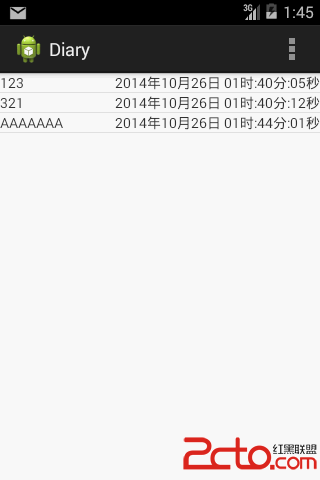
這次要示範如何使用資料庫來儲存資料,做一個簡單的寫日記小程式。 執行效果如下: 一、列表無資料時的提示 當 ListView 沒有資料可顯示時,我們需要給使用者一個提
 Android 使用 Matrix 處理 Bitmap:縮放、旋轉、平移與斜切
Matrix 是 Android 中對圖形做變換的核心工具,縮放、旋轉、平移、斜切都靠它。以下整理它的數學結構與常用 API,並附完整示範。 Matrix 的結構 Ma
 Android 自定義支付密碼軟鍵盤實作(含隨機鍵盤)
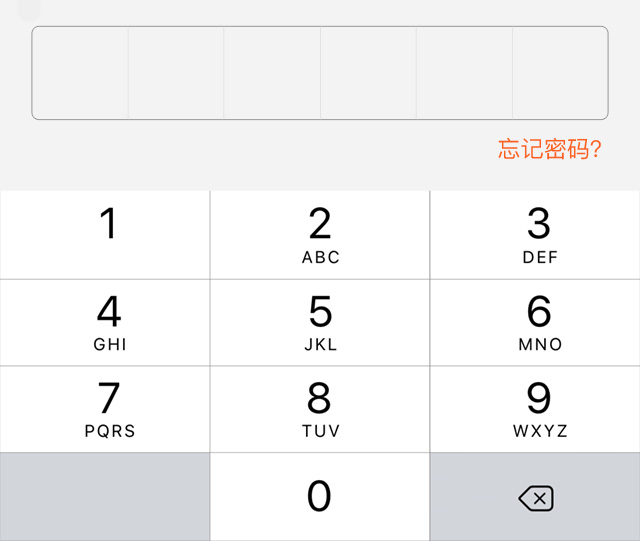
Android 自定義輸入支付密碼的軟鍵盤 專案需要實現一個類似支付寶那樣的密碼鎖功能,帶有自己的軟鍵盤。這裡整理了相關資料供大家參考,若有錯誤歡迎留言指正。 需求:實現