

編輯:關於 Android 程式設計
Android 的補間動畫共有四種基本型態:透明度漸變(Alpha)、旋轉(Rotate)、縮放(Scale)、位移(Translate)。把它們用 AnimationSet 疊在一起,還能做出複合效果。以下用五顆按鈕分別觸發,點下去就能看到對應動畫。
package com.tmacsky;

import android.app.Activity;
import android.os.Bundle;
import android.util.Log;
import android.view.View;
import android.view.View.OnClickListener;
import android.view.animation.AlphaAnimation;
import android.view.animation.Animation;
import android.view.animation.AnimationSet;
import android.view.animation.AnimationUtils;
import android.view.animation.RotateAnimation;
import android.view.animation.ScaleAnimation;
import android.view.animation.TranslateAnimation;
import android.view.animation.Animation.AnimationListener;
import android.widget.Button;
import android.widget.ImageView;

public class AnimationDemoActivity extends Activity {

    private ImageView imageView;

    @Override
    public void onCreate(Bundle savedInstanceState) {
        super.onCreate(savedInstanceState);
        setContentView(R.layout.main);

        imageView = (ImageView) findViewById(R.id.imageView);

        Button alpha = (Button) findViewById(R.id.Alpha);
        alpha.setOnClickListener(new AnimationClickListener(AnimationType.Alpha));

        Button rotate = (Button) findViewById(R.id.Rotate);
        rotate.setOnClickListener(new AnimationClickListener(AnimationType.Rotate));

        Button scale = (Button) findViewById(R.id.Scale);
        scale.setOnClickListener(new AnimationClickListener(AnimationType.Scale));

        Button translate = (Button) findViewById(R.id.Translate);
        translate.setOnClickListener(new AnimationClickListener(AnimationType.Translate));

        Button complex = (Button) findViewById(R.id.Complex);
        complex.setOnClickListener(new AnimationClickListener(AnimationType.Complex));
    }

    /** 用列舉把「按鈕」與「動畫種類」綁在一起,避免寫五個匿名類別 */
    enum AnimationType { Alpha, Rotate, Scale, Translate, Complex }

    class AnimationClickListener implements OnClickListener {

        private AnimationType animationType;

        public AnimationClickListener(AnimationType animType) {
            animationType = animType;
        }

        public void onClick(View v) {
            switch (animationType) {

                case Alpha:
                    // 從 XML 載入漸變動畫
                    AlphaAnimation alphaAnimation = (AlphaAnimation)
                            AnimationUtils.loadAnimation(AnimationDemoActivity.this, R.anim.alpha);
                    imageView.startAnimation(alphaAnimation);
                    break;

                case Rotate:
                    // 以自身中心為軸旋轉一圈,重複三次
                    RotateAnimation rotateAnimation = new RotateAnimation(
                            0, 360,
                            Animation.RELATIVE_TO_SELF, 0.5f,
                            Animation.RELATIVE_TO_SELF, 0.5f);
                    rotateAnimation.setDuration(3000);
                    rotateAnimation.setRepeatCount(3);
                    imageView.startAnimation(rotateAnimation);
                    break;

                case Scale:
                    // 以自身中心為基準放大到 1.5 倍,重複三次
                    ScaleAnimation scaleAnimation = new ScaleAnimation(
                            1, 1.5f, 1, 1.5f,
                            Animation.RELATIVE_TO_SELF, 0.5f,
                            Animation.RELATIVE_TO_SELF, 0.5f);
                    scaleAnimation.setDuration(3000);
                    scaleAnimation.setRepeatCount(3);
                    imageView.startAnimation(scaleAnimation);
                    break;

                case Translate:
                    // 從自身位置移動到兩倍寬/高的位置,重複三次
                    TranslateAnimation translateAnimation = new TranslateAnimation(
                            Animation.RELATIVE_TO_SELF, 0,
                            Animation.RELATIVE_TO_SELF, 2,
                            Animation.RELATIVE_TO_SELF, 0,
                            Animation.RELATIVE_TO_SELF, 2);
                    translateAnimation.setDuration(3000);
                    translateAnimation.setRepeatCount(3);
                    imageView.startAnimation(translateAnimation);
                    break;

                case Complex:
                    // 四種動畫同時播放
                    AnimationSet sets = new AnimationSet(false);

                    AlphaAnimation alpha1 = new AlphaAnimation(1f, 0.1f);
                    alpha1.setDuration(3000);

                    RotateAnimation rotate1 = new RotateAnimation(
                            0, 360,
                            Animation.RELATIVE_TO_SELF, 0.5f,
                            Animation.RELATIVE_TO_SELF, 0.5f);
                    rotate1.setDuration(3000);

                    ScaleAnimation scale1 = new ScaleAnimation(
                            1, 1.5f, 1, 1.5f,
                            Animation.RELATIVE_TO_SELF, 0.5f,
                            Animation.RELATIVE_TO_SELF, 0.5f);
                    scale1.setDuration(3000);

                    TranslateAnimation translate1 = new TranslateAnimation(
                            Animation.RELATIVE_TO_SELF, 0,
                            Animation.RELATIVE_TO_SELF, 2,
                            Animation.RELATIVE_TO_SELF, 0,
                            Animation.RELATIVE_TO_SELF, 2);
                    translate1.setDuration(3000);

                    sets.addAnimation(alpha1);
                    sets.addAnimation(rotate1);
                    sets.addAnimation(scale1);
                    sets.addAnimation(translate1);
                    imageView.startAnimation(sets);
                    break;

                default:
                    break;
            }
        }
    }
}
<?xml version="1.0" encoding="utf-8"?>
<LinearLayout xmlns:android="https://schemas.android.com/apk/res/android"
    android:layout_width="fill_parent"
    android:layout_height="fill_parent"
    android:orientation="vertical" >

    <TextView
        android:layout_width="fill_parent"
        android:layout_height="wrap_content"
        android:text="@string/hello" />

    <ImageView
        android:id="@+id/imageView"
        android:layout_width="wrap_content"
        android:layout_height="wrap_content"
        android:src="@drawable/qa" />

    <Button android:id="@+id/Alpha"
        android:layout_width="wrap_content" android:layout_height="wrap_content"
        android:text="Alpha" />
    <Button android:id="@+id/Rotate"
        android:layout_width="wrap_content" android:layout_height="wrap_content"
        android:text="Rotate" />
    <Button android:id="@+id/Scale"
        android:layout_width="wrap_content" android:layout_height="wrap_content"
        android:text="Scale" />
    <Button android:id="@+id/Translate"
        android:layout_width="wrap_content" android:layout_height="wrap_content"
        android:text="Translate" />
    <Button android:id="@+id/Complex"
        android:layout_width="wrap_content" android:layout_height="wrap_content"
        android:text="Complex" />

</LinearLayout>
<?xml version="1.0" encoding="utf-8"?>
<alpha xmlns:android="https://schemas.android.com/apk/res/android"
    android:fromAlpha="1"
    android:toAlpha="0.3"
    android:duration="2000"
    android:repeatCount="3" />
AnimationListener 的三個回呼。若需要知道動畫何時開始、重複、結束,可以掛上 Animation.AnimationListener,分別實作 onAnimationStart、onAnimationRepeat、onAnimationEnd。這是串接動畫序列(例如第一段結束後播放第二段)的標準做法。
RELATIVE_TO_SELF 與 pivot 的關係。Animation.RELATIVE_TO_SELF, 0.5f 表示軸心位於自身寬/高的 50%,也就是正中心。若想讓旋轉圍繞左上角,改成 0f 即可。
AnimationSet 的 shareInterpolator。建構子傳入 false 表示各子動畫保留自己的插值器;傳 true 則共用同一組。做複合效果時通常給 false,讓每個動畫各自調整速度曲線。
補間動畫不改變真實位置。這是最容易被忽略的一點:動畫結束後 View 會瞬間回到原點,且點擊熱區仍在原本位置。若需要真正改變位置或讓狀態保留,請改用 ObjectAnimator/ViewPropertyAnimator 這類 Property Animation。
最後,若要在 XML 中做複合動畫,可以把上述四個標籤包在 <set> 裡,並用 android:interpolator 統一設定速度曲線,效果與程式碼版本等價,但更容易調整與重複使用。
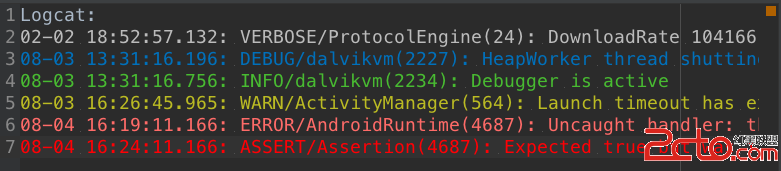 Android Studio 技巧:給 LogCat 換上高辨識度的配色
LogCat 默認配色偏素,各級別日誌混在一起時很不醒目。花一分鐘改一下顏色,排查問題的效率會明顯提升。 一、先看效果 二、設置步驟 打開 File → Setti
 Android APK 動態加載機制研究(二):資源訪問與 Activity 生命週期管理
前言 上一篇我們分析了 Android 中 APK 動態加載的基本原理,並在結尾指出兩個尚未解決的難題:資源的訪問與 Activity 生命週期管理。本文接著處理這兩件事
 Android 手機衛士中的設置密碼對話框
在手機安全類應用中,設置密碼是常見流程。使用者第一次設定密碼時,通常需要輸入兩次,並點擊確認或取消。本文說明如何完成這樣的對話框畫面。 效果如下: 布局結構 畫面可由
 Android 平台搖一搖切歌功能的完整實作(高通平台)
客戶要求在高通 7251 平台上為音樂播放器加上「搖一搖切歌」功能。查了些資料後基本實現,這裡把完整改動記錄下來,其他平台(展訊、MTK)也能類推。 一、先看改動範圍
