

編輯:關於 Android 程式設計
最近在進行 app 開發的同時,也重新複習了動畫方面的知識。本文將重點整理 Android 的 Property Animation(屬性動畫),作為學習筆記與交流之用。
Android 框架提供了幾種動畫方式,其中 Property Animation 在 Android 3.0 以上版本才有,一般建議優先採用,因為它更強大也更有效率。三種動畫分別是:
Property Animation:這種動畫系統能為任何物件製作動畫,包括那些沒有被加入界面的物件。
View Animation:較為老舊的方式,只能對 View 使用,設定與使用都比較容易。
Drawable Animation:像電影一樣,將一個個 Drawable 依序播放出來。
簡單來說,Property Animation 能在一段時間內改變某個屬性(物件中的欄位)的值,例如位置、動畫持續時間、動畫開始時間等,藉此控制動畫。其常見屬性包括:
Duration:動畫持續時間,系統預設為 300ms。
Time interpolation:動畫插入器,例如 LinearInterpolator 讓動畫以均勻速率變化。
Repeat count and mode:動畫重複次數與模式,包含 restart 與 reverse。
Animation sets:可將一系列動畫放入集合中一起或依序執行。
Frame refresh delay:動畫的刷新時間,系統預設為 10ms。
View Animation 只能操作 View 物件,且僅能進行 rotate、scale、translate 與 alpha 操作。它另一個局限在於:動畫只是改變了 View 被繪製的位置,並未真正改變 View 本身。相對地,Property Animation 透過改變 View 物件實際的屬性來製作動畫,且 View 會在屬性變動時自動呼叫 invalidate() 刷新畫面。View 類別中便新增了多個便於製作動畫的屬性:
translationX 與 translationY:相對於父控制項左上角的位置。
rotation、rotationX、rotationY:旋轉的中心點座標。
scaleX 與 scaleY:縮放的中心點座標。
pivotX 與 pivotY:中心點的座標。
x 與 y:距離座標。
alpha:透明度,值介於 0 到 1 之間。
第一種方式是使用多個 ObjectAnimator,並以 AnimatorSet 組合:
ObjectAnimator animX = ObjectAnimator.ofFloat(myView, "x", 50f);
ObjectAnimator animY = ObjectAnimator.ofFloat(myView, "y", 100f);
AnimatorSet animSetXY = new AnimatorSet();
animSetXY.playTogether(animX, animY);
animSetXY.start();
第二種方式是使用單一 ObjectAnimator 搭配 PropertyValuesHolder:
PropertyValuesHolder pvhX = PropertyValuesHolder.ofFloat("x", 50f);
PropertyValuesHolder pvhY = PropertyValuesHolder.ofFloat("y", 100f);
ObjectAnimator.ofPropertyValuesHolder(myView, pvhX, pvhY).start();
第三種方式是使用 ViewPropertyAnimator:
myView.animate().x(50f).y(100f);
Android 允許以 XML 代替程式碼來運用動畫,方便在多個 Activity 之間重複利用或重新編輯。為了區分新的 Property Animation 與舊的 View Animation,從 Android 3.1 以上,檔案要放在 res/animator 而非 res/animator。XML 中可設定三種動畫:ValueAnimator 對應 <animator>、ObjectAnimator 對應 <objectAnimator>、AnimatorSet 對應 <set>。用法如下:
<set android:ordering="sequentially">
<set>
<objectAnimator
android:propertyName="x"
android:duration="500"
android:valueTo="400"
android:valueType="intType"/>
<objectAnimator
android:propertyName="y"
android:duration="500"
android:valueTo="300"
android:valueType="intType"/>
</set>
<objectAnimator
android:propertyName="alpha"
android:duration="500"
android:valueTo="1f"/>
</set>
在程式碼中載入並套用這個動畫:
AnimatorSet set=(AnimatorSet)AnimatorInflater.loadAnimator(myContext, R.anim.property_animator);
set.setTarget(myObject);
set.start();
在 android.animation 套件中可以找到許多 Property Animation 的 API,而在 android.view.animation 套件中則能找到許多預先定義的 Interpolator。以下說明幾個核心類別:
ValueAnimator 繼承自 Animator,是屬性動畫的主要計時引擎,每隔約 10ms 計算一次屬性的值。
ObjectAnimator 繼承自 ValueAnimator,除了計算數值外,還能指定目標物件與屬性並將結果刷新出來。
AnimatorSet 則提供把多個動畫組合起來、彼此關聯執行的機制。
Evaluators 用來告訴動畫系統如何計算特定屬性的值,例如 IntEvaluator、FloatEvaluator、ArgbEvaluator 與 TypeEvaluator。而 Interpolator 則定義動畫數值隨時間變化的規律,常見的有:
AccelerateDecelerateInterpolator:先加速後減速。
AccelerateInterpolator:一直加速。
DecelerateInterpolator:開始時快,之後變慢。
AnticipateInterpolator:開始時先往後再往前甩。
OvershootInterpolator:往前甩超過一定值後再回到原點。
BounceInterpolator:動畫結束時像球一樣彈起。
CycleInterpolator:沿著正弦曲線循環播放特定次數。
AnticipateOvershootInterpolator:開始時先往後,再往前甩超過一定值後返回最後的值。
LinearInterpolator:以常量速率變化。
此外也能實作 TimeInterpolator 介面來自訂插入器。
最後要補充的是,Property Animation 不僅能用在 View 上,也能用在 ViewGroup 的版面變更動畫,例如 APPEARING、CHANGE_APPEARING、DISAPPEARING 與 CHANGE_DISAPPEARING 等狀態。掌握這些概念後,就能為應用打造更流暢、更具張力的動態效果。
 Android App 線上更新的完整實作流程
線上更新是幾乎每個 App 都需要的功能。本文以一個完整的 Splash 啟動頁為例,把「檢查版本 → 提示更新 → 下載 APK → 觸發安裝」這條鏈路走一遍。 一、
 Android AsyncTask 異步任務執行機制完整說明
AsyncTask 的核心概念 AsyncTask 是 Android 早期常用的異步任務工具,用來在背景執行耗時工作,並將結果回傳給 UI 執行緒。它讓開發者能以較直觀
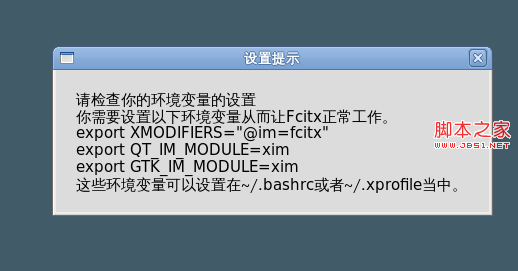 Eclipse Indigo 與 ibus 衝突問題分析:Android 開發環境實錄
今天在筆記型電腦上開發時又碰到了老問題。經過反覆確認,Eclipse Indigo 版本與 ibus 1.3.11 之間確實存在衝突。具體表現是:在 Eclipse 編輯
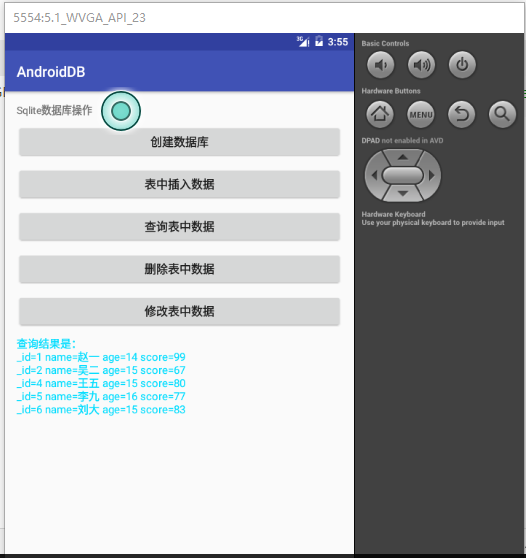 Android SQLite 常用操作整理:語法、Helper 與業務層封裝
正式專案裡,多數人會直接採用 GreenDAO、Room 這類 ORM 框架來碰資料庫。但偶爾還是需要下來寫幾句原生 SQL,或是要 debug 框架產生的語法。這幾天剛