

編輯:關於 Android 程式設計
App 要跟上傳資料,最直覺的方式就是 HTTP POST。相較於把參數拼在網址後面的 GET,POST 把內容放進 request body,適合傳送較長的文字或不想暴露在網址列中的欄位。以下用 Apache HttpClient 走一遍完整流程。
NameValuePair 清單。UrlEncodedFormEntity 把清單編碼成表單格式,字元集指定 UTF-8 以避免中文亂碼。execute() 送出請求,取得 HttpResponse。一個輸入框、一個按鈕、一個用來顯示回應的 TextView 就足夠:
<LinearLayout xmlns:android="https://schemas.android.com/apk/res/android"
    android:layout_width="match_parent"
    android:layout_height="match_parent"
    android:orientation="vertical" >

    <EditText
        android:id="@+id/txt"
        android:layout_width="match_parent"
        android:layout_height="wrap_content" />

    <Button
        android:id="@+id/btn"
        android:layout_width="wrap_content"
        android:layout_height="wrap_content"
        android:text="送出" />

    <TextView
        android:id="@+id/show"
        android:layout_width="match_parent"
        android:layout_height="wrap_content" />
</LinearLayout>
package com.hl;

import java.io.BufferedReader;
import java.io.IOException;
import java.io.InputStream;
import java.io.InputStreamReader;
import java.util.ArrayList;
import java.util.HashMap;
import java.util.Iterator;
import java.util.Map;
import java.util.Set;

import org.apache.http.HttpEntity;
import org.apache.http.HttpResponse;
import org.apache.http.client.entity.UrlEncodedFormEntity;
import org.apache.http.client.methods.HttpPost;
import org.apache.http.impl.client.DefaultHttpClient;
import org.apache.http.message.BasicNameValuePair;

import android.app.Activity;
import android.os.Bundle;
import android.view.View;
import android.view.View.OnClickListener;
import android.widget.Button;
import android.widget.EditText;
import android.widget.TextView;

public class SimplePOST extends Activity {
    private TextView show;
    private EditText txt;
    private Button btn;

    @Override
    public void onCreate(Bundle savedInstanceState) {
        super.onCreate(savedInstanceState);
        setContentView(R.layout.main);

        show = (TextView) findViewById(R.id.show);
        txt = (EditText) findViewById(R.id.txt);
        btn = (Button) findViewById(R.id.btn);

        btn.setOnClickListener(new OnClickListener() {
            @Override
            public void onClick(View v) {
                dopost(txt.getText().toString());
            }
        });
    }

    private void dopost(String val) {
        // 封裝要送出的欄位
        Map<String, String> params = new HashMap<String, String>();
        params.put("name", val);

        DefaultHttpClient client = new DefaultHttpClient();
        HttpPost httpPost = new HttpPost("https://mhycoe.com/test/post.php");

        // 把 Map 轉成 NameValuePair 清單
        ArrayList<BasicNameValuePair> pairs = new ArrayList<BasicNameValuePair>();
        if (params != null) {
            Set<String> keys = params.keySet();
            for (Iterator<String> i = keys.iterator(); i.hasNext();) {
                String key = i.next();
                pairs.add(new BasicNameValuePair(key, params.get(key)));
            }
        }

        try {
            UrlEncodedFormEntity entity = new UrlEncodedFormEntity(pairs, "utf-8");
            httpPost.setEntity(entity);

            HttpResponse response = client.execute(httpPost);
            HttpEntity resEntity = response.getEntity();
            InputStream content = resEntity.getContent();

            String result = convertStreamToString(content);
            show.setText(result);
        } catch (IllegalStateException e) {
            e.printStackTrace();
        } catch (IOException e) {
            e.printStackTrace();
        }
    }

    private String convertStreamToString(InputStream is) {
        BufferedReader reader = new BufferedReader(new InputStreamReader(is));
        StringBuilder sb = new StringBuilder();
        String line = null;
        try {
            while ((line = reader.readLine()) != null) {
                sb.append(line);
            }
        } catch (IOException e) {
            e.printStackTrace();
        } finally {
            try {
                is.close();
            } catch (IOException e) {
                e.printStackTrace();
            }
        }
        return sb.toString();
    }
}
權限。在 AndroidManifest.xml 的 </manifest> 之前加上網路權限,否則會收到 SocketException: Permission denied:
<uses-permission android:name="android.permission.INTERNET" />
執行緒。Android 3.0 以後不允許在主執行緒(UI Thread)進行網路 I/O,直接照上面的寫法會拋出 NetworkOnMainThreadException。實務上要把 dopost() 包進 AsyncTask、Thread 或後續的 java.util.concurrent 工具裡,取得結果後再回到主執行緒更新 TextView。此外 Apache HttpClient 在 Android 5.0 之後已被標記為 deprecated,新專案建議改用 HttpURLConnection 或 OkHttp。
 Android ListView 常用管理操作示例彙編
ListView 作為最經典的列表控件,相關操作大家都應該很熟了。數據管理方面也不陌生:單擊、雙擊、多選刪除、刷新、添加數據等等。這裡我把 ListView 的數據管理操
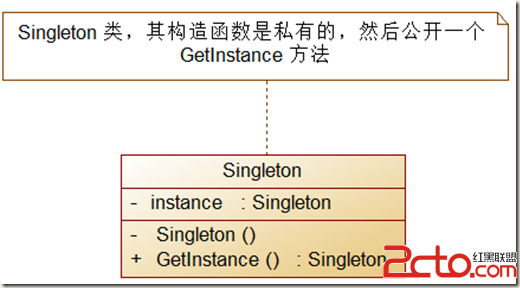 Android 單例模式七種常見寫法與實踐要點
單例模式的核心價值 在 Android 開發中,單例模式常用於管理需要全域唯一且資源消耗較高的物件,例如圖片載入器、網路請求器、資料庫 helper 等。以 ImageL
 Android 微信支付接入:流程、簽名與常見問題
微信支付接入需要同時處理用戶端、後端與微信平台設定。開發前必須準備好 AppID、商戶參數、簽名方式,以及正確的包名與應用簽名。基本流程一般流程是:應用向後端下單,後端依
 Android 屏幕適配五種方案詳解:從像素密度到權重布局
什麼是屏幕適配 所謂適配,就是讓同一個應用在不同的手機上呈現一致的視覺效果。動手之前,第一步永遠是先確認當前設備屬於哪一檔像素密度(xhdpi、hdpi、mdpi 等)。