

編輯:關於 Android 程式設計
在編譯 Android 全原始碼時,難免會遇到各種報錯。以下整理兩個較為典型的問題與對應的解法,供大家參考。
編譯時可能出現類似以下的錯誤日誌:
frameworks/hwext/Android.mk:167: ...libfm_common_hal
build/core/base_rules.mk:64: *** Module name: libfwoeminfo_jni
build/core/base_rules.mk:65: *** Makefile location: frameworks/hwext/k3v2oem1/src/com/huawei/android/hardware/oeminfo/jni/Android.mk
* Module is attempting to use the 'user' tag. This
* used to cause the module to be installed automatically.
* Now, the module must be listed in the PRODUCT_PACKAGES
* section of a product makefile to have it installed.
*** user tag detected on module.. Stop.
build: make error
解決辦法:將對應 mk 檔案中的 LOCAL_MODULE_TAGS := user 修改為 LOCAL_MODULE_TAGS := eng 即可。
另一種常見報錯如下:
packages/apps/Bluetooth/src/com/broadcom/bt/service/ftp/FTPService.java:345: unreported exception java.lang.Throwable; must be caught or declared to be thrown
super.finalize();
^
解決辦法:為原本的 finalize() 方法加上 try...catch 結構,並在 finally 區塊中呼叫 super.finalize(),確保例外被妥善處理。示例如下:
@Override
protected void finalize() throws Throwable {
try {
if(V) {
synchronized (FTPService.class) {
Log.d(TAG, "FINALIZED. Class= " + this);
}
}
} catch (Throwable t) {
throw t;
} finally {
super.finalize();
}
}
這兩類問題在 Android 全工程編譯中相當常見,掌握後可大幅減少排錯時間。
 百度有錢是什麼?額度申請、提領與注意事項
百度有錢是個人消費金融服務,申請通過後可獲得信用額度,用於分期消費或教育貸款。 使用時先登入百度帳號,填寫資料等待評估,額度核准後可提領到銀行卡。注意通常僅支援借記卡還款
 Android 樣式布局實戰:打造帶分組標題與內容的 ListView(附源碼)
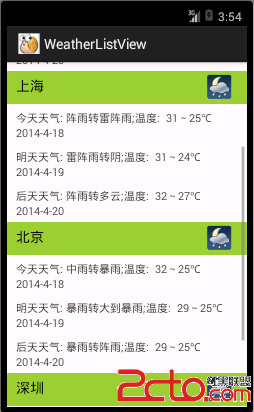
ListView 是 Android 中最常用的數據展示控件。如果每一行都長得一模一樣,界面會顯得單調乏味。實際項目裡,我們經常需要讓列表呈現「標題行 + 內容行」交替的
 微信公眾平台開發入門教程(SAE 方倍工作室出品,從零到天氣預報)
本系列教程以微信公眾帳號「方倍工作室」為示範對象,帶你從零開始走完整個開發流程。完成後你將學會:建立新浪雲計算平台應用、啟用微信公眾平台開發模式、掌握基礎接口的消息與事件
 打造強大的 Android 日誌工具類 LogUtils
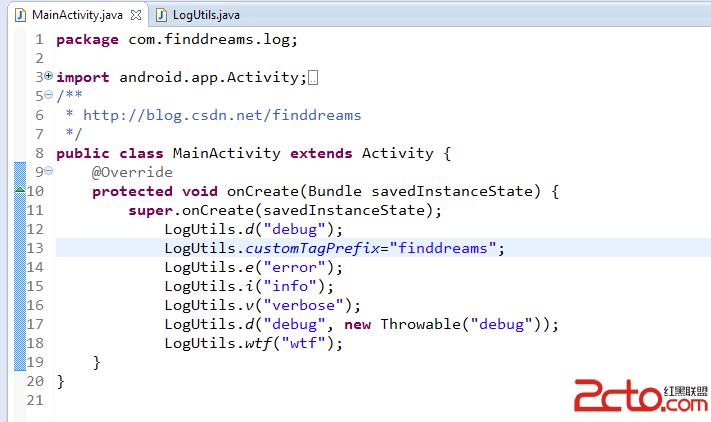
在開發中,我們常常透過打印 log 來調試應用。Java 中常用 System.out.println() 在控制台輸出日誌,而 Android 則提供了專門的 Log