

編輯:關於 Android 程式設計
以下程式碼可直接嵌入專案使用,用來依據當前網路類型動態設定代理連線:
[java]
/**
* 針對圖片下載的代理設定;
* 取得動態代理的 HttpURLConnection
* @param url 請求的 url 位址;
* @return HttpURLConnection 可直接進行資料操作;
* @throws IOException
*/
public HttpURLConnection getDynamicNetWorkHttpURLConnection(HttpURLConnection httpURLConnection, String url) throws IOException {
URL mURL = new URL(url);
if (DynamicNetWork.mConnectType == 0) {
if (mCurrentApnName == null) {
mCurrentApnName = getCurrentApnInUse(context);
}
/** 移動的代理連線 */
if (mCurrentApnName.startsWith(CMWAP)) {
String mDomainName = getDomainName(url);
url = url.replace(mDomainName, mWAPLocalHost);
httpURLConnection = (HttpURLConnection) mURL.openConnection();
httpURLConnection.setRequestProperty("X-Online-Host", mDomainName);
}
/** 聯通的代理連線 */
else if (mCurrentApnName.startsWith(UNIWAP) || mCurrentApnName.startsWith(G3WAP)) {
InetSocketAddress inetAddress = new InetSocketAddress(mWAPLocalHost, 80);
java.net.Proxy.Type proxyType = java.net.Proxy.Type.valueOf(mURL.getProtocol().toUpperCase());
java.net.Proxy javaProxy = new java.net.Proxy(proxyType, inetAddress);
httpURLConnection = (HttpURLConnection) mURL.openConnection(javaProxy);
}
/** 電信的代理連線 */
else if (mCurrentApnName.startsWith(CTWAP)) {
InetSocketAddress inetAddress = new InetSocketAddress(mCDMALocalHost, 80);
java.net.Proxy.Type proxyType = java.net.Proxy.Type.valueOf(mURL.getProtocol().toUpperCase());
java.net.Proxy javaProxy = new java.net.Proxy(proxyType, inetAddress);
httpURLConnection = (HttpURLConnection) mURL.openConnection(javaProxy);
}
} else {
httpURLConnection = (HttpURLConnection) mURL.openConnection();
}
httpURLConnection.connect();
return httpURLConnection;
}
取得當前網路名稱的方法:
[java]
public static String getCurrentApnInUse(Context mcontext) {
String name = "no";
ConnectivityManager manager = (ConnectivityManager) mcontext.getSystemService(Context.CONNECTIVITY_SERVICE);
try {
NetworkInfo activeNetInfo = manager.getActiveNetworkInfo();
if (activeNetInfo != null && activeNetInfo.isAvailable()) {
name = activeNetInfo.getExtraInfo();
}
} catch (Exception e) {
e.printStackTrace();
}
return name;
}
取得當前代理位址的方法:
[java]
public static String getApnProxy(String currentName) {
if ("".equals(currentName) || null == currentName) {
return "";
}
currentName = currentName.toLowerCase();
if (currentName.startsWith(CMWAP) || currentName.startsWith(UNIWAP) || currentName.startsWith(G3WAP))
return CMCC_WAPPROXY;
else if (currentName.startsWith(CTWAP))
return CMCC_CDMAPROXY;
else
return "";
}
透過判斷 APN 名稱的前綴(如 CMWAP、UNIWAP、G3WAP、CTWAP),即可辨識當前所屬電信業者並套用對應的 WAP 代理設定,讓圖片等資源在行動網路下也能正確下載。
 自定義 RefreshRecyclerView:下拉刷新與載入更多的完整實作
ListView 已經用了很多年,後來有了 RecyclerView,基本可以取代 ListView / GridView,還支援瀑布流模式,加上各種動畫效果,於是就試著
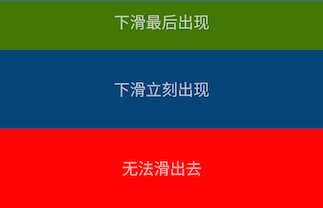 AppBarLayout 與 scrollFlags 的滾動行為
AppBarLayout 的三段式滑動 AppBarLayout 可以粗略分為三種行為:滑到最後才出現、下滑立刻出現、以及永遠無法滑出。前兩者都屬於可滾動內容,後者則固定
 Android ViewFlipper 使用示例:打造註冊引導頁
ViewFlipper 的工作機制非常直白:它把加入其中的子 View 按順序輪流顯示,同一時刻只有一個子 View 可見,其餘全部置為 GONE。子 View 既可以寫
 用 WindowManager 在應用最上層繪製懸浮 View
一般來說,Android 顯示一個 View 都是透過 Activity 的 setContentView 來設定。但其實還有一條路:直接用 WindowManager