

編輯:關於 Android 程式設計
在開發過程中,時常需要讓應用程式跳轉到系統內建的各種設定或功能頁面。Android 透過 Intent 提供了統一的方式來實現這些跳轉,以下整理幾個常見的情境。
Intent intent = new Intent(android.provider.Settings.ACTION_SETTINGS);
startActivityForResult(intent, 0);
其他設定頁面同理,替換對應的 Action 即可:
Intent intent = new Intent(android.provider.Settings.ACTION_WIFI_SETTINGS); // WIFI 設定
startActivity(intent);

Intent intent2 = new Intent(android.provider.Settings.ACTION_APPLICATION_SETTINGS); // 管理應用程式
context.startActivity(intent2);
或者採用以下方式(3.0 以前的版本可使用):
Intent intent = new Intent("/");
ComponentName cm = new ComponentName("com.android.settings",
        "com.android.settings.WirelessSettings");
intent.setComponent(cm);
intent.setAction("android.intent.action.VIEW");
startActivityForResult(intent, 0);
Intent intent = new Intent(Intent.ACTION_SET_WALLPAPER);
startActivity(intent);
Intent intent = new Intent(Intent.ACTION_DIAL);
startActivity(intent);
Intent intent = new Intent(Intent.ACTION_VIEW);
intent.setType("vnd.android.cursor.dir/contact");
startActivity(intent);
Intent intent = new Intent(Intent.ACTION_VIEW);
intent.setType("vnd.android.cursor.dir/calls");
startActivity(intent);
Intent intent = new Intent(Intent.ACTION_MAIN);
intent.addCategory(Intent.CATEGORY_DEFAULT);
intent.setType("vnd.android-dir/mms-sms");
startActivity(intent);
以上都是透過 Intent 搭配系統提供的 Action 或 MIME Type 來完成頁面跳轉。掌握這套模式後,面對各種系統功能入口都能快速對應上手。
 Android Studio 右鍵選單裡找不到 Git?兩張圖教你搞定
從 Git clone 一個專案並打開後,許多人會習慣性地像在 Eclipse 裡那樣,選中工程按右鍵,想找出 Git 的版本控制選項。 但如下圖所示,你會發現右鍵選單裡
 Android 開發環境搭建:Eclipse (Mars) 完整指南
一、Eclipse 簡介 Eclipse 是一個開源、基於 Java 的可擴展開發平台。就其本身而言,它只是一個框架加一組服務,用於通過插件組件拼裝出完整的開發環境。 雖
 用 Android AccessibilityService 打造微信搶紅包插件
在手機的「更多設定」或「高級設定」中,你會發現一個無障礙功能。很多人不清楚它的用途,其實它是為了增強使用者介面,幫助身障人士或暫時無法充分與設備互動的人。它的實現是透過
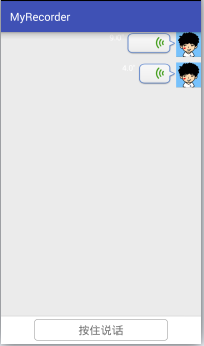 Android 仿微信錄製音頻並發送的完整實現
MyRecorder(仿微信,錄製音頻並發送功能)① 布局實現(activity_main.xml)整體採用線性布局,上方是一個 ListView,下方是一個自定義 Bu