

編輯:關於 Android 程式設計
android.view.VelocityTracker 主要用於追蹤觸控螢幕事件(如 flinging 快速滑動及其他手勢)的速度。本文將介紹它的核心用法與常用方法。
使用 VelocityTracker 時,先透過 addMovement(MotionEvent) 把觸控事件加入物件中;接著在需要時呼叫 computeCurrentVelocity(int) 計算速度,最後再以 getXVelocity() 或 getYVelocity() 取得水平與垂直方向的速度。
需要特別注意的是:在呼叫 get 系列方法取得速度之前,必須先呼叫 computeCurrentVelocity(int) 完成速度單位的初始化,否則取得到的值可能不正確。
void addMovement(MotionEvent event):將使用者的移動事件加入追蹤器。void clear():將追蹤器重設回初始狀態。void computeCurrentVelocity(int units, float maxVelocity):依已收集的點計算目前速度。參數 units 代表速度的時間單位——值為 1 表示「每毫秒移動的像素數」,值為 1000 則表示「每秒移動的像素數」;maxVelocity 為速度上限。void computeCurrentVelocity(int units):等同以 Float.MAX_VALUE 作為最大速度呼叫上面的方法。float getXVelocity() / float getYVelocity():取得最後一次計算的水平/垂直速度。float getXVelocity(int id) / float getYVelocity(int id):針對特定手指(多點觸控)取得速度。static VelocityTracker obtain():取得一個 VelocityTracker 實例。void recycle():將物件歸還資源池以供重複使用。
private VelocityTracker mVelocityTracker;  // 宣告變數

// 在 onTouchEvent(MotionEvent ev) 中:
if (mVelocityTracker == null) {
    mVelocityTracker = VelocityTracker.obtain();  // 取得實例
}
mVelocityTracker.addMovement(ev);                 // 加入移動事件

// 當事件為 MotionEvent.ACTION_UP 時計算速度
final VelocityTracker velocityTracker = mVelocityTracker;

// units 設為 1(每毫秒像素數),maxVelocity 設為 0.01
// 當實際速度大於 0.01 時顯示 0.01,小於 0.01 時顯示正常值
velocityTracker.computeCurrentVelocity(1, (float) 0.01);
Log.i("test", "velocityTraker" + velocityTracker.getXVelocity());

// units 設為 1000,代表每秒移動的像素數
velocityTracker.computeCurrentVelocity(1000);
Log.i("test", "velocityTraker" + velocityTracker.getXVelocity());
obtain() 取得 VelocityTracker 實例。onTouchEvent 回呼中,以 addMovement(MotionEvent) 傳入目前的移動事件。computeCurrentVelocity(int units) 計算速度。getXVelocity()、getYVelocity() 取得目前速度。透過 VelocityTracker,你就能為自訂 UI 加入順滑的甩動(fling)效果,例如判斷使用者快速滑動後觸發相應的滾動或翻頁動畫。
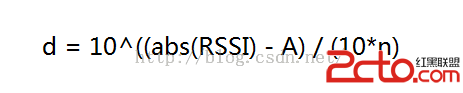 藍牙防丟器原理與 Android BLE 開發實踐
本文整理自一個已完成的藍牙防丟器專案,重點說明原理、產品實現,以及 Android 端的 BLE 介面編程方式。至於 BLE 協定本身與涉及 JNI 的內部源碼實現,留待
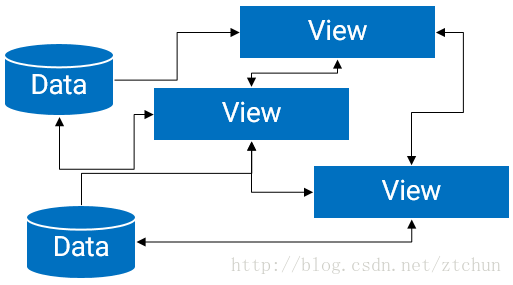 詳解 Android MVP 架構的職責拆分與落地實作
一、概述 傳統 Android 開發多採用 MVC 模式: Model:業務邏輯與實體模型 View:對應版面配置檔 Controller:對應 Activity
 Android 3.0 ActionBar 導航欄使用解析
上圖中,[1] 是 ActionBar 的應用圖標,[2] 是兩個 Action 按鈕,[3] 是 Overflow(溢位)按鈕。 ActionBar 是什麼 Act
 Android 觸摸事件傳遞機制圖解詳解
本文的講解流程如下: TouchEvent 相關事件簡介流程圖分解講解總結與歸納 一、TouchEvent 相關事件簡介 Android 的 TouchEve