

編輯:關於 Android 程式設計
本文示範一個登入頁面:輸入使用者名稱與密碼,登入成功後跳轉到主頁面,失敗時顯示錯誤訊息。傳遞參數時使用 BasicNameValuePair 的 List,並以 httpPost.setEntity 的方式送出,而不能用 HttpParams。
首先在登入按鈕的點擊事件中,建立 HttpClient 與 HttpPost,把使用者名稱與密碼打包成 NameValuePair 清單後編碼送出:
HttpClient httpClient = new DefaultHttpClient();
HttpPost httpPost = new HttpPost(strUrl);
List<BasicNameValuePair> params = new LinkedList<BasicNameValuePair>();
params.add(new BasicNameValuePair("username", userName.getText().toString()));
params.add(new BasicNameValuePair("password", password.getText().toString()));
httpPost.setEntity(new UrlEncodedFormEntity(params, "utf-8"));
HttpResponse httpResponse = httpClient.execute(httpPost);
接著在接收端判斷狀態碼是否為 200,若成功則解析回傳的 JSON,取出 loginStatus 與 outMessage:
if (httpResponse.getStatusLine().getStatusCode() == 200) {
result = EntityUtils.toString(httpResponse.getEntity());
JSONTokener jsonParser = new JSONTokener(result);
JSONObject jsonResult = (JSONObject) jsonParser.nextValue();
String status = jsonResult.getString("loginStatus");
String outMessage = jsonResult.getString("outMessage");
if (status.equals("true")) {
Intent i = new Intent(LoginActivity.this, MainActivity.class);
i.putExtra("username", outMessage);
startActivityForResult(i, FIRST_REQUEST_CODE);
} else {
errorMsg.setVisibility(View.VISIBLE);
errorMsg.setText(outMessage);
}
} else {
errorMsg.setVisibility(View.VISIBLE);
errorMsg.setText("網路連接問題。CODE:" + httpResponse.getStatusLine().getStatusCode());
}
最後別忘了以 try-catch 處理 JSONException、UnsupportedEncodingException、ClientProtocolException 與 IOException 等可能的例外。這樣就完成了一個以 HttpClient 對接伺服器 Servlet 的完整登入流程。
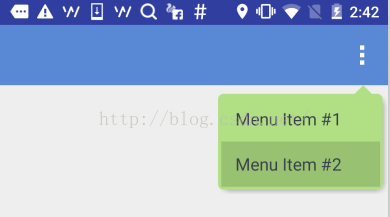 Android 自定義 ViewGroup(一)——帶箭頭的圓角矩形菜單
這次要做一个帶箭頭的圓角矩形菜單,大概是這個樣子: 要求:頂部的箭頭要對準菜單錨點,菜單項按壓時反色,背景色與按壓色可配置。 最偷工減料的做法是請 UX 切一張三角形圖
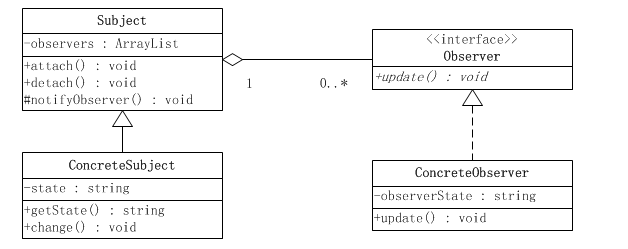 Android 源碼中的觀察者模式:以 Adapter 數據刷新為例
一、模式概述 定義 觀察者模式定義了對象之間的一種「一對多」依賴關係:當某一個對象的狀態發生改變時,所有依賴於它的對象都會收到通知,並被自動更新。 典型使用場景 關聯行
 Android 自繪動畫實戰與性能優化——以 Tencent OS 錄音機波形動效為例
一、先把繪制原理說清楚 Android 的圖形繪製主要建立在 View 之上。每個 View 的呈現都要走一遍 onMeasure、onLayout、onDraw 三步曲
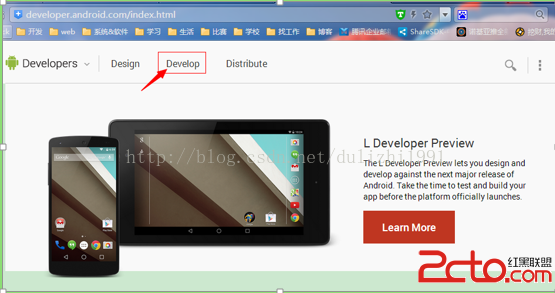 Android NDK 開發入門:從下載到跑通第一個 JNI HelloWorld
本文記錄一次完整的 NDK 入門過程,從下載工具到在 Eclipse 中把 hello-jni 實例跑起來,中間的坑也一併寫上。 一、下載 NDK 登錄 Android