

編輯:關於 Android 程式設計
GET 方式會把資料作為網址的一部分提交,且對長度有限制。POST 方式則類似,參數同樣經過 URL 編碼,但變數名稱與值不放在網址中,而是放在實際的 HTTP 請求訊息內部傳送。
透過 HttpURLConnection 設定請求方式與相關標頭:
HttpURLConnection urlConnection = (HttpURLConnection) url.openConnection();
urlConnection.setConnectTimeout(3000);
urlConnection.setRequestMethod("POST"); // 以 POST 請求方式提交
urlConnection.setDoInput(true); // 讀取資料
urlConnection.setDoOutput(true); // 向伺服器寫資料
byte[] myData = stringBuilder.toString().getBytes();
urlConnection.setRequestProperty("Content-Type", "application/x-www-form-urlencoded");
urlConnection.setRequestProperty("Content-Length", String.valueOf(myData.length));
以下重點說明 sendPostMessage 方法:先把 Map 中的參數以 key=value& 的形式拼接並編碼,再透過輸出流寫入伺服器,最後讀取回應:
// 拼接並編碼參數
for (Map.Entry<String, String> entry : params.entrySet()) {
stringBuilder.append(entry.getKey()).append("=")
.append(URLEncoder.encode(entry.getValue(), encode)).append("&");
}
stringBuilder.deleteCharAt(stringBuilder.length() - 1);
// 寫入資料
OutputStream outputStream = urlConnection.getOutputStream();
outputStream.write(myData, 0, myData.length);
outputStream.close();
// 取得回應
int responseCode = urlConnection.getResponseCode();
if (responseCode == 200) {
return changeInputStream(urlConnection.getInputStream(), encode);
}
其中 changeInputStream 負責把輸入流讀進 ByteArrayOutputStream,再以指定編碼轉成字串。
伺服器端建立一個繼承 HttpServlet 的 LoginAction,在 doPost 中設定編碼後,用 request.getParameter 取得 username 與 password,比對是否正確並回傳結果:
response.setContentType("text/html;charset=utf-8");
request.setCharacterEncoding("utf-8");
String userName = request.getParameter("username");
String passWord = request.getParameter("password");
if (userName.equals("admin") && passWord.equals("123456")) {
out.print("login successful!");
} else {
out.print("login failed");
}
別忘了在 web.xml 中設定 servlet 與 servlet-mapping,讓 /servlet/LoginAction 能正確對應到 LoginAction。這樣就完成了一個以 POST 提交並由 Servlet 處理的完整範例。
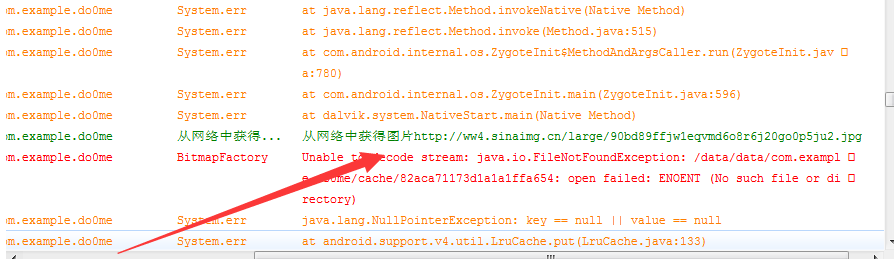 Android 圖片三級緩存設計:記憶體、檔案與網路
為什麼需要圖片緩存在 Android 應用中,圖片往往是最佔用記憶體與網路資源的內容之一。如果每次都從網路重新下載,不僅增加流量消耗,也會讓列表滾動變得卡頓。因此,合理的
 Android 筆記(四):Fragment 的基本用法與 Activity 通訊
前置說明一:照前面的方式建立專案時,如果用的是較新的 ADT,而 Minimum SDK 選了 Android 2.* 或 1.*,系統會自動產生一個相容用的附屬專案 a
 Android 開發常用指令集錦(圖文並茂,適合新手)
前言 做 Android 開發難免會用到命令列工具,有些指令確實非常實用。但對初學者而言,這些指令往往連想都沒想過要用。舉例來說,想把一個 .apk 裝到模擬器上,很多人
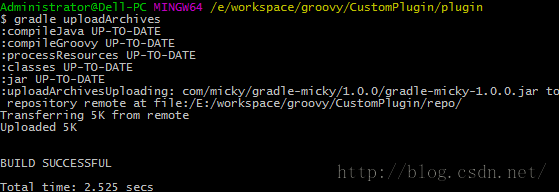 為Android Studio打造自定義Gradle插件的完整教程
Google已經建議Android開發全面轉向Android Studio,而Android Studio使用gradle進行編譯打包。既然gradle功能龐大,那不如動