

編輯:關於 Android 程式設計
本系列第三篇在系統相機錄影的基礎上,進一步示範如何修改影片的元數據(例如標題)。這裡有一個關鍵觀念:在 MediaStore 中更新元數據時,並不會改動影片檔案本身,而只是更新 MediaStore 中關於該影片的記錄。
package c.c;

import android.app.Activity;
import android.content.ContentValues;
import android.content.Intent;
import android.net.Uri;
import android.os.Bundle;
import android.provider.MediaStore;
import android.view.View;
import android.view.View.OnClickListener;
import android.widget.Button;
import android.widget.EditText;

/**
 * Demo 描述:
 * 1. 利用系統相機拍攝視頻
 * 2. 利用系統控件播放視頻
 * 3. 修改視頻的元數據(如視頻 title)
 *
 * 注意:在 MediaStore 中更新元數據時,不會更新視頻文件本身,
 * 而只是更新 MediaStore 中關於該視頻的記錄。
 */
public class MainActivity extends Activity {
    private final static int VIDEO_CAPTURE = 9527;
    private Uri mVideoUri;
    private Button mCaptureButton;
    private Button mPlayButton;
    private Button mSaveButton;
    private EditText mEditText;

    @Override
    public void onCreate(Bundle savedInstanceState) {
        super.onCreate(savedInstanceState);
        setContentView(R.layout.main);
        init();
    }

    private void init() {
        mCaptureButton = (Button) findViewById(R.id.capture_Button);
        mCaptureButton.setOnClickListener(new ButtonClickListenerImpl());

        mPlayButton = (Button) findViewById(R.id.play_Button);
        mPlayButton.setEnabled(false);
        mPlayButton.setOnClickListener(new ButtonClickListenerImpl());

        mSaveButton = (Button) findViewById(R.id.save_Button);
        mSaveButton.setEnabled(false);
        mSaveButton.setOnClickListener(new ButtonClickListenerImpl());

        mEditText = (EditText) findViewById(R.id.editText);
        mEditText.setEnabled(false);
    }

    private class ButtonClickListenerImpl implements OnClickListener {
        public void onClick(View v) {
            if (v.getId() == R.id.capture_Button) {
                Intent intent = new Intent(MediaStore.ACTION_VIDEO_CAPTURE);
                startActivityForResult(intent, VIDEO_CAPTURE);
            }
            if (v.getId() == R.id.play_Button) {
                Intent intent = new Intent(Intent.ACTION_VIEW, mVideoUri);
                startActivity(intent);
            }
            if (v.getId() == R.id.save_Button) {
                ContentValues contentValues = new ContentValues(1);
                String title = mEditText.getText().toString();
                contentValues.put(MediaStore.MediaColumns.TITLE, title);
                int result = getContentResolver().update(mVideoUri, contentValues, null, null);
                if (result == 1) {
                    System.out.println("設置視頻名稱成功");
                } else {
                    System.out.println("設置視頻名稱失敗");
                }
            }
        }
    }

    @Override
    protected void onActivityResult(int requestCode, int resultCode, Intent data) {
        super.onActivityResult(requestCode, resultCode, data);
        if (resultCode == RESULT_OK && requestCode == VIDEO_CAPTURE) {
            mVideoUri = data.getData();
            mPlayButton.setEnabled(true);
            mSaveButton.setEnabled(true);
            mEditText.setEnabled(true);
        }
    }
}
<LinearLayout xmlns:android="https://schemas.android.com/apk/res/android"
    xmlns:tools="https://schemas.android.com/tools"
    android:layout_width="match_parent"
    android:layout_height="match_parent"
    android:orientation="vertical">

    <Button
        android:id="@+id/capture_Button"
        android:layout_width="150dip"
        android:layout_height="wrap_content"
        android:text="Video Capture" />

    <Button
        android:id="@+id/play_Button"
        android:layout_width="150dip"
        android:layout_height="wrap_content"
        android:text="Video Play" />

    <EditText
        android:id="@+id/editText"
        android:layout_width="150dip"
        android:layout_height="wrap_content"
        android:hint="video title" />

    <Button
        android:id="@+id/save_Button"
        android:layout_width="150dip"
        android:layout_height="wrap_content"
        android:text="save Button" />

</LinearLayout>
修改標題的核心在於透過 ContentResolver.update() 搭配 MediaStore.MediaColumns.TITLE,就能更新 MediaStore 中的記錄。掌握這個觀念後,還有許多影片屬性(如描述、方向等)都能用同樣方式調整。
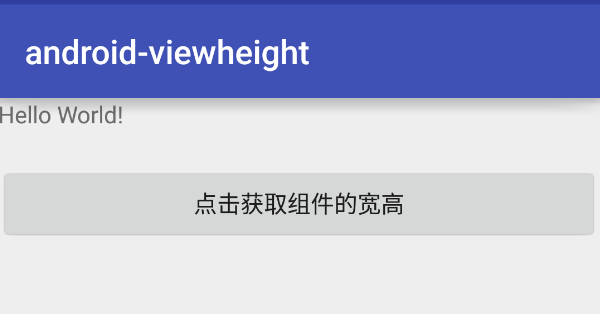 Activity 啟動時獲取元件寬高的三種可靠做法
上一個小專案我們聊過如何防止按鈕重複點擊——核心思路是重寫 OnClickListener 的 onClick,為兩次點擊的時間間隔設一個閾值,間隔太短就判定為無效點擊,
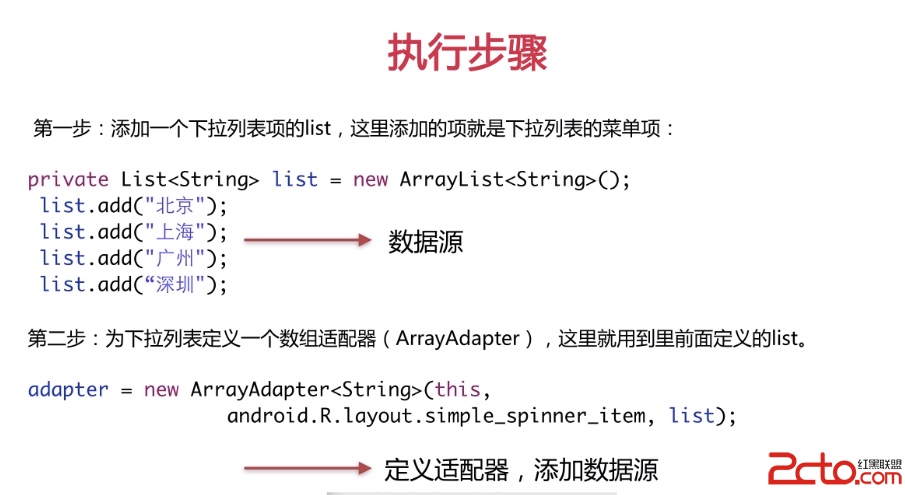 Android Spinner 下拉清單:兩種寫法與五個必要步驟
Spinner 就是把選單攤開讓使用者挑一項,看似簡單,但適配器的選擇會直接影響你能客製到什麼程度。以下整理五個必要步驟,以及實務上最常見的兩種寫法。 五個步驟,缺
 ConstraintLayout 入門:用約束打造扁平化布局
序 在 Google I/O 大會上,除了 Android Studio 2.2 預覽版,還帶來了一個基於約束的布局庫。 簡單說,它是 RelativeLayout 的進
 路由器不再滿屏亂碼!自訂Android手機Wi-Fi名稱
想讓路由器清楚辨識自己的手機,可修改Android的hostname。Root後用RE檔案管理器編輯system/build.prop,加入net.hostname=自訂