

編輯:關於 Android 程式設計
CTS(Compatibility Test Suite)是 Android 相容性測試套件,以 instrumentation 的方式在裝置上執行。熟悉幾個 adb 指令,就能精準地重跑某個失敗案例,而不必每次跑完整個套件。
adb shell pm list instrumentation
輸出會列出每個測試包的執行器名稱與其 target,例如:
instrumentation:com.android.cts.animation/android.test.InstrumentationTestRunner (target=com.android.cts.animation)
instrumentation:com.android.cts.app/android.test.InstrumentationCtsTestRunner (target=com.android.cts.stub)
instrumentation:com.android.cts.os/android.test.InstrumentationCtsTestRunner (target=com.android.cts.stub)
格式是「套件名稱/執行器類別」。後續下指令時必須與這裡的內容完全一致,否則會找不到測試。
用 -e class 指定「測試類別#方法名稱」即可只跑一個案例:
adb shell am instrument -e class android.animation.cts.ValueAnimatorTest#testCurrentPlayTime \
  -w -r com.android.cts.animation/android.test.InstrumentationTestRunner

adb shell am instrument -e class android.app.cts.ActivityManagerMemoryClassTest#testGetMemoryClass \
  -w -r com.android.cts.app/android.test.InstrumentationCtsTestRunner
拿掉 -e class 參數,就會執行該套件下的全部測試:
adb shell am instrument -w -r com.android.cts.animation/android.test.InstrumentationTestRunner
adb shell am instrument -w -r com.android.cts.app/android.test.InstrumentationCtsTestRunner
-w 代表等待 instrumentation 執行完畢才返回,不加的話指令會立刻結束而看不到結果;-r 則是以原始格式輸出結果,讓每個案例的成敗與堆疊都能被讀取。除錯時常搭配 -e debug true 讓測試進入除錯模式,或用 -e log true 輸出更詳細的測試生命週期日誌。
若要一次篩選多個類別,可以重複傳入多個 -e class 參數。日常開發中,最實用的習慣是先用完整的 CTS 跑出一份失敗清單,再用單一方法指令逐一重跑修驗,能省下大量等待時間。
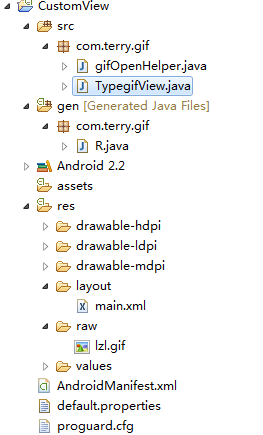 把自訂 Android 元件打包成 JAR 的實作方法
在專案開發中,難免會需要自己製作自訂 View 控制項。後續其他專案若也需要,多數人的做法是直接複製貼上——這雖然可行,但並不是好解法。 問題在於,隨著專案數量累積,自訂
 Android Fresco 圖片框架入門:高效載入、快取與顯示優化
Fresco 是 Facebook 推出的圖片載入框架,支援多級快取、漸進式顯示、GIF 與 WebP 等格式,適合需要大量圖片呈現的應用。使用前需在 build.gra
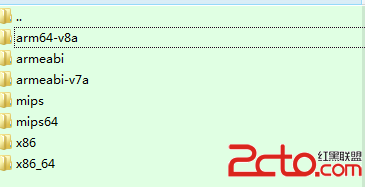 Android APK 在 32 位元與 64 位元系統下的差異解析
如今 64 位元 Android 系統日益普及,越來越多 APK 宣稱支援 64 位元,於是在打包時加入 arm64-v8a 目錄並放入 64 位元的 so。但若程式碼未
 堅果手機哪個版本更值得買 16GB與32GB怎麼選
一般手機常分兩個版本,而當年iPhone 6S一口氣推出了三個。那麼昨晚發表的堅果手機分了幾版? 從存儲角度看,堅果手機目前有16GB與32GB兩個版本,售價分別為89