

編輯:關於 Android 程式設計
本文整理幾個常見控制項的用法,包括圖片按鈕、單選按鈕群組、多選方塊以及開關按鈕,並示範它們在佈局檔與字串資源中的設定方式。
[html]
<LinearLayout xmlns:android="https://schemas.android.com/apk/res/android"
    xmlns:tools="https://schemas.android.com/tools"
    android:id="@+id/LinearLayout1"
    android:layout_width="match_parent"
    android:layout_height="match_parent"
    android:orientation="vertical" >

    <TextView
        android:layout_width="wrap_content"
        android:layout_height="wrap_content"
        android:text="@string/hello_world"
        tools:context=".MainActivity" />
    <!-- 圖片按鈕 -->
    <ImageButton
        android:layout_width="wrap_content"
        android:layout_height="wrap_content"
        android:src="@drawable/home"
        android:contentDescription="@string/imagetext"
        />
    <!-- 按鈕中加圖片和文字 -->
    <Button
        android:layout_width="wrap_content"
        android:layout_height="wrap_content"
        android:text="@string/textbtn"
        android:drawableRight="@drawable/home" /> <!-- home 是 res 目錄下 drawable 資料夾中的一張圖片 -->
    <!-- Radio 組,單選按鈕 -->
    <RadioGroup
        android:layout_width="wrap_content"
        android:layout_height="wrap_content"
        >
        <RadioButton
            android:layout_width="wrap_content"
            android:layout_height="wrap_content"
            android:text="@string/nan"
            />
        <RadioButton
            android:layout_width="wrap_content"
            android:layout_height="wrap_content"
            android:text="@string/nv"
            />
    </RadioGroup>
    <!-- 開關狀態按鈕 -->
    <ToggleButton
        android:layout_width="wrap_content"
        android:layout_height="wrap_content"
        android:textOff="打開"
        android:textOn="關閉"
        />
    <!-- checkbox 多選按鈕 -->
    <CheckBox
        android:layout_width="fill_parent"
        android:layout_height="wrap_content"
        android:text="1.江西"
        />

     <CheckBox
        android:layout_width="fill_parent"
        android:layout_height="wrap_content"
        android:text="2.福建"
        />

     <CheckBox
        android:layout_width="fill_parent"
        android:layout_height="wrap_content"
        android:text="1.浙江"
        />
</LinearLayout>
這裡有幾個重點:ImageButton 以 android:src 指定圖片,並建議加上 android:contentDescription 以提升無障礙性;Button 可用 android:drawableRight 在文字旁附加圖示;RadioButton 必須包在 RadioGroup 裡才能形成互斥的單選群組;而 ToggleButton 則透過 textOn 與 textOff 分別設定開啟與關閉狀態時顯示的文字。
為了讓介面文字便於維護與多語系擴充,建議把顯示文字抽到 strings.xml 中:
[html]
<resources>
    <string name="app_name">ImageButton</string>
    <string name="hello_world">圖片按鈕</string>
    <string name="menu_settings">Settings</string>
    <string name="title_activity_main">MainActivity</string>
    <string name="imagetext">這是圖片按鈕</string>
    <string name="textbtn">按鈕文字</string>
    <string name="nan">男</string>
    <string name="nv">女</string>
</resources>
把文字統一放在資源檔裡,不僅能避免寫死字串,日後要做多國語言時也能輕鬆因應。
 Android 基礎入門教程——8.3.16 Canvas API 詳解(Part 1)
 標籤:Android 基礎入門教程 本節引言 前面我們花了 13 小節詳細講
 用 RecyclerView 打造自訂列表:點擊事件與下拉刷新完整實作
如果你還在用 ListView、GridView 堆疊畫面,是时候認識一下 RecyclerView 了。它是 Android Support-v7 套件裡登場的列表控制
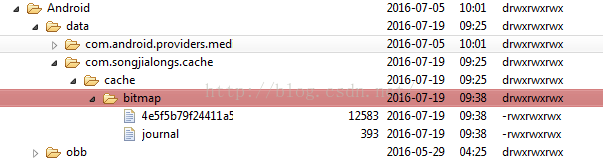 Android 圖片快取實作:LruCache 與 DiskLruCache 雙層策略
在 App 中載入網路圖片時,若每次都重新下載,不僅浪費流量,也會拖慢使用者體驗。常見的解法是加入快取:先查記憶體,再查本機檔案,最後才走網路。Android 中常用 L
 RecyclerView 滑動邊界檢測:打造可靠的頂部與底部判斷工具
從滑動監聽到邊界判斷 在 Android 開發中,RecyclerView 常用於長列表與動態資料展示。當我們需要實作「加載更多」、「回到頂部」、浮動按鈕的顯示與隱藏,或