

編輯:關於 Android 程式設計
本篇筆記示範如何在 Android 中操作幾個常見的 App 級控件,包括 Options Menu、AlertDialog、Notification(通知)以及 ProgressDialog(進度對話框)。重點在於透過 onOptionsItemSelected 依選單項目的不同,觸發對應的效果。
[java]
package com.example.apppalettesdemo;
import android.app.Activity;
import android.app.AlertDialog;
import android.app.AlertDialog.Builder;
import android.app.Notification;
import android.app.NotificationManager;
import android.app.PendingIntent;
import android.app.ProgressDialog;
import android.content.DialogInterface;
import android.content.DialogInterface.OnClickListener;
import android.content.Intent;
import android.view.Menu;
import android.view.MenuItem;
import android.widget.Toast;
public class MainActivity extends Activity implements OnClickListener {
@Override
public void onCreate(Bundle savedInstanceState) {
super.onCreate(savedInstanceState);
setContentView(R.layout.activity_main);
}
@Override
public boolean onCreateOptionsMenu(Menu menu) {
getMenuInflater().inflate(R.menu.my_options_menu, menu);
return true;
}
@Override
public boolean onOptionsItemSelected(MenuItem item) {
Boolean flag = false;
switch (item.getItemId()) {
case R.id.AlertDialog01:
Builder dialog = new AlertDialog.Builder(MainActivity.this);
dialog.setTitle("Hint");
dialog.setMessage("This is Message!");
dialog.setPositiveButton("Ok", this);
dialog.show();
flag = true;
break;
case R.id.notificationManager01:
NotificationManager notiManager =
(NotificationManager) getSystemService(NOTIFICATION_SERVICE);
Notification notiInst = new Notification(
R.drawable.ic_launcher, "This is notify 2012-09-12",
System.currentTimeMillis());
PendingIntent pendIntent = PendingIntent.getActivity(
this, 0, new Intent(this, MainActivity.class),
PendingIntent.FLAG_UPDATE_CURRENT);
notiInst.setLatestEventInfo(this, "Notify", "Notify 01", pendIntent);
notiManager.notify(0, notiInst);
flag = true;
break;
case R.id.progressDialog01:
ProgressDialog progrDialog = new ProgressDialog(this);
progrDialog.setProgressStyle(ProgressDialog.STYLE_SPINNER);
progrDialog.setMessage("Loading Information...");
progrDialog.show();
flag = true;
break;
default:
break;
}
return flag;
}
@Override
public void onClick(DialogInterface dialog, int which) {
Toast.makeText(this, "You just press 'AlertDialog' button!", Toast.LENGTH_SHORT).show();
}
}
這段程式碼示範了三種常見互動:點選選單彈出帶確認按鈕的 AlertDialog;透過 NotificationManager 搭配 PendingIntent 發送可點擊的通知;以及用 ProgressDialog 顯示載入中的轉圈動畫。理解這幾個元件的搭配,就能應付大部分日常 App 的提示與互動需求。
 映客直播怎麼領微信紅包 四步領取教學
映客直播開始發紅包了,除了能透過直播獲得收益,還能領取微信紅包。不知道具體怎麼操作的朋友,跟著小編一起看下去。 映客是一款覆蓋iPhone、Android、Apple W
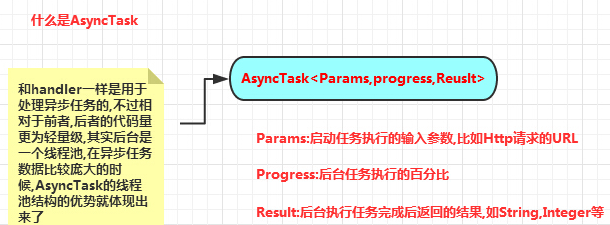 事件處理機制之AsyncTask異步任務:從多線程基礎到實戰
(一)概述 本節要介紹的是Android為我們提供的一個輕量級異步任務處理類:AsyncTask。我們通常會繼承AsyncTask,在其中實現異步操作,再把執行進度反饋給
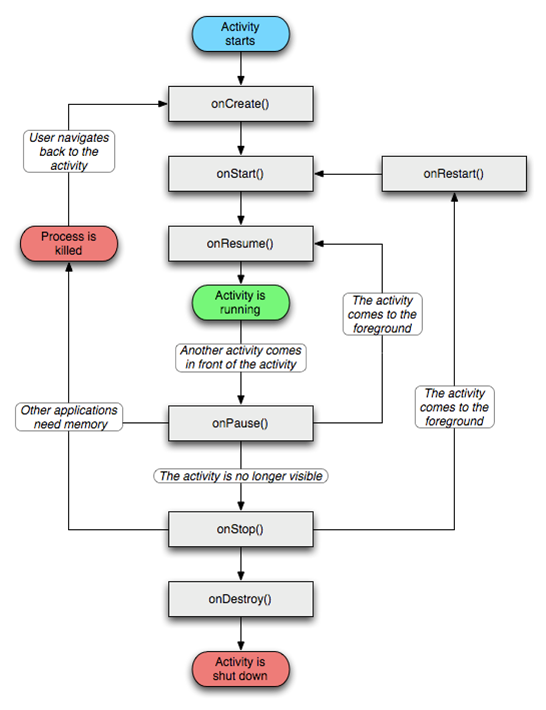 Android 開發系列之二:透透解析 Activity 的生命週期
在上篇文章介紹了「使用按鈕顯示時間」之後,本文將深入探討 Android 中至關重要的 Activity 生命週期。 Activity 從建立到銷毀的過程中,會在不同階段
 Android Notification 通知機制解析與完整範例
Notification 是顯示在手機狀態欄的通知,屬於系統層級的全域提示,通常由 NotificationManager 統一管理。不論訊息來自聊天軟體還是下載進度,使