

編輯:關於 Android 程式設計
行動裝置的記憶體有限,直接載入一張千萬畫素的照片,Bitmap 本身就足以讓應用被系統回收。與其先解碼再縮圖,不如在解碼階段就丟掉多餘的像素——關鍵是 BitmapFactory.Options 的 inJustDecodeBounds 與 inSampleSize。
把 inJustDecodeBounds 設為 true,BitmapFactory 只讀取圖片檔頭,取得寬高(outWidth、outHeight)而不真正配置像素記憶體。接著用目標尺寸算出應該縮小的倍率,塞進 inSampleSize,第二次解碼時就會直接產出縮小的圖。這樣的縮放是 2 的 n 次方倍,不會變形,也不必進行昂貴的二次繪製。
/**
 * 從檔案解析出符合指定範圍的 Bitmap
 *
 * @param path      圖片路徑
 * @param maxWidth  最大寬度,<= 0 表示不限制
 * @param maxHeight 最大高度,<= 0 表示不限制
 */
public static Bitmap decodeFile(String path, int maxWidth, int maxHeight) {
    BitmapFactory.Options options = new BitmapFactory.Options();
    options.inJustDecodeBounds = true;
    BitmapFactory.decodeFile(path, options);

    double ratio = 1D;
    if (maxWidth > 0 && maxHeight <= 0) {
        // 只限寬度,高度不限制
        ratio = Math.ceil(options.outWidth / maxWidth);
    } else if (maxHeight > 0 && maxWidth <= 0) {
        // 只限高度,寬度不限制
        ratio = Math.ceil(options.outHeight / maxHeight);
    } else if (maxWidth > 0 && maxHeight > 0) {
        // 兩者都限制,取較大的倍率以確保同時落在範圍內且不變形
        double widthRatio = Math.ceil(options.outWidth / maxWidth);
        double heightRatio = Math.ceil(options.outHeight / maxHeight);
        ratio = widthRatio > heightRatio ? widthRatio : heightRatio;
    }

    if (ratio > 1) {
        options.inSampleSize = (int) ratio;
    }

    options.inJustDecodeBounds = false;
    options.inPreferredConfig = Bitmap.Config.RGB_565;
    return BitmapFactory.decodeFile(path, options);
}
取整方式。範例用 Math.ceil,會無條件進位到 2 的次方以上,較保險但縮得比預期多。若想讓成品盡量接近目標尺寸,可以改用 Math.round 或直接對目標比值取最接近的整數。
RGB_565 的取捨。相較 ARGB_8888,RGB_565 每個像素少一半記憶體,對不含透明通道的照片來說畫質差異幾乎看不出來,省下的空間卻很可觀。若圖片需要透明背景,就必須維持 ARGB_8888。
為什麼兩者都限制時取較大值。因為 inSampleSize 是整數倍縮小,取較大的倍率才能保證縮完之後寬高都不超過上限;取較小值會讓其中一邊超出範圍。
記得回收。Bitmap 用完若不再需要,早期版本建議呼叫 recycle();在 Android 3.0 之後 Bitmap 的像素記憶體已歸 Java 堆管理,交由 GC 處理即可,過度呼叫 recycle 反而容易踩到「Canvas: trying to use a recycled bitmap」的錯誤。
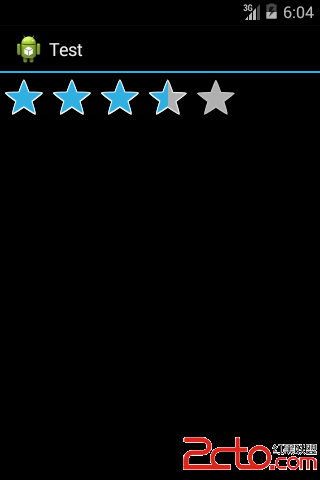 Android 開發實戰:RatingBar 評分控件用法全解析
在電商、音樂、影片這類應用裡,「打分」幾乎是標配的互動。Android 為此提供了現成的 RatingBar 控件,它以一排星星的形式呈現,用戶點擊或拖動即可給出評價,開
 Android 自訂控制項:仿 iOS 6 風格開關
在 Android 中,系統提供的 Switch 樣式未必符合所有設計需求。若想打造更接近 iOS 風格的開關效果,可以自訂一個 View,透過 Canvas 繪製軌道與
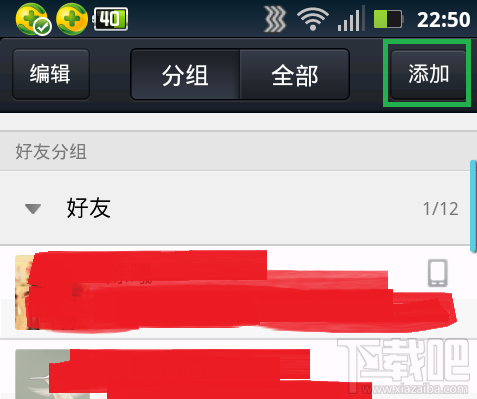 手機QQ怎麼加好友?六種新增聯絡人的方式
電腦版QQ加好友的流程大家都很熟,手機版的入口則換了位置,而且提供的方式比想像中多。從「+」號進入後,總共有六種路徑可以選,其中四種是加好友,另外兩種與群組有關。手機QQ
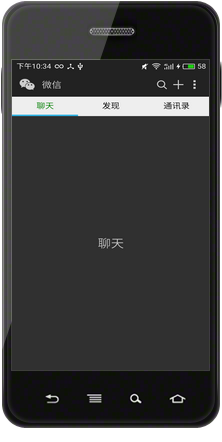 高仿微信 5.2.1 主介面:ViewPager + Fragment 選項卡與紅點提醒
好一陣子沒更新文章了,最近在忙公司的專案,這也是我參與的第一個正式專案。做完之後才發現,自己累積一年的知識真的還不夠用。想精進,靠得住的路徑其實很樸素:專案、書、影片、部