

編輯:關於 Android 程式設計
Android 上的 HTTP 通訊主要用 HttpURLConnection(以及後來的 OkHttp)。GET 與 POST 的寫法差別不小,中文亂碼問題幾乎每個人都會遇到一次。本文把常見情境整理成可直接參考的片段。
ConnectivityManager cm = (ConnectivityManager)
        getSystemService(Context.CONNECTIVITY_SERVICE);
NetworkInfo netInfo = cm.getActiveNetworkInfo();
if (netInfo != null && netInfo.isConnected()) {
    // 有網路
}
原範例寫的 getActivityNetworkInfo() 並不存在,正確的方法名稱是 getActiveNetworkInfo()。另外這個 API 在 Android 10 之後已標記為 deprecated,新專案建議改用 NetworkCapabilities 搭配 registerDefaultNetworkCallback()。
<uses-permission android:name="android.permission.INTERNET"/>
URL url = new URL("https://www.sohu.com");
HttpURLConnection conn = (HttpURLConnection) url.openConnection();
conn.setConnectTimeout(5000);
conn.setReadTimeout(5000);
conn.setRequestMethod("GET");

if (conn.getResponseCode() == 200) {
    InputStream is = conn.getInputStream();
    String result = readData(is, "UTF-8");
    is.close();
}
conn.disconnect();
取得圖片時流程完全一樣,只是把 InputStream 交給 BitmapFactory.decodeStream() 而不是轉字串。setConnectTimeout() 與 setReadTimeout() 建議一定要設,否則網路異常時會卡到系統預設的超時,動輒數分鐘。
GET 的參數直接接在網址後面:
https://xxxx/xxx.action?name=tom&age=12
URL realUrl = new URL(requestUrl);
HttpURLConnection conn = (HttpURLConnection) realUrl.openConnection();
conn.setRequestMethod("GET");
conn.setConnectTimeout(5000);

// 直到呼叫 getResponseCode(),request 才真的送出
if (conn.getResponseCode() == 200) {
    String result = readAsString(conn.getInputStream(), "UTF-8");
    System.out.println(result);
}
「直到讀取回應才送出」是 HttpURLConnection 的特性:設定 requestProperty 只是暫存,真正 flush 是在取得連線流時發生。
亂碼一定要分兩端來看,只修一邊不會好。
用戶端:GET 的中文參數必須先做 URL 編碼。
String value = URLEncoder.encode("中文", "UTF-8");
伺服器端(Tomcat):GET 的參數預設以 ISO-8859-1 解碼,需要轉回 UTF-8:
if ("GET".equals(request.getMethod())) {
    String v = request.getParameter("name");
    v = new String(v.getBytes("ISO-8859-1"), "UTF-8");
}
更根本的解法是設定 Tomcat 的 Connector 加上 useBodyEncodingForURI="true",或修改 server.xml 的 URIEncoding,一次解決所有端點。
URL realUrl = new URL(requestUrl);
HttpURLConnection conn = (HttpURLConnection) realUrl.openConnection();
conn.setDoOutput(true);          // 允許輸出
conn.setUseCaches(false);        // 不使用快取
conn.setRequestMethod("POST");
conn.setRequestProperty("Connection", "Keep-Alive");
conn.setRequestProperty("Charset", "UTF-8");
conn.setRequestProperty("Content-Type", "application/x-www-form-urlencoded");

String data = "name=xxx&age=12";
conn.setRequestProperty("Content-Length", String.valueOf(data.getBytes().length));

conn.getOutputStream().write(data.getBytes("UTF-8"));

if (conn.getResponseCode() == 200) {
    String result = readAsString(conn.getInputStream(), "UTF-8");
}
conn.disconnect();
兩個易錯點:setDoOutput(true) 一定要在 setRequestMethod() 之前或至少不要漏掉,否則無法寫入 body;Content-Length 要算的是位元組長度而非字串長度,中文一字的 byte 數與 char 數不同,寫錯會導致伺服器只收到部分內容。
StringBuilder xml = new StringBuilder();
xml.append("<?xml version=\"1.0\" encoding=\"utf-8\" ?>");
xml.append("<M1 V=10000>");
xml.append("<U I=1 D=\"N73\">中國</U>");
xml.append("</M1>");

byte[] xmlByte = xml.toString().getBytes("UTF-8");

URL url = new URL("https://xxx.do?method=readxml");
HttpURLConnection conn = (HttpURLConnection) url.openConnection();
conn.setConnectTimeout(5000);
conn.setDoOutput(true);
conn.setUseCaches(false);
conn.setRequestMethod("POST");
conn.setRequestProperty("Connection", "Keep-Alive");
conn.setRequestProperty("Charset", "UTF-8");
conn.setRequestProperty("Content-Length", String.valueOf(xmlByte.length));
// 必須設定內容類型,否則伺服器無法辨識資料格式
conn.setRequestProperty("Content-Type", "text/xml; charset=UTF-8");

DataOutputStream outStream = new DataOutputStream(conn.getOutputStream());
outStream.write(xmlByte);
outStream.flush();
Content-Type 在傳 XML 時特別關鍵,少了它伺服器往往會收到空 body 或回 415。另外注意 XML 宣告的 encoding 必須和實際 getBytes() 用的編碼一致,兩者不符時解析端會解出亂碼。
HttpURLConnection 是平台內建、沒有額外套件依賴的選擇,適合簡單情境。若是正式專案,OkHttp 提供了連線池、攔截器、GZIP、HTTP/2 支援,寫法也乾淨得多;搭配 Retrofit 更可以把回應直接對應成資料物件。此外所有網路操作都必須在背景執行緒進行,並記得處理 IOException——網路環境下它是常態而非例外。
本文原始作者:toto1297488504
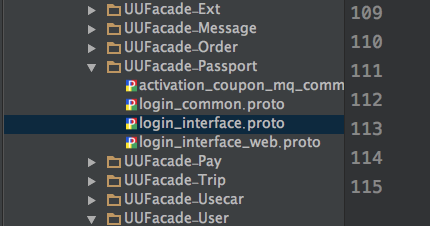 App 產品研發(九):網絡傳輸協議的選擇與實踐
上一篇談的是 App 的數據統計,大致分為導入第三方服務與自行實作兩條路。一般情況下第三方服務已能滿足絕大多數需求,只有對數據敏感度要求較高的產品,自建統計才是更好的選擇
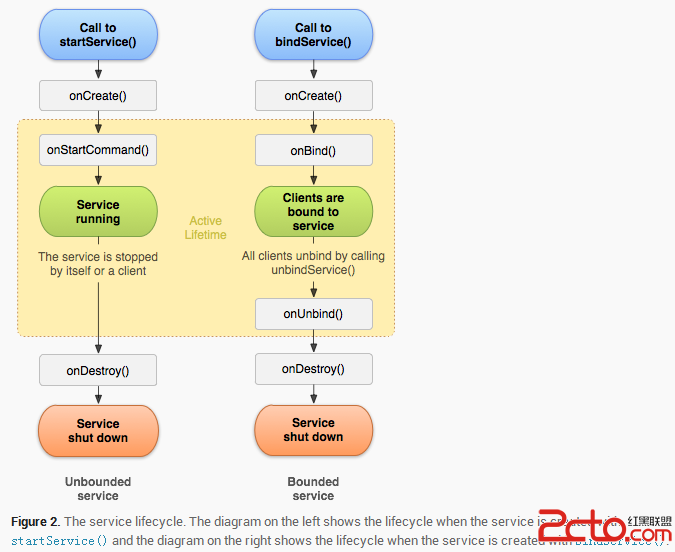 淺談 Android Service 的啟動、綁定與生命週期
Service 的兩種主要使用方式 Service 可以在背景執行不需要使用者互動的任務。常見方式有 startService 與 bindService,兩者在使用情境
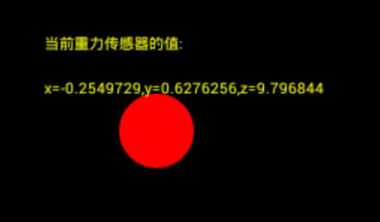 使用重力感測器製作 Android 滾動彈球
重力感測器能偵測裝置在 X、Y、Z 軸上的重力變化,常用於水平儀、搖動偵測與簡單遊戲互動。本文以滾動彈球為例,說明如何整合 SensorManager 與 Surface
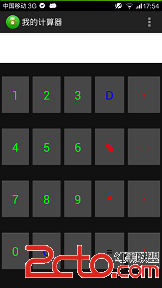 Android 入門實作:手把手寫出一個簡易計算機
過去寫程式都是在 PC 上打轉,重心放在演算法與資料結構。後來因為一些機緣,加上意識到行動裝置開發的重要性,而課餘時間又意外地多,於是就一头栽進了 Android 的世界