

編輯:關於 Android 程式設計
在 Android 開發中,「讀檔」與「寫檔」看似簡單,但真正容易出錯的地方往往不是 API 本身,而是檔案放在哪裡以及用什麼編碼去解讀。本文依儲存位置分成五種常見情境,逐一說明各自的讀寫方式與限制。
放在 res/raw 的檔案會被打包進 APK,屬於唯讀資源,程式執行期無法修改。讀取時透過 openRawResource() 取得串流即可。
String res = "";
try {
    InputStream in = getResources().openRawResource(R.raw.bbi);
    int length = in.available();
    byte[] buffer = new byte[length];
    in.read(buffer);
    // 依 bbi.txt 實際編碼挑選,選錯就會出現亂碼
    res = EncodingUtils.getString(buffer, "BIG5");
    in.close();
} catch (Exception e) {
    e.printStackTrace();
}
myTextView.setText(res);
原始碼中同時列出了 UTF-8、UNICODE、BIG5 三種寫法,實務上請先確認檔案編碼再決定;繁體中文環境常見的 Big5 檔案若用 UTF-8 解,畫面上就是一堆問號與亂碼。
assets 與 raw 的差別在於:assets 保留原始檔案名稱與目錄結構,適合存放需要動態列舉的檔案清單。
String fileName = "yan.txt";
String res = "";
try {
    InputStream in = getResources().getAssets().open(fileName);
    int length = in.available();
    byte[] buffer = new byte[length];
    in.read(buffer);
    res = EncodingUtils.getString(buffer, "UTF-8");
} catch (Exception e) {
    e.printStackTrace();
}
模擬器或真機上要讀外部儲存媒體的檔案,可以先用 adb 把本機檔案推上去:
adb push e:/Y.txt /sdcard/
adb pull /data/data/com.tt/files/Test.txt e:/
路徑分隔符號要用正斜線,反斜線在 adb 指令中不會被正確解析。讀取時必須直接使用 FileInputStream,openFileInput() 只能存取應用程式私有目錄,對 SD 卡無效。
String fileName = "/sdcard/Y.txt";   // 亦可寫成 mnt/sdcard/Y.txt
String res = "";
try {
    FileInputStream fin = new FileInputStream(fileName);
    int length = fin.available();
    byte[] buffer = new byte[length];
    fin.read(buffer);
    res = EncodingUtils.getString(buffer, "UTF-8");
    fin.close();
} catch (Exception e) {
    e.printStackTrace();
}
myTextView.setText(res);
預設的寫入位置是 /data/data/套件名/files/,也就是 App 的工作目錄。開啟 DDMS 的 File Explorer 就能看見整個模擬器的目錄結構。
public void writeFileData(String fileName, String message) {
    try {
        FileOutputStream fout = openFileOutput(fileName, MODE_PRIVATE);
        byte[] bytes = message.getBytes();
        fout.write(bytes);
        fout.close();
    } catch (Exception e) {
        e.printStackTrace();
    }
}
MODE_PRIVATE 表示僅本 App 可讀寫,是最安全、也最常用於存放設定檔與暫存資料的模式。
寫入與讀取搭配 openFileOutput() 與 openFileInput(),兩者操作的都是同一個 files 目錄,不需要指定絕對路徑。
public void writeFileData(String fileName, String message) {
    try {
        FileOutputStream fout = openFileOutput(fileName, MODE_PRIVATE);
        fout.write(message.getBytes());
        fout.close();
    } catch (Exception e) {
        e.printStackTrace();
    }
}

public String readFileData(String fileName) {
    String res = "";
    try {
        FileInputStream fin = openFileInput(fileName);
        int length = fin.available();
        byte[] buffer = new byte[length];
        fin.read(buffer);
        res = EncodingUtils.getString(buffer, "UTF-8");
        fin.close();
    } catch (Exception e) {
        e.printStackTrace();
    }
    return res;
}
寫入外部儲存媒體時,openFileOutput() 完全派不上用場,必須改用 FileOutputStream 並提供完整路徑;讀取 likewise 使用 FileInputStream。
public void writeFileSdcard(String fileName, String message) {
    try {
        FileOutputStream fout = new FileOutputStream(fileName);
        fout.write(message.getBytes());
        fout.close();
    } catch (Exception e) {
        e.printStackTrace();
    }
}

public String readFileSdcard(String fileName) {
    String res = "";
    try {
        FileInputStream fin = new FileInputStream(fileName);
        int length = fin.available();
        byte[] buffer = new byte[length];
        fin.read(buffer);
        res = EncodingUtils.getString(buffer, "UTF-8");
        fin.close();
    } catch (Exception e) {
        e.printStackTrace();
    }
    return res;
}
raw 與 assets 唯讀、私有目錄用 open 系列方法、SD 卡用 File 串流,這三條規則記住,就不會再走冤枉路。另外提醒:較新的 Android 版本對外部儲存媒體有分區儲存與執行期權限的規範,實作時記得搭配 READ/WRITE_EXTERNAL_STORAGE 權限宣告與權限請求流程。
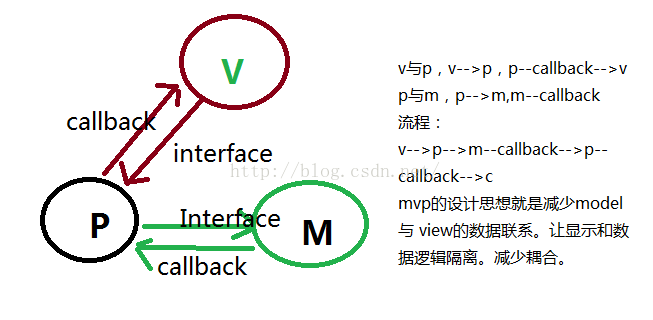 Android MVP 架構學習實例:從 MVC 到 MVP 的實踐
為什麼需要探討架構隨著行動開發的不斷演進,專案設計模式也越來越講究。良好的架構不僅能加快開發速度,也能讓後續維護與擴充變得更輕鬆。不過,並沒有一種萬能架構適合所有團隊與所
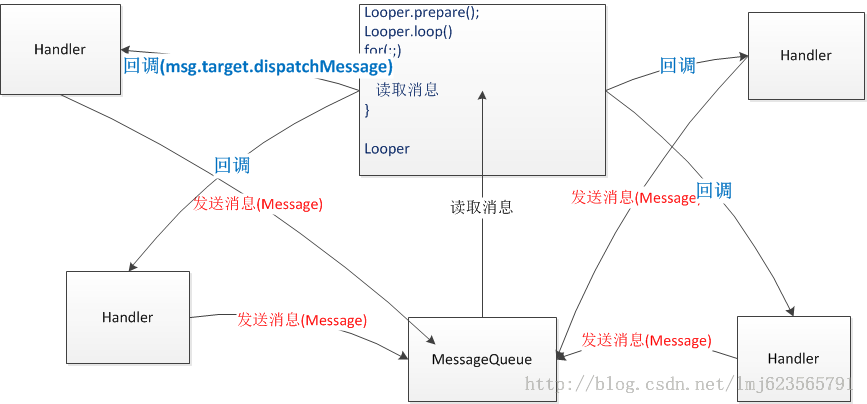 Android 執行緒非同步訊息處理總整理:Handler、Looper 與 Message 關係解析
前言 在 Android 開發中,Handler、Looper 與 Message 經常一起出現,卻也容易讓初學者混淆。簡單來說,這三者共同構成了一套非同步訊息處理機制:
 Android 自定義開關按鈕:從思路到完整實現
自定義控制項是 Android 開發中很能訓練思維的主題。以下以開關按鈕為例,說明如何從效果分析、屬性定義、測量、繪製到事件處理,一步步完成一個可重複使用的自定義 Vie
 Android 6.0 動態權限管理的解決方案
Android 6.0 版本(API 23)推出了許多新特性,大幅提升了用戶體驗,同時也給程序員帶來了新的負擔。動態權限管理就是其中之一:一方面讓用戶更容易控制自己的隱私