

編輯:關於 Android 程式設計
Android 內建的 layoutAnimation 提供了一個非常方便的方式,能讓容器中的子控制項「逐一」以動畫方式進場,例如讓表格的每一行依序淡入或滑入。相比自行用 SurfaceView 手動實作,这种做法簡單許多。
先建立一個 translate 位移動畫,讓元件從左側滑入:
<?xml version="1.0" encoding="utf-8"?>
<translate xmlns:android="https://schemas.android.com/apk/res/android"
    android:duration="300"
    android:fillAfter="false"
    android:fromXDelta="-550"
    android:toXDelta="0" >
</translate>
再建立一個 layoutAnimation,引用上面的單項動畫,並設定播放順序與延遲:
<?xml version="1.0" encoding="utf-8"?>
<layoutAnimation xmlns:android="https://schemas.android.com/apk/res/android"
    android:animation="@anim/player_info_left_in"
    android:animationOrder="normal"
    android:delay="0.75" >
</layoutAnimation>
其中 animationOrder 可設為 normal(正向)、reverse(反向)或 random(隨機);delay 則是每個子項之間的延遲比例。
在一個含多個子控制項的 View(例如 TableLayout)中加入 android:layoutAnimation 屬性:
<TableLayout
    android:layout_width="fill_parent"
    android:layout_height="fill_parent"
    android:layoutAnimation="@anim/left_in_player_info_show_anim" >
    <TableRow ........./>
    <TableRow ........./>
    <TableRow ........./>
    <TableRow ........./>
    <TableRow ........./>
</TableLayout>
完成上述設定後,當頁面開啟時,TableLayout 中的各個 <TableRow /> 就會依序逐行播放進場動畫。整體而言,layoutAnimation 是 Android 提供的一項實用功能,能大幅簡化群組元件的入場動畫實作。
 Android 播放視頻時的可拖拽懸浮窗口:DragVideo 與 ViewDragHelper 解析
為什麼做這個項目 在視頻網站看電影時有個細節很打動人:當頁面滑動遮住了播放窗口,播放器會縮成一個小窗固定在角落,而且這個小窗可以隨意拖動。既然 Web 端能做,移動端自然
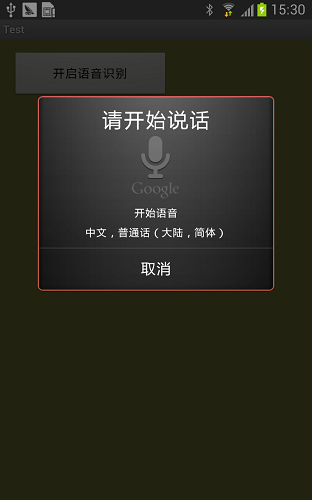 用 Intent 調用系統語音識別的完整示例
原理與前提 Android 主要依靠 RecognizerIntent 拉起語音識別流程,代碼本身不長,但有几個前提要先確認清楚。 其一,設備上必須裝有提供識別能力的應用
 一加3怎麼刷入第三方Recovery?完整刷機步驟教學
一加3刷入第三方Recovery完整流程 刷入第三方Recovery前,需要先解鎖Bootloader,再刷入TWRP等工具。操作會清空數據,請提前備份。 準備工作 進
 Android SwipeRefreshLayout 下拉刷新使用說明
SwipeRefreshLayout 簡介 SwipeRefreshLayout 是 Android 支援庫提供的下拉刷新控制元件,常出現在 Gmail 等應用中。它只能