

編輯:關於 Android 程式設計
android-async-http 是一個基於 Apache HttpClient 的異步網絡請求庫,用起来非常輕鬆。所有網絡操作都在非 UI 線程完成,結果通過回調方法返回,因此不會阻塞介面。
主要特點:異步發送 Http 請求並以匿名內部類回調結果、請求全部在 UI 線程之外執行、透過線程池控制併發、支援文件上傳下載、響應可自動打包成 JSON。
Github 地址:https://github.com/loopj/android-async-http
V1.4.9 的 javadoc:https://loopj.com/android-async-http/doc/
下載 zip 解壓後是 Android Studio 工程,目錄結構如下:
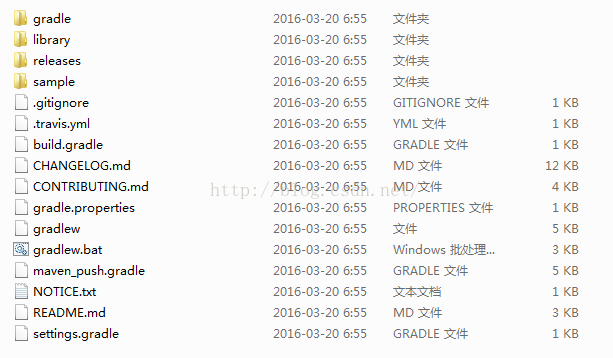
examples:簡單示例
library:核心源碼所在目錄(方法一:把 library/src/main/Java 下的文件複製到應用的 src 目錄)
releases:各版本的 jar 包(方法二:把最新 jar 複製到應用的 libs 目錄)
samples:更多示例,可供參考
備註:方法一與方法二只能擇一,建議用方法二。
1. 異步發送 HTTP 請求,以匿名回調處理響應
2. HTTP 請求在 UI 線程之外執行
3. 請求使用線程池,限制併發以控制資源佔用
4. 用 RequestParams 統一封裝 GET / POST 參數
5. 不依賴第三方庫即可做 multipart 文件上傳
6. 體積極小,全部功能約 60kb
7. 針對移動網絡不穩定的智慧重試機制
8. 內建響應解析為 JSON(JsonHttpResponseHandler)
9. 可選擇持久化 cookie,存入應用的 SharedPreferences
任何網絡請求框架,本質上都在解決三件事:如何發請求、如何封裝參數、如何接收與處理響應。先看最基礎的用法:
AsyncHttpClient client = new AsyncHttpClient();
client.get("https://www.google.com", new AsyncHttpResponseHandler() {
    @Override
    public void onSuccess(String response) {
        System.out.println(response);
    }
});
核心類,內部持有 HttpClient,提供 get / put / post / delete / head 等方法。使用時只需傳入 url 與 RequestParams,還可以選擇性傳入 Context 以便取消相關請求,同時必須提供一個 ResponseHandlerInterface 實作(通常直接繼承 AsyncHttpResponseHandler)。
AsyncHttpClient 內部有一個線程池,所有請求最終都會走到 sendRequest(),在該方法內把參數封裝成 AsyncHttpRequest(繼承自 Runnable),交給線程池執行。
繼承 Runnable,被 submit 到線程池後執行網絡請求,並發送 start、success 等消息。
可以加入普通字串參數,也可以加入 File、InputStream 來上傳文件,內部以 Map 保存 Key-Value。
呼叫 get() 等方法時傳入 Context、Url、RequestParams、responseHandler;get() 內部再轉呼叫 sendRequest(),sendRequest() 把請求封裝成 AsyncHttpRequest 並提交到線程池的阻塞隊列。隊列中的線程執行 run() 方法,responseHandler 依序呼叫 sendStartMessage()、makeRequestWithRetries()、sendFinishMessage() 記錄任務過程;在 makeRequestWithRetries() 中執行真正的網絡語句 HttpResponse response = client.execute(request, context);,之後調用 sendResponseMessage(response) 發送響應消息,最終走到 onSuccess(int statusCode, Header[] headers, byte[] responseBody)。子類只要重寫這個方法就能拿到結果。
AsyncHttpResponseHandler、TextHttpResponseHandler、JsonHttpResponseHandler、BaseJsonHttpResponseHandler。
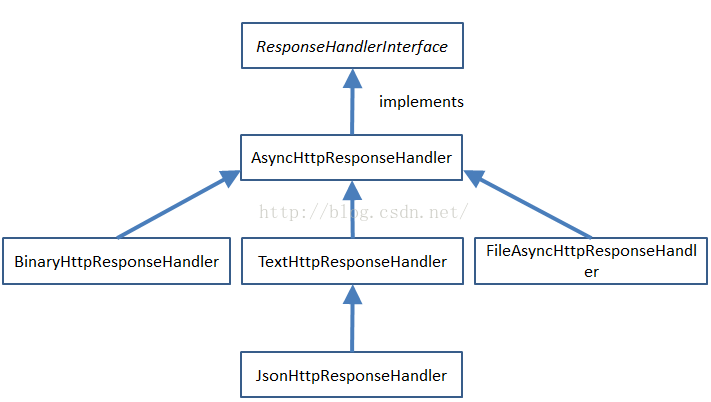
AsyncHttpResponseHandler:接收請求結果,一般重寫 onSuccess 與 onFailure,另有 onStart、onFinish 等回調。
// 子類必須實作,用來處理成功響應
public abstract void onSuccess(int statusCode, Header[] headers, byte[] responseBody);

// 子類必須實作,用來處理失敗響應
public abstract void onFailure(int statusCode, Header[] headers, byte[] responseBody, Throwable error);
BinaryHttpResponseHandler:以字節流形式返回,適合處理圖片、二進制數據。
@Override
public abstract void onSuccess(int statusCode, Header[] headers, byte[] binaryData);

@Override
public abstract void onFailure(int statusCode, Header[] headers, byte[] binaryData, Throwable error);
TextHttpResponseHandler:重寫了父類的 onSuccess / onFailure,把 byte 數組轉成 String。
public abstract void onFailure(int statusCode, Header[] headers, String responseString, Throwable throwable);

public abstract void onSuccess(int statusCode, Header[] headers, String responseString);
JsonHttpResponseHandler:泛型化的 JSON 處理類,提供 parseResponse 方法,把響應解析成需要的類型,子類可以自行決定解析方式,也可以直接接 gson。
public void onSuccess(int statusCode, Header[] headers, JSONObject response) {
    AsyncHttpClient.log.w(LOG_TAG, "onSuccess(int, Header[], JSONObject) was not overriden, but callback was received");
}

public void onSuccess(int statusCode, Header[] headers, JSONArray response) {
    AsyncHttpClient.log.w(LOG_TAG, "onSuccess(int, Header[], JSONArray) was not overriden, but callback was received");
}

public void onFailure(int statusCode, Header[] headers, Throwable throwable, JSONObject errorResponse) {
    AsyncHttpClient.log.w(LOG_TAG, "onFailure(int, Header[], Throwable, JSONObject) was not overriden, but callback was received", throwable);
}

public void onFailure(int statusCode, Header[] headers, Throwable throwable, JSONArray errorResponse) {
    AsyncHttpClient.log.w(LOG_TAG, "onFailure(int, Header[], Throwable, JSONArray) was not overriden, but callback was received", throwable);
}

@Override
public void onFailure(int statusCode, Header[] headers, String responseString, Throwable throwable) {
    AsyncHttpClient.log.w(LOG_TAG, "onFailure(int, Header[], String, Throwable) was not overriden, but callback was received", throwable);
}

@Override
public void onSuccess(int statusCode, Header[] headers, String responseString) {
    AsyncHttpClient.log.w(LOG_TAG, "onSuccess(int, Header[], String) was not overriden, but callback was received");
}
parseResponse 的實作:
protected Object parseResponse(byte[] responseBody) throws JSONException {
    if (null == responseBody) return null;
    Object result = null;
    // 先 trim 去掉空白,再判斷是否為合法 JSON
    String jsonString = getResponseString(responseBody, getCharset());
    if (jsonString != null) {
        jsonString = jsonString.trim();
        if (useRFC5179CompatibilityMode) {
            if (jsonString.startsWith("{") || jsonString.startsWith("[")) {
                result = new JSONTokener(jsonString).nextValue();
            }
        } else {
            // 判斷是 {} 物件還是 [] 陣列,否則當成字串處理
            if ((jsonString.startsWith("{") && jsonString.endsWith("}"))
                    || (jsonString.startsWith("[") && jsonString.endsWith("]"))) {
                result = new JSONTokener(jsonString).nextValue();
            } else if (jsonString.startsWith("\"") && jsonString.endsWith("\"")) {
                // 去掉兩端的引號
                result = jsonString.substring(1, jsonString.length() - 1);
            }
        }
    }
    if (result == null) {
        result = jsonString;
    }
    return result;
}
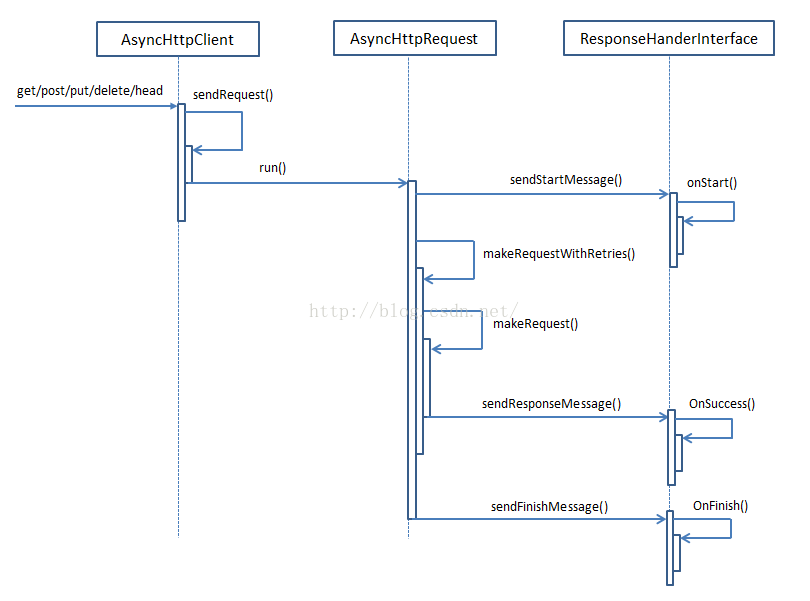
1. 呼叫 AsyncHttpClient 的 get / post 等方法發起請求
2. 所有請求都彙集到 sendRequest(),在其中被封裝為 AsyncHttpRequest 並丟進線程池
3. 請求被執行時(AsyncHttpRequest.run()),呼叫 makeRequestWithRetries() 發出真正的請求,失敗時可重試;並在開始、結束、成功或失敗時向 ResponseHandlerInterface 發送消息
4. 實務上多用 AsyncHttpResponseHandler 的子類,透過 onStart、onSuccess 等回調取得結果
get 方法有多個重載,最終都會收斂到四參數版本,再轉進 sendRequest():
public RequestHandle get(Context context, String url, RequestParams params,
                         ResponseHandlerInterface responseHandler) {
    return sendRequest(httpClient, httpContext,
            new HttpGet(getUrlWithQueryString(isUrlEncodingEnabled, url, params)),
            null, responseHandler, context);
}

// 帶自定義 Header 的版本
public RequestHandle get(Context context, String url, Header[] headers, RequestParams params,
                         ResponseHandlerInterface responseHandler) {
    HttpUriRequest request = new HttpGet(getUrlWithQueryString(isUrlEncodingEnabled, url, params));
    if (headers != null) request.setHeaders(headers);
    return sendRequest(httpClient, httpContext, request, null, responseHandler, context);
}

protected RequestHandle sendRequest(DefaultHttpClient client, HttpContext httpContext,
                                    HttpUriRequest uriRequest, String contentType,
                                    ResponseHandlerInterface responseHandler, Context context) {
    if (uriRequest == null) {
        throw new IllegalArgumentException("HttpUriRequest must not be null");
    }
    if (responseHandler == null) {
        throw new IllegalArgumentException("ResponseHandler must not be null");
    }
    if (responseHandler.getUseSynchronousMode() && !responseHandler.getUsePoolThread()) {
        throw new IllegalArgumentException("Synchronous ResponseHandler used in AsyncHttpClient. "
                + "You should create your response handler in a looper thread or use SyncHttpClient instead.");
    }
    if (contentType != null) {
        if (uriRequest instanceof HttpEntityEnclosingRequestBase
                && ((HttpEntityEnclosingRequestBase) uriRequest).getEntity() != null
                && uriRequest.containsHeader(HEADER_CONTENT_TYPE)) {
            log.w(LOG_TAG, "Passed contentType will be ignored because HttpEntity sets content type");
        } else {
            uriRequest.setHeader(HEADER_CONTENT_TYPE, contentType);
        }
    }
    // 把請求頭與請求 Url 同步給 responseHandler
    responseHandler.setRequestHeaders(uriRequest.getAllHeaders());
    responseHandler.setRequestURI(uriRequest.getURI());

    // 封裝成 AsyncHttpRequest,準備投入線程池
    AsyncHttpRequest request = newAsyncHttpRequest(client, httpContext, uriRequest,
            contentType, responseHandler, context);
    threadPool.submit(request); // 重點:提交到線程池等待執行

    RequestHandle requestHandle = new RequestHandle(request);
    if (context != null) {
        List<RequestHandle> requestList;
        synchronized (requestMap) {
            requestList = requestMap.get(context);
            if (requestList == null) {
                requestList = Collections.synchronizedList(new LinkedList<RequestHandle>());
                requestMap.put(context, requestList);
            }
        }
        requestList.add(requestHandle);
        Iterator<RequestHandle> iterator = requestList.iterator();
        while (iterator.hasNext()) {
            if (iterator.next().shouldBeGarbageCollected()) {
                iterator.remove();
            }
        }
    }
    return requestHandle; // 返回可用來取消請求的手柄
}
// 異步 HTTP 請求對象,實作 Runnable,說明它是給線程執行的任務類,重點在 run 方法
public class AsyncHttpRequest implements Runnable {
    private final AbstractHttpClient client;      // Http 客戶端
    private final HttpContext context;
    private final HttpUriRequest request;         // 保存 HttpGet 等請求對象
    private final ResponseHandlerInterface responseHandler; // 響應處理者
    private final AtomicBoolean isCancelled = new AtomicBoolean();
    private int executionCount;
    private boolean cancelIsNotified;
    private volatile boolean isFinished;
    private boolean isRequestPreProcessed;

    @Override
    public void run() {
        if (isCancelled()) return;

        if (!isRequestPreProcessed) {
            isRequestPreProcessed = true;
            onPreProcessRequest(this);
        }
        if (isCancelled()) return;

        // 發送開始消息
        responseHandler.sendStartMessage();
        if (isCancelled()) return;

        try {
            // 重點方法:執行請求(含重試)
            makeRequestWithRetries();
        } catch (IOException e) {
            if (!isCancelled()) {
                // 發送失敗消息
                responseHandler.sendFailureMessage(0, null, null, e);
            } else {
                AsyncHttpClient.log.e("AsyncHttpRequest", "makeRequestWithRetries returned error", e);
            }
        }
        if (isCancelled()) return;

        // 發送結束消息
        responseHandler.sendFinishMessage();
        if (isCancelled()) return;

        onPostProcessRequest(this);
        isFinished = true;
    }

    private void makeRequest() throws IOException {
        if (isCancelled()) return;
        if (request.getURI().getScheme() == null) {
            throw new MalformedURLException("No valid URI scheme was provided");
        }
        if (responseHandler instanceof RangeFileAsyncHttpResponseHandler) {
            ((RangeFileAsyncHttpResponseHandler) responseHandler).updateRequestHeaders(request);
        }
        // 真正的網絡請求語句
        HttpResponse response = client.execute(request, context);
        if (isCancelled()) return;

        // 響應返回前的預處理
        responseHandler.onPreProcessResponse(responseHandler, response);
        if (isCancelled()) return;

        // 把 HttpResponse 交給響應處理者
        responseHandler.sendResponseMessage(response);
        if (isCancelled()) return;

        // 響應返回後的後處理
        responseHandler.onPostProcessResponse(responseHandler, response);
    }

    // 帶重試次數的請求
    private void makeRequestWithRetries() throws IOException {
        boolean retry = true;
        IOException cause = null;
        HttpRequestRetryHandler retryHandler = client.getHttpRequestRetryHandler();
        try {
            while (retry) {
                try {
                    makeRequest();
                    return;
                } catch (UnknownHostException e) {
                    // 在 WiFi 與行動網絡間切換時可能拋出此異常,交由重試邏輯判斷
                    cause = new IOException("UnknownHostException exception: " + e.getMessage(), e);
                    retry = (executionCount > 0) && retryHandler.retryRequest(e, ++executionCount, context);
                } catch (NullPointerException e) {
                    // HttpClient 4.0.x 的已知問題
                    cause = new IOException("NPE in HttpClient: " + e.getMessage());
                    retry = retryHandler.retryRequest(cause, ++executionCount, context);
                } catch (IOException e) {
                    if (isCancelled()) return;
                    cause = e;
                    retry = retryHandler.retryRequest(cause, ++executionCount, context);
                }
                if (retry) {
                    responseHandler.sendRetryMessage(executionCount);
                }
            }
        } catch (Exception e) {
            AsyncHttpClient.log.e("AsyncHttpRequest", "Unhandled exception origin cause", e);
            cause = new IOException("Unhandled exception: " + e.getMessage(), cause);
        }
        throw (cause);
    }
}
各個回調的觸發時機:
// run() 開始時透過 sendStartMessage() 觸發,想追蹤任務就重寫它
public void onStart() {
}

// run() 結束時透過 sendFinishMessage() 觸發
public void onFinish() {
}

// makeRequest() 拿到 HttpResponse 前後分別觸發
@Override
public void onPreProcessResponse(ResponseHandlerInterface instance, HttpResponse response) {
}

@Override
public void onPostProcessResponse(ResponseHandlerInterface instance, HttpResponse response) {
}

public abstract void onSuccess(int statusCode, Header[] headers, byte[] responseBody);

public abstract void onFailure(int statusCode, Header[] headers, byte[] responseBody, Throwable error);
消息分發的實現,本質上是模仿 Android 的 Handler / Message:
protected void handleMessage(Message message) {
    Object[] response;
    try {
        switch (message.what) {
            case SUCCESS_MESSAGE:
                response = (Object[]) message.obj;
                if (response != null && response.length >= 3) {
                    onSuccess((Integer) response[0], (Header[]) response[1], (byte[]) response[2]);
                } else {
                    AsyncHttpClient.log.e(LOG_TAG, "SUCCESS_MESSAGE didn't got enough params");
                }
                break;
            case FAILURE_MESSAGE:
                response = (Object[]) message.obj;
                if (response != null && response.length >= 4) {
                    onFailure((Integer) response[0], (Header[]) response[1],
                            (byte[]) response[2], (Throwable) response[3]);
                } else {
                    AsyncHttpClient.log.e(LOG_TAG, "FAILURE_MESSAGE didn't got enough params");
                }
                break;
            case START_MESSAGE:
                onStart();
                break;
            case FINISH_MESSAGE:
                onFinish();
                break;
            case PROGRESS_MESSAGE:
                response = (Object[]) message.obj;
                if (response != null && response.length >= 2) {
                    try {
                        onProgress((Long) response[0], (Long) response[1]);
                    } catch (Throwable t) {
                        AsyncHttpClient.log.e(LOG_TAG, "custom onProgress contains an error", t);
                    }
                }
                break;
            case RETRY_MESSAGE:
                response = (Object[]) message.obj;
                if (response != null && response.length == 1) {
                    onRetry((Integer) response[0]);
                }
                break;
            case CANCEL_MESSAGE:
                onCancel();
                break;
        }
    } catch (Throwable error) {
        onUserException(error);
    }
}
響應消息的發送,判斷成功或失敗的依據是狀態碼:
@Override
public void sendResponseMessage(HttpResponse response) throws IOException {
    // asyncHttpRequest 在線程池中執行,先判斷線程狀態
    if (!Thread.currentThread().isInterrupted()) {
        StatusLine status = response.getStatusLine();
        byte[] responseBody = getResponseData(response.getEntity());

        // getResponseData() 可能耗時,因此再做一次取消檢查
        if (!Thread.currentThread().isInterrupted()) {
            if (status.getStatusCode() >= 300) {
                sendFailureMessage(status.getStatusCode(), response.getAllHeaders(),
                        responseBody,
                        new HttpResponseException(status.getStatusCode(), status.getReasonPhrase()));
            } else {
                sendSuccessMessage(status.getStatusCode(), response.getAllHeaders(), responseBody);
            }
        }
    }
}
注意:開始與結束消息取決於任務生命週期,成功與失敗消息取決於狀態碼,兩者判斷依據不同。
內部按類型分成好幾個並發 Map:普通字串參數、流參數、單文件參數、多文件參數,以及帶物件的參數。
public class RequestParams implements Serializable {
    public final static String APPLICATION_OCTET_STREAM = "application/octet-stream";
    public final static String APPLICATION_JSON = "application/json";

    // 普通 Url 參數
    protected final ConcurrentHashMap<String, String> urlParams = new ConcurrentHashMap<String, String>();
    // 流參數
    protected final ConcurrentHashMap<String, StreamWrapper> streamParams = new ConcurrentHashMap<String, StreamWrapper>();
    // 單文件參數
    protected final ConcurrentHashMap<String, FileWrapper> fileParams = new ConcurrentHashMap<String, FileWrapper>();
    // 多文件參數
    protected final ConcurrentHashMap<String, List<FileWrapper>> fileArrayParams = new ConcurrentHashMap<String, List<FileWrapper>>();
    // 帶物件的 Url 參數
    protected final ConcurrentHashMap<String, Object> urlParamsWithObjects = new ConcurrentHashMap<String, Object>();

    public RequestParams() {
        this((Map<String, String>) null);
    }

    public RequestParams(Map<String, String> source) {
        if (source != null) {
            for (Map.Entry<String, String> entry : source.entrySet()) {
                put(entry.getKey(), entry.getValue());
            }
        }
    }

    public RequestParams(final String key, final String value) {
        this(new HashMap<String, String>() {{
            put(key, value);
        }});
    }

    public void put(String key, String value) {
        if (key != null && value != null) {
            urlParams.put(key, value);
        }
    }

    public void put(String key, File file, String contentType, String customFileName)
            throws FileNotFoundException {
        if (file == null || !file.exists()) {
            throw new FileNotFoundException();
        }
        if (key != null) {
            fileParams.put(key, new FileWrapper(file, contentType, customFileName));
        }
    }

    public void put(String key, InputStream stream, String name,
                    String contentType, boolean autoClose) {
        if (key != null && stream != null) {
            streamParams.put(key, StreamWrapper.newInstance(stream, name, contentType, autoClose));
        }
    }

    public void put(String key, Object value) {
        if (key != null && value != null) {
            urlParamsWithObjects.put(key, value);
        }
    }

    public void put(String key, int value) {
        if (key != null) {
            urlParams.put(key, String.valueOf(value));
        }
    }
    // ... 另有 long、集合、陣列、多值參數等重載
}
官方建議的做法是:把 AsyncHttpClient 宣告為靜態實例,在項目中統一使用。
import com.loopj.android.http.*;

public class TwitterRestClient {
    private static final String BASE_URL = "https://api.twitter.com/1/";
    private static AsyncHttpClient client = new AsyncHttpClient();

    public static void get(String url, RequestParams params,
                           AsyncHttpResponseHandler responseHandler) {
        client.get(getAbsoluteUrl(url), params, responseHandler);
    }

    public static void post(String url, RequestParams params,
                            AsyncHttpResponseHandler responseHandler) {
        client.post(getAbsoluteUrl(url), params, responseHandler);
    }

    private static String getAbsoluteUrl(String relativeUrl) {
        return BASE_URL + relativeUrl;
    }
}
RequestParams 支援的參數類型相當豐富:
RequestParams params = new RequestParams();
params.put("username", "yanbober");
params.put("password", "123456");
params.put("email", "yanbobersky@email.com");

/* 上傳文件 */
params.put("file_pic", new File("test.jpg"));
params.put("file_inputStream", inputStream);
params.put("file_bytes", new ByteArrayInputStream(bytes));

/* 嵌套 Map,結果為 user[first_name]=jesse&user[last_name]=yan */
Map<String, String> map = new HashMap<String, String>();
map.put("first_name", "jesse");
map.put("last_name", "yan");
params.put("user", map);

/* Set,結果為 what=haha&like=wowo */
Set<String> set = new HashSet<String>();
set.add("haha");
set.add("wowo");
params.put("what", set);

/* List,結果為 languages[]=Java&languages[]=C */
List<String> list = new ArrayList<String>();
list.add("Java");
list.add("C");
params.put("languages", list);

AsyncHttpClient client = new AsyncHttpClient();
client.post("https://localhost:8080/androidtest/", params, responseHandler);
帶 JSON body 的 POST:
try {
    JSONObject jsonObject = new JSONObject();
    jsonObject.put("username", "ryantang");
    StringEntity stringEntity = new StringEntity(jsonObject.toString());
    client.post(mContext, "https://api.com/login", stringEntity, "application/json",
            new JsonHttpResponseHandler() {
                @Override
                public void onSuccess(JSONObject jsonObject) {
                    super.onSuccess(jsonObject);
                }
            });
} catch (JSONException e) {
    e.printStackTrace();
} catch (UnsupportedEncodingException e) {
    e.printStackTrace();
}
BinaryHttpResponseHandler 下載文件:
client.get("https://download/file/test.java", new BinaryHttpResponseHandler() {
    @Override
    public void onSuccess(byte[] arg0) {
        super.onSuccess(arg0);
        File file = Environment.getExternalStorageDirectory();
        File file2 = new File(file, "down");
        file2.mkdir();
        file2 = new File(file2, "down_file.jpg");
        try {
            FileOutputStream oStream = new FileOutputStream(file2);
            oStream.write(arg0);
            oStream.flush();
            oStream.close();
        } catch (Exception e) {
            e.printStackTrace();
            Log.i(null, e.toString());
        }
    }
});
圖片上傳:
String path = "https://sv1.livechano.com:8080/upload.action?action=1.6&type=1&ext=png";
File myFile = new File("/sdcard/test.png");
RequestParams params = new RequestParams();
try {
    params.put("image", myFile, "application/octet-stream");
    AsyncHttpClient client = new AsyncHttpClient();
    client.post(path, params, new AsyncHttpResponseHandler() {
        @Override
        public void onFailure(Throwable error, String content) {
            super.onFailure(error, content);
            Toast.makeText(MainActivity.this, "上傳失敗!" + content, Toast.LENGTH_LONG).show();
        }

        @Override
        public void onSuccess(int statusCode, String content) {
            super.onSuccess(statusCode, content);
            System.out.println("content: " + content);
            Toast.makeText(MainActivity.this, "上傳成功!" + content, Toast.LENGTH_LONG).show();
        }
    });
} catch (FileNotFoundException e) {
    // 處理異常
}
 Android 6.0 動態權限踩坑實錄:應對「不再提示」後的權限申請
Android 6.0 之後,一類被稱為「危險權限」的能力不再靠清單文件一聲招呼就能拿到,必須在用戶真正用到時,於運行期動態申請。 在此之前,用戶安裝應用時會看到一大串「
 Android 動畫進階:Animator 與 LayoutAnimator 實作解析
相較於傳統 Animation,Animator 系列更適合操作 View 屬性,而且動畫結束後通常不會自動回復原狀。ObjectAnimator 可直接指定目標物件、屬
 Volley 源碼解析與 OkHttp、RxJava 組合的網絡層設計
OkHttp 這些年在討論區的能見度一直很高,Android 4.4 之後甚至把系統內的 HttpURLConnection 底層換成了 OkHttp 實現,等於官方背書
 Android 以 PopupWindow 實作滑動刪除(精簡版)
本文參考〈Android 仿騰訊 QQ 實現滑動刪除〉一文進行學習。該文實作的功能是:在 ListView 的 Item 上從右向左滑動時出現刪除按鈕,點擊刪除按鈕即可刪