

編輯:關於 Android 開發
在實際開發中,有時需要讓兩個 Service 相互監視、彼此守護,當一方被系統回收時,另一方能迅速將其重新拉起,以提升服務的存活率。本文以 ServiceA 與 ServiceB 為例,示範透過 AIDL 與前台服務達到此目的。
服務 A:
1 public class ServiceA extends Service { 2 3 4 private static final String TAG = ServiceA.class.getSimpleName(); 5 MyBinder mBinder; 6 MyServiceConnection mServiceConnection; 7 PendingIntent mPendingIntent; 8 9 @Override 10 public void onCreate() { 11 super.onCreate(); 12 13 if(mBinder==null) 14 { 15 mBinder=new MyBinder(); 16 } 17 mServiceConnection=new MyServiceConnection(); 18 } 19 20 @Override 21 public int onStartCommand(Intent intent, int flags, int startId) { 22 ServiceA.this.bindService(new Intent(ServiceA.this,ServiceB.class),mServiceConnection, Context.BIND_IMPORTANT); 23 mPendingIntent=PendingIntent.getService(this,0,intent,0); 24 Notification.Builder builder=new Notification.Builder(this); 25 builder.setTicker("守護服務A啟動中") 26 .setContentText("我是來守護服務B的") 27 .setContentTitle("守護服務A") 28 .setSmallIcon(R.mipmap.ic_launcher) 29 .setContentIntent(mPendingIntent) 30 .setWhen(System.currentTimeMillis()); 31 Notification notification=builder.build(); 32 33 startForeground(startId,notification); 34 35 36 return START_STICKY; 37 } 38 39 @Override 40 public IBinder onBind(Intent intent) { 41 return mBinder; 42 } 43 44 public class MyBinder extends IBridgeInterface.Stub { 45 @Override 46 public String getName() throws RemoteException { 47 return "name:"+TAG; 48 } 49 } 50 51 class MyServiceConnection implements ServiceConnection { 52 @Override 54 public void onServiceConnected(ComponentName componentName, IBinder iBinder) { ... 64 Toast.makeText(ServiceA.this,name+"連接成功",Toast.LENGTH_SHORT).show(); 65 } 66 @Override 68 public void onServiceDisconnected(ComponentName componentName) { 69 Toast.makeText(ServiceA.this,TAG+"斷開連接",Toast.LENGTH_SHORT).show(); 70 71 ServiceA.this.startService(new Intent(ServiceA.this,ServiceB.class)); 72 ServiceA.this.bindService(new Intent(ServiceA.this,ServiceB.class),mServiceConnection, Context.BIND_IMPORTANT); 73 } 76 } 79 }服務 B:
1 public class ServiceB extends Service { 3 private static final String TAG = ServiceB.class.getSimpleName(); 4 private PendingIntent mPendingIntent; 5 private MyBinder mBinder; 6 private MyServiceConnection mServiceConnection; 8 @Override 9 public IBinder onBind(Intent intent) { 10 return mBinder; 11 } ... 24 public int onStartCommand(Intent intent, int flags, int startId) { 25 this.bindService(new Intent(ServiceB.this, ServiceA.class), mServiceConnection, Context.BIND_IMPORTANT); ... 38 return START_STICKY; 39 } ... 63 public void onServiceDisconnected(ComponentName componentName) { 64 Toast.makeText(ServiceB.this, TAG + "斷開連接", Toast.LENGTH_SHORT).show(); 65 66 ServiceB.this.startService(new Intent(ServiceB.this, ServiceA.class)); 67 ServiceB.this.bindService(new Intent(ServiceB.this, ServiceA.class), mServiceConnection, Context.BIND_IMPORTANT); 68 } 69 } 72 }跨進程通訊用的 IBridgeInterface.aidl:
1 interface IBridgeInterface { 2 String getName(); 3 }界面 MainActivity 只需啟動兩個服務:
1 public class MainActivity extends Activity { 5 protected void onCreate(Bundle savedInstanceState) { 6 super.onCreate(savedInstanceState); 7 setContentView(R.layout.activity_main); 9 startService(new Intent(this, ServiceA.class)); 10 startService(new Intent(this, ServiceB.class)); 11 } 13 }AndroidManifest.xml 中將 ServiceB 放到獨立行程:
1 <service android:name=".services.ServiceA" /> 2 <service 3 android:name=".services.ServiceB" 4 android:process=":remote" />
由於涉及跨行程,onServiceConnected() 中必須使用:
IBridgeInterface.Stub.asInterface(iBinder).getName();
而不能直接轉型:
((ServiceA.MyBinder)iBinder).getName();
onStartCommand() 必須回傳一個整數,用來描述系統/service 在服務被終止後該如何處理。回傳值須為以下常數之一:
START_NOT_STICKY:若系統在 onStartCommand() 回傳後終止服務,除非有掛起的 Intent 待傳遞,否則系統不會重建服務。
START_STICKY:若系統終止服務,會重建服務並呼叫 onStartCommand(),但不會重新傳遞最後一個 Intent(除非有掛起的啟動 Intent)。適合像媒體播放器這類無限期運行、等待工作的服務。
START_REDELIVER_INTENT:若系統終止服務,會重建服務並透過最後傳入的 Intent 呼叫 onStartCommand(),任何掛起的 Intent 也會依序傳遞。適合下載檔案這類需要立即恢復的工作。
透過兩個前台服務互相 bind 並在 onServiceDisconnected 中重新拉起對方,再搭配 START_STICKY 與獨立行程,就能構建出一組彼此守護、較難被系統一併清除的服務組合。
 用 Android Studio 進行 OpenCV 開發:第一個灰階化專案
專案環境 本文記錄在 Windows 7 64 位元環境下,使用 Android Studio 1.5.1 與 OpenCV-2.4.9-android-sdk 建立第一
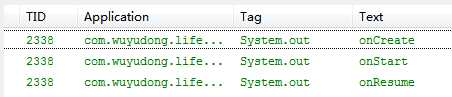 Android Activity 生命週期完整解析(含 onXxx 回呼與三種狀態)
 新建一個專案,MainActivity 的程式碼如下,我們藉由它來觀察各個生命週期方
 CAS 單一登入原理完整解析:TGC、ST、PGT 與代理認證
一、CAS 是什麼 CAS(Central Authentication Service)源自耶魯大學,是一套企業級的開源單一登入解決方案,屬於 Web SSO 範疇。專
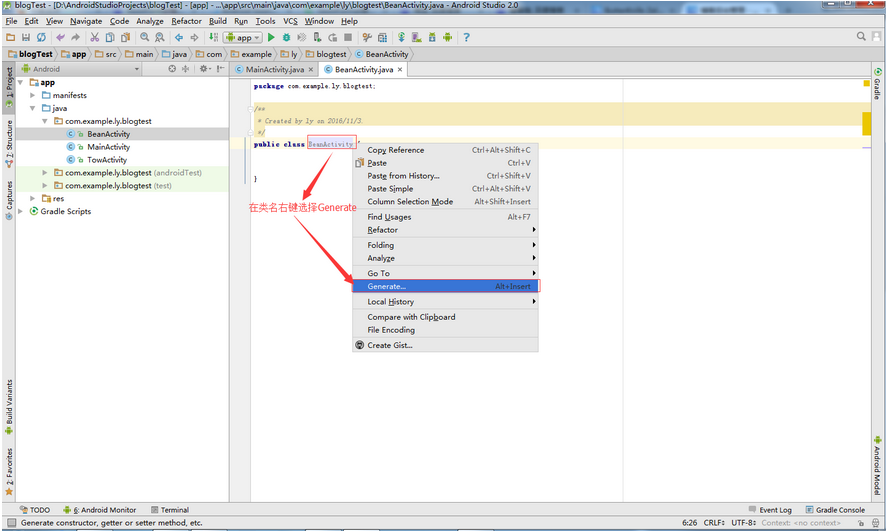 GsonFormat 插件從配置到使用
 在 Android 開發中,伺服器常以 JSON 格式回傳資料。若需要建立對應的 Java 物件,GsonFormat 插件可以快