

編輯:關於 Android 開發
最近碰到一個小但惱人的問題:在 Android 5.1 上,Button 裡的英文字串會自動變成全部大寫,而 TextView 用同一個字串顯示卻正常。
圖 1:Button

圖 2:TextView

Button 的定義如下:
<Button
    android:id="@+id/addContacts"
    android:layout_width="match_parent"
    android:layout_height="wrap_content"
    android:text="@string/contactList_addContact" />
TextView 的定義:
<TextView
    android:layout_width="match_parent"
    android:layout_height="0dp"
    android:layout_margin="10dp"
    android:layout_weight="1"
    android:gravity="center"
    android:text="@string/contactList_addContact"
    android:textSize="24sp" />
兩者參照的是同一個字串資源:
<string name="contactList_addContact">Add</string>
結果 Button 顯示 ADD,TextView 顯示 Add。奇怪的是專案裡其他 Button 都正常:

這兩個按鈕的定義:
<LinearLayout
    android:layout_width="fill_parent"
    android:layout_height="0dp"
    android:layout_margin="10dp"
    android:layout_weight="1"
    android:gravity="center"
    android:orientation="horizontal">

    <Button
        android:id="@+id/btn_cancel"
        android:layout_width="0dp"
        android:layout_height="fill_parent"
        android:layout_weight="1"
        android:gravity="center"
        android:text="@string/btn_cancel"
        android:textColor="@color/black" />

    <Button
        android:id="@+id/btn_save"
        android:layout_width="0dp"
        android:layout_height="fill_parent"
        android:layout_weight="1"
        android:gravity="center"
        android:text="@string/btn_save"
        android:textColor="@color/black" />

</LinearLayout>
字串資源:
<string name="btn_cancel">Cancel</string>
<string name="btn_save">Save</string>
推測是 5.1 的 SDK 調整了 Button 的預設 Style,把 textAllCaps 設為 true。翻一下系統原始碼 frameworks/base/core/res/res/values/styles_material.xml 第 233 行:
<style name="TextAppearance.Material.Button">
    <item name="textSize">@dimen/text_size_button_material</item>
    <item name="fontFamily">@string/font_family_button_material</item>
    <item name="textAllCaps">true</item>
    <item name="textColor">?attr/textColorPrimary</item>
</style>

確實是 textAllCaps 被設成了 true。至於為什麼同頁的 Cancel/Save 看起來正常,通常是因為字串本身的第一個字母剛好就是大寫、後續字母的視覺差異不明顯,或該處另套了不同的 style,並非真的沒套用。
只要在該按鈕上補一個屬性即可。android:textAllCaps 用來控制是否以全大寫呈現文字,設為 false 就會照原字串顯示:
<Button
    android:id="@+id/addContacts"
    android:layout_width="match_parent"
    android:layout_height="wrap_content"
    android:text="@string/contactList_addContact"
    android:textAllCaps="false" />
改完後的效果:

逐顆按鈕加屬性在按鈕多的畫面裡很囉嗦。可以在 theme 裡覆寫按鈕樣式,或直接在 <style name="AppTheme"> 中加入 <item name="android:textAllCaps">false</item>,讓全站 Button 預設不轉大寫;需要 Material 原味的個別按鈕再自行覆寫回 true。
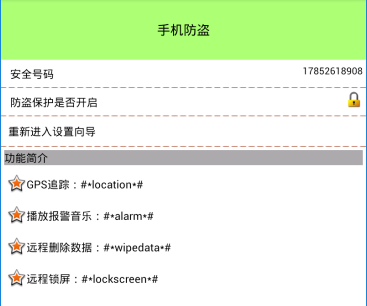 手機安全衛士實作:手機防盜頁與設定向導完整解析
手機防盜是安全衛士的重要功能,核心概念是綁定 SIM 卡與安全號碼,當手機被換卡或收到特定指令時,能發送警報、播放音樂、取得定位或遠端鎖定。本文以 LostFindAct
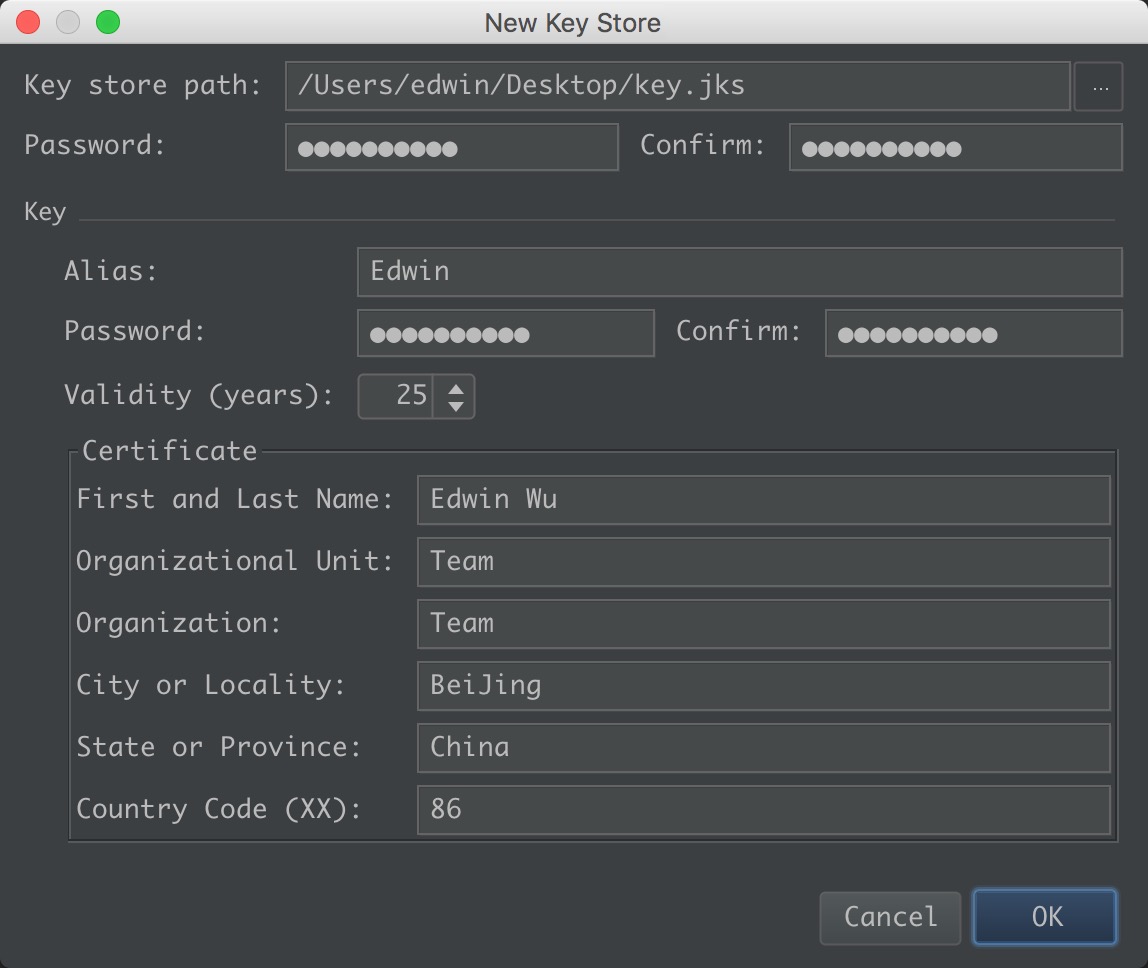 Android Studio 建立簽名金鑰並發布 APK
 在 Android Studio 打包正式版本時,需要建立或指定 keystore。建立 New Key Sto
 用 PopupWindow 做下拉選單:比 Spinner 更好客製的實作
最近在做下拉選單。原本想用 Spinner,無奈它達不到專案的要求;跟同學同事問了一圈,發現大家都在用 PopupWindow。&nb
 Xamarin Android 實作:在 Toolbar 圖示上做出數字提示(Badge)
讓 App 圖示也能顯示未讀數量 最近用 Xamarin 做一個 Android 應用,需求是:打開 App 時若有新訊息,得在 Toolbar 或首頁圖示上標出數字提示