

編輯:關於 Android 開發
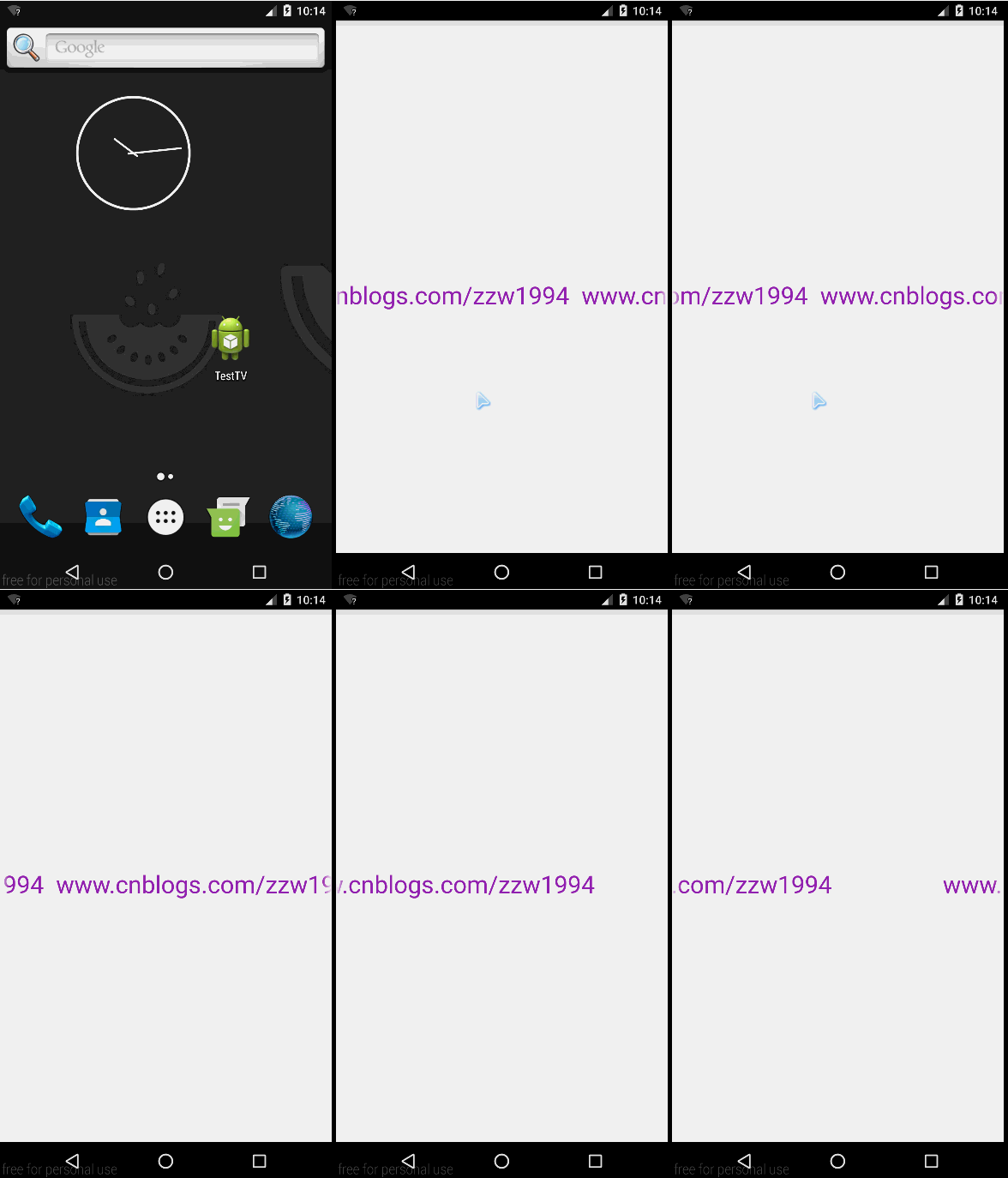
一段過長的文字在單行空間裡自動向右捲動,看起來活潑不少。實作成本非常低,重點全在 XML 的四個屬性。
<?xml version="1.0" encoding="utf-8"?>
<LinearLayout xmlns:android="https://schemas.android.com/apk/res/android"
    android:layout_width="match_parent"
    android:layout_height="match_parent"
    android:orientation="vertical" >

    <!-- 關鍵屬性:ellipsize、focusable、focusableInTouchMode、singleLine -->
    <TextView
        android:layout_width="match_parent"
        android:layout_height="match_parent"
        android:layout_marginTop="20dp"
        android:textColor="#9C27B0"
        android:ellipsize="marquee"
        android:focusable="true"
        android:focusableInTouchMode="true"
        android:singleLine="true"
        android:gravity="center"
        android:text="www.cnblogs.com/zzw1994 www.cnblogs.com/zzw1994"
        android:textSize="30sp" />

</LinearLayout>android:ellipsize="marquee" 決定溢出內容的處理方式,改成 marquee 就會啟動跑馬燈。但 marquee 有個前提條件:View 必須處於「有焦點」狀態,所以才需要 focusable 與 focusableInTouchMode 這兩個屬性鋪路。singleLine 則是確保文字不會換行,跑馬燈才有意義。
這裡還示範了兩個純視覺的設定:textColor 改為紫色 #9C27B0,textSize 放大到 30sp,並用 gravity="center" 讓文字水平置中。
第一,讓跑馬燈從一開始就動。 有些情況下即使屬性齊全,文字仍要等到 View 取得焦點才開始捲動。若希望進頁面就動,可以在程式碼中補上:
textView.setSelected(true);第二,控制捲動速度。 XML 屬性無法直接調整跑馬燈速度,它與 textSize、文字長度有關。若需要更精細的控制(自訂速度、停留時間、反覆次數),就該改用 ValueAnimator 或 ObjectAnimator 搭配 translationX 自行實作。
跑馬燈在窄幅空間展示次要資訊很合適,例如公告欄、歌曲名稱。但若是使用者必須完整閱讀的內容,流動的文字反而增加閱讀負擔, also 對部分使用者造成注意力干擾。這類情境建議改用多行顯示或點擊展開。
 Android 專案實戰:從零打造 2048 遊戲
 《2048》是一款流傳很廣的數字遊戲,最早在 2014 年 3 月 20 日發行。原作者 Gabriele Cirul
 Android Service 全面剖析:生命週期、Local Service、IntentService 與 AIDL 遠程服務
Service 是 Android 四大元件中最容易被誤解的一個。很多人以為它是「比較長命的 Activity」,也以為它天生就能跑背景耗時任務。事實上,Service
 Android多分辨率適配實踐(一):用字體圖標精準控制圖標樣式
 目錄 Android多分辨率適配實踐【0】基礎適配篇(撰寫中)Android多分辨率適配實踐【1】使用字
 Android 設定頁框架:PreferenceScreen 與 PreferenceFragment 實作
為什麼不用普通布局硬做 設定頁有大量重複模式:一行標題加說明、點擊開對話框、右側帶開關、點擊跳轉。若用一般布局手刻,每個項目都要自己處理點擊、狀態保存、樣式一致性。And