

編輯:關於 Android 開發
像是應用市場的 App 介紹頁,文字動輒數百字,若全部攤開會把畫面塞滿。更好的做法是只顯示三、四行摘要,再給一個展開入口,讓有興趣的人自行決定要不要往下讀。
這種設計的價值在於尊重使用者的時間與注意力。手機使用情境多半是零碎的,能在最短時間內讓使用者抓到重點,比一次丟出龐雜資訊要有效得多。
下面在原生 TextView 基礎上實作一個可伸縮的 ExpandableTextView。
關鍵還是在 maxLines。在 View 尚未繪製前,用 ViewTreeObserver 掛上 onPreDraw 監聽,取得文字完整顯示所需的總行數,再把最大行數設成一個較小的值,摘要效果就出現了。使用者觸發展開時,把最大行數設為「實際行數 + 1」,多留一行避免截斷。
1 package com.lixu.ExpandableTextView; 2 3 import android.app.Activity; 4 import android.os.Bundle; 5 import android.view.View; 6 import android.view.View.OnClickListener; 7 import android.widget.Button; 8 9 public class MainActivity extends Activity { 10 private String str = ""; 11 12 @Override 13 protected void onCreate(Bundle savedInstanceState) { 14 super.onCreate(savedInstanceState); 15 setContentView(R.layout.activity_main); 16 17 for (int i = 0; i < 200; i++) { 18 str = str + i + " "; 19 } 20 final ExpandableTextView etv = (ExpandableTextView) findViewById(R.id.etv); 21 etv.setText(str); 22 23 Button btn = (Button) findViewById(R.id.btn); 24 25 btn.setOnClickListener(new OnClickListener() { 26 @Override 27 public void onClick(View v) { 28 boolean b = etv.getExpandablestatus(); 29 30 b = !b; 31 etv.setExpandable(b); 32 33 } 34 }); 35 36 } 37 38 }
示範資料用迴圈拼出 200 個數字組成的長字串,確保一定超過三行。按鈕採「反轉狀態」的寫法,一顆按鈕同時負責展開與收合。
1 package com.lixu.ExpandableTextView; 2 3 import android.content.Context; 4 import android.util.AttributeSet; 5 import android.view.ViewTreeObserver; 6 import android.view.ViewTreeObserver.OnPreDrawListener; 7 import android.widget.TextView; 8 import android.widget.Toast; 9 10 public class ExpandableTextView extends TextView { 11 12 // 最大行,默認顯示3行 13 private final int MAX = 3; 14 15 // 完全展開需要的行數 16 private int lines; 17 18 private ExpandableTextView mExpandableTextView; 19 20 private boolean expandablestatus = false; 21 22 // 構造方法用兩個參數的 23 public ExpandableTextView(Context context, AttributeSet attrs) { 24 super(context, attrs); 25 mExpandableTextView = this; 26 init(); 27 } 28 29 private void init() { 30 // 在view繪制之前的時候執行,在onDraw之前 31 ViewTreeObserver mViewTreeObserver = this.getViewTreeObserver(); 32 mViewTreeObserver.addOnPreDrawListener(new OnPreDrawListener() { 33 @Override 34 public boolean onPreDraw() { 35 // 避免重復監聽 36 mExpandableTextView.getViewTreeObserver().removeOnPreDrawListener(this); 37 // 獲得內容行數 38 lines = getLineCount(); 39 40 return true; 41 } 42 }); 43 setExpandable(false); 44 45 } 46 // 是否展開或者收縮, 47 // true,展開; 48 // false,不展開 49 50 public void setExpandable(boolean isExpand) { 51 if (isExpand) { 52 setMaxLines(lines + 1); 53 } else 54 setMaxLines(MAX); 55 56 expandablestatus = isExpand; 57 } 58 59 public boolean getExpandablestatus() { 60 return expandablestatus; 61 } 62 63 }
自訂元件在 XML 中要使用「完整類別路徑」當作標籤名稱,這是很多人第一次寫自訂 View 時會卡住的地方:
1 <RelativeLayout xmlns:android="https://schemas.android.com/apk/res/android" 2 xmlns:tools="https://schemas.android.com/tools" 3 android:layout_width="match_parent" 4 android:layout_height="match_parent" > 5 6 <com.lixu.ExpandableTextView.ExpandableTextView 7 android:id="@+id/etv" 8 android:layout_width="match_parent" 9 android:layout_height="wrap_content" 10 android:layout_alignParentTop="true" /> 11 12 <Button 13 android:id="@+id/btn" 14 android:layout_width="wrap_content" 15 android:layout_height="wrap_content" 16 android:layout_alignParentBottom="true" 17 android:layout_centerHorizontal="true" 18 android:text="點擊" /> 19 20 </RelativeLayout>
為什麼選 onPreDraw:這個時點文字已完成量測,getLineCount() 才有意義;同時畫面尚未繪製,改動 maxLines 不會造成視覺跳動。
務必移除監聽:繪製流程會反覆觸發 onPreDraw,不移除就會陷入無限迴圈,這是最常見的翻车點。
+1 是保險:不同字型、行距與螢幕密度下,行數估算可能偏少一格,留一行餘量能避免最後一句被切掉。
可以再加的部分:加上「展開/收起」提示文字或箭頭,並在收合狀態用 setEllipsize(TextUtils.TruncateAt.END) 顯示省略號,使用者會更清楚這裡還能互動。
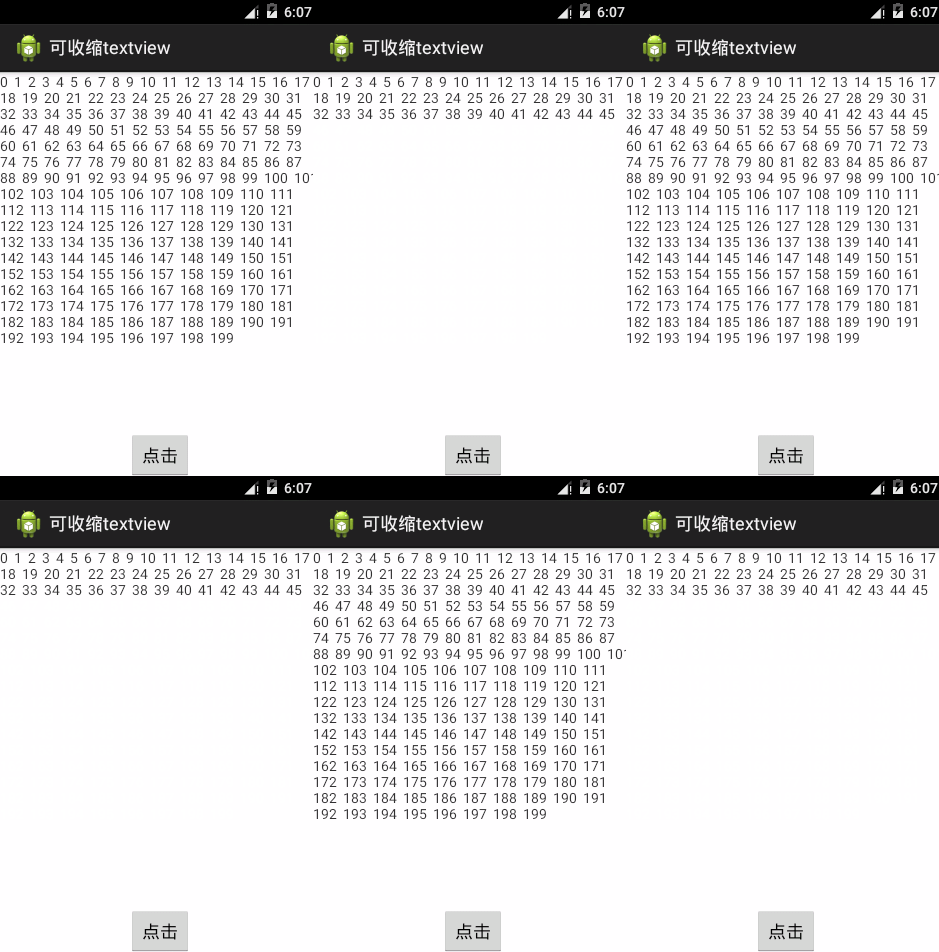
運行效果如下:
 自製 Sony 風格滾動相冊小部件:單一 View 實作解析
Sony 手機的銷量姑且不論,它在某些細節上的設計確實做得不錯。工業設計之外,相冊那個雙指縮放的動畫尤其好看,而桌面上那個滾動相冊小部件我也很喜歡,比原生相冊的圖片牆好用
 Android 5.X 實戰:Toolbar + DrawerLayout 打造抽屜菜單
 前言 Android 5.X 新增了一個控件 Toolbar,它比 Action
 lesson3:Qt 對話框完全指南——QDialog 與六大內建對話框
一、QDialog 類別 1. 對話框的概念 對話框在各式軟體中無所不在,主要用來向使用者提示資訊或接收使用者回饋,是應用程式與使用者互動的橋樑。 對話框是一個頂層視窗,
 Android 動態調試七種武器之離別鉤:Hooking(下)
0x00 序 行動安全越來越熱,各種調試工具層出不窮,但因為環境與需求各異,沒有一件工具是萬能的。工具是死的,人是活的;若能理解工具背後的原理,再搭配自身經驗,你也能打造