

編輯:關於 Android 開發
常見的聯絡人與通訊錄會依姓氏分成 A、B、C……到 Z 分組排列,方便使用者快速定位。要做出「分組標題懸停在頂部、隨著捲動彈入彈出」的效果,可以用第三方開源框架 PinnedSectionListView(GitHub:https://github.com/beworker/pinned-section-listview )。
它的運作方式是:分組標籤會固定懸停在 ListView 頂端,直到該分組被滑出/滑入可視範圍時才交接給下一個標籤,形成彈入彈出的視覺效果。
把 PinnedSectionListView 類別放進自己的專案中:
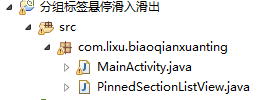
該類別繼承自 ListView,原始碼約五百行,核心機制可以概括為幾個部分,理解之後要移植或客製都會容易得多:
isItemViewTypePinned(int viewType)。回傳 true 的 view type 就是「會被懸停的分組標籤」。super.dispatchDraw 之後把懸停 View 疊畫上去,並用 clipRect 與 translate 控制它與下一個分組交接時的位移。GradientDrawable 在懸停標籤下方畫一層由深到淺的陰影,高度依螢幕密度換算。使用這個控制項,Adapter 必須實作 PinnedSectionListAdapter,並且在 getViewTypeCount() 中回報至少兩種 view type(分組與內容各一)。這裡用一個 Data 內部類別區分兩者:
package com.lixu.biaoqianxuanting;

import java.util.ArrayList;
import com.lixu.biaoqianxuanting.PinnedSectionListView.PinnedSectionListAdapter;
import android.app.Activity;
import android.content.Context;
import android.graphics.Color;
import android.os.Bundle;
import android.view.LayoutInflater;
import android.view.View;
import android.view.ViewGroup;
import android.widget.ArrayAdapter;
import android.widget.TextView;

public class MainActivity extends Activity {

    private ArrayList<Data> data;

    @Override
    protected void onCreate(Bundle savedInstanceState) {
        super.onCreate(savedInstanceState);
        setContentView(R.layout.activity_main);

        String[] s = { "家人", "朋友", "同事", "同學", "基友", "情人", "老婆" };

        data = new ArrayList<Data>();
        for (String n : s) {
            Data group = new Data();
            group.type = Data.GROUP;
            group.text = n;
            data.add(group);
            for (int i = 0; i < 10; i++) {
                Data child = new Data();
                child.type = Data.CHILD;
                child.text = "聯系人" + i;
                data.add(child);
            }
        }

        PinnedSectionListView pslv = (PinnedSectionListView) findViewById(R.id.pslv);
        pslv.setAdapter(new MyAdapter(this, -1));
    }

    /** 存放資料型態的類別 */
    private class Data {
        public static final int GROUP = 0;
        public static final int CHILD = 1;
        public int type;
        public String text;
        public static final int TYPE_COUNT = 2;   // 兩種 type
    }

    private class MyAdapter extends ArrayAdapter implements PinnedSectionListAdapter {

        private LayoutInflater flater;

        public MyAdapter(Context context, int resource) {
            super(context, resource);
            flater = LayoutInflater.from(context);
        }

        @Override public int getCount() {
            return data.size();
        }

        @Override
        public View getView(int position, View convertView, ViewGroup parent) {
            int type = getItemViewType(position);
            if (convertView == null) {
                convertView = flater.inflate(android.R.layout.simple_list_item_1, null);
            }
            TextView tv = (TextView) convertView.findViewById(android.R.id.text1);
            tv.setText(data.get(position).text);

            switch (type) {
                case Data.GROUP:      // 分組標題:藍底大字
                    tv.setBackgroundColor(Color.BLUE);
                    tv.setTextSize(35);
                    break;
                case Data.CHILD:      // 一般項目:小字
                    tv.setTextSize(15);
                    break;
                default:
                    break;
            }
            return convertView;
        }

        /** 回報列表有幾種 view type:child 與 group */
        @Override public int getViewTypeCount() {
            return Data.TYPE_COUNT;
        }

        /** 取得該位置的 view type */
        @Override public int getItemViewType(int position) {
            return data.get(position).type;
        }

        @Override public Object getItem(int position) {
            return data.get(position);
        }

        /**
         * 這個方法是 PinnedSectionListView 的靈魂。
         * 全部回傳 false 時,控制項就退化成一個普通的 ListView(只是有兩種 view type)。
         * 回傳值直接決定它是 PinnedSectionListView 還是普通 ListView。
         */
        @Override
        public boolean isItemViewTypePinned(int viewType) {
            switch (viewType) {
                case Data.GROUP:
                    return true;      // 只有分組標籤需要懸停
                case Data.CHILD:
                default:
                    return false;
            }
        }
    }
}<RelativeLayout xmlns:android="https://schemas.android.com/apk/res/android"
xmlns:tools="https://schemas.android.com/tools"
android:layout_width="match_parent"
android:layout_height="match_parent">
<com.lixu.biaoqianxuanting.PinnedSectionListView
android:id="@+id/pslv"
android:layout_width="match_parent"
android:layout_height="match_parent" />
</RelativeLayout>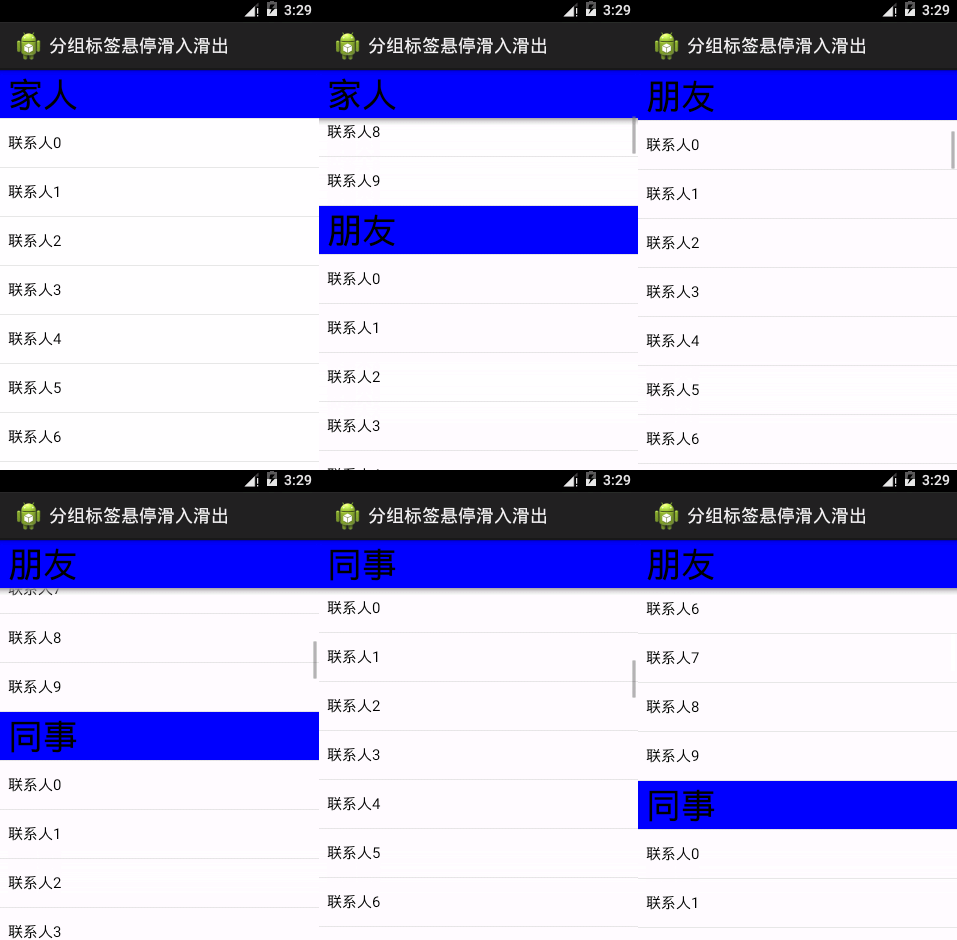
isItemViewTypePinned 是整個效果的開關,回傳值寫錯就完全沒有懸停行為,這是最常出問題的地方。
此外,getViewTypeCount() 一定要大於或等於 2,否則框架在 debug 模式下會直接丟 IllegalArgumentException;如果 Adapter 有實作 SectionIndexer,框架會走快速路徑去找當前分組,效能會更好,這也是正式通訊錄應用值得補上的一塊。
 ELF Format 筆記(十五):符號哈希表與查詢流程
符號哈希表存在的理由 作者:ilocker(關注 Android 安全)。 符號哈希表(symbol hash table)並不是 ELF 規範的一部分,而是為了加速符號
 Android 自定義 View 屬性:attrs.xml 與 obtainStyledAttributes 用法
自定義屬性的目的 開發自定義 View 時,除了內建屬性,也可以定義自己的 XML 屬性,例如 myapp:textSize,讓使用方式更直覺。 建立 attrs.xml
 Android 自動完成輸入框 AutoCompleteTextView 使用教學
輸入前幾個字就自動補全 AutoCompleteTextView 能在使用者輸入單詞或句子的前幾個字時,自動彈出匹配的候選內容,大幅減少輸入。效果如下: 一、MainA
 Android 大圖載入記憶體:inSampleSize 取樣與螢幕自適應
直接把一張手機拍的高解析照片塞進 ImageView,是新手最常踩的 OutOfMemoryError 陷阱。本文示範如何用 BitmapFactory.Options