

編輯:關於 Android 開發
JSON 的解析相對簡單,實作程式碼也不複雜。本文採用 Android 提供的 JsonReader 串流式 API 來解析 JSON 數據,相較於一次性載入整個物件樹,串流解析在處理大數據時更省記憶體。
JSON 存儲的是無序的「名稱/值」對集合,具備良好的可讀性、可擴展性與編解碼便利性。
對於一個物件:
(1)以「{」開始,「}」結束;
(2)每個「名稱」後跟一個「:」;
(3)「名稱/值」對之間以「,」分隔。
對於一個陣列:
(1)以「[」開始,「]」結束;
(2)值之間以「,」分隔。
以下為官方提供的 JSON 範例:
[ { "id": 912345678901, "text": "How do I read JSON on Android?", "geo": null, "user": { "name": "android_newb", "followers_count": 41 } }, { "id": 912345678902, "text": "@android_newb just use android.util.JsonReader!", "geo": [50.454722, -104.606667], "user": { "name": "jesse", "followers_count": 2 } } ]
若在程式碼中直接定義 JSON 字串,需對雙引號使用反斜線轉義:
private String jsonDate = "[" +
"{\"id\": 912345678901," +
"\"text\":\"How do I read JSON on Android?\"," +
"\"geo\":null," +
"\"user\":{\"name\":\"android_newb\",\"followers_count\":41}}," +
"{\"id\": 912345678902," +
"\"text\":\"@android_newb just use android.util.JsonReader!\"," +
"\"geo\":[50.454722,-104.606667]," +
"\"user\":{\"name\":\"jesse\",\"followers_count\":2}}" +
"]";
1. 建立一個 JsonReader 物件。
2. 用 beginArray() 開始解析最外層的陣列。
3. 用 beginObject() 開始解析陣列中的物件。
4. 直接數據可直接讀取;若遇到嵌套的陣列,需另寫解析方法遞迴處理。
5. 解析完成後,別忘了用 endArray()、endObject() 關閉解析。
package com.mecury.jsontest; import java.io.IOException; import java.io.StringReader; import android.util.JsonReader; import android.util.JsonToken; public class JsonUtils { public void parseJson(String jsonDate) throws IOException{ //創建JsonReader對象 JsonReader jsReader = new JsonReader(new StringReader(jsonDate)); jsReader.beginArray(); while (jsReader.hasNext()) { readMessage(jsReader); } jsReader.endArray(); } public void readMessage(JsonReader jsReader) throws IOException{ jsReader.beginObject(); while(jsReader.hasNext()){ String tagName = jsReader.nextName(); if (tagName.equals("id")) { System.out.println("name:"+jsReader.nextLong()); }else if (tagName.equals("text")) { System.out.println("text:"+jsReader.nextString()); }else if (tagName.equals("geo") && jsReader.peek()!=JsonToken.NULL) { readDoubleArray(jsReader); }else if (tagName.equals("user")) { readUser(jsReader); }else { //跳過當前值 jsReader.skipValue(); System.out.println("skip======>"); } } jsReader.endObject(); } //解析geo中的數據 public void readDoubleArray(JsonReader jsReader) throws IOException{ jsReader.beginArray(); while(jsReader.hasNext()){ System.out.println(jsReader.nextDouble()); } jsReader.endArray(); } //讀取user中的數據 public void readUser(JsonReader jsReader) throws IOException{ String userName = null; int followsCount = -1; jsReader.beginObject(); while (jsReader.hasNext()) { String tagName = jsReader.nextName(); if (tagName.equals("name")) { userName = jsReader.nextString(); System.out.println("user_name:"+ userName); }else if (tagName.equals("followers_count")) { followsCount = jsReader.nextInt(); System.out.println("followers_count:"+followsCount); } } jsReader.endObject(); } }
name:912345678901
text:How do I read JSON on Android?
skip======>
user_name:android_newb
followers_count:41
name:912345678902
text:@android_newb just use android.util.JsonReader!
50.454722
-104.606667
user_name:jesse
followers_count:2
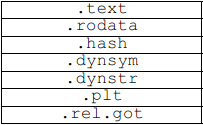 ELF Format 筆記(十四)—— 段內容解析
 作者 ilocker:關注 Android 安全(新手),QQ:2597294287 一個段(segment)由一個或
 Android 反射機制實現與原理:從 Java 反射到實際應用
反射的基本概念 反射是指程序在運行時能夠檢查、訪問和修改自身結構與行為的能力。在 Java 中,反射機制允許程序動態獲取類的信息,例如構造方法、成員方法、字段、父類、接口
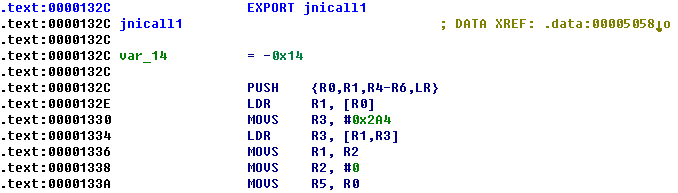 Android 逆向動態調試入門:從 SO 斷點到 Dex Dump
在 SO 關鍵函數下斷點動態調試常見起點,是在 SO 檔案中的關鍵函數設置斷點。通常先用靜態分析工具找到函數偏移,再讓 android_server 運行並轉發埠,之後以
 解決Android打包時APK META-INF重複檔案錯誤
 在Android專案打包過程中,有時會遇到類似以下的錯誤訊息: * What went wrong: Exe