

編輯:關於 Android 開發
透過訊息通道傳輸訊息物件,一個帳號發給另一個帳號,只要對方在線就能立即收到,這就是最樸素的即時通訊定義。通道可以由 TCP/IP 或 UDP 實作。通俗地說,就是把一個人要傳給另一個人的內容(文字、音訊、影片、檔案)透過 C/S 通道即時送達。
完整的即時通訊應該包含四種形式:
在傳統的 OSI 四層模型中,TCP 與 UDP 屬於傳輸層協定,承載著實際的訊息內容;IP 屬於網路層,負責定址。TCP/IP 也就是傳輸控制協定/網際協定,規範了主機如何連入網際網路以及資料如何在彼此間傳輸。
Socket(又稱「套接字」)位於應用層與傳輸層之間,是一個抽象層,用於描述 IP 位址與埠號,本質上是一條通信連線的 handle。應用程式透過 socket 送出請求或回應請求,它把 TCP/IP 繁瑣的操作包裝成幾個簡單介面,讓應用層得以輕鬆實現跨網路通信。
XMPP(可擴充的訊息處理現場協定)則是基於 XML 的應用層協定,專為即時通訊設計,底層仍靠 Socket 實作。它同時支援即時訊息與在線狀態探測,並促進伺服器之間的準即時互動。XMPP 的目標之一是讓不同作業系統、不同瀏覽器的使用者也能互相傳送即時訊息。
於是實作即時通訊就有兩條路:一是直接操作 Socket,自己設計訊息格式與會話邏輯;二是借助開源方案(伺服器端用 openfire),以 XMPPConnection 建立連線。
XMPP 的所有工作都是在一條 XMPP 流(stream)上收發節點(stanza)來完成。核心工具集由三種基本節點構成:<presence>(在線狀態)、<message>(訊息)、<iq>(資訊查詢)。
XMPP 流由兩份 XML 文件組成,通訊的每個方向各一份,根元素是 <stream:stream>,其子元素由可路由的節點與相關的頂層子元素構成。
XMPP 同樣分客戶端與伺服器。客戶端負責初始化通訊流程、向伺服器發起連線請求,系統透過行動網路與網際網路建立連線,再由伺服器完成與各 Android 客戶端的即時通訊。伺服器端採用 Openfire,它允許多個客戶端同時登入並併發連線,對每個連線進行認證,認證通過後建立會話,後續通訊都在該會話上下文中進行。
實務上常見的做法是使用 asmack 這個開源框架,它基於 XMPP 協定、採用 C/S 架構,透過行動網路以 TCP 連到自建的 Openfire 伺服器。
XMPP 通道的建立步驟:
// 1. 配置通道資訊
ConnectionConfiguration configuration = new ConnectionConfiguration(HOST, PORT);
// 2. 設定 Debug 與安全模式
configuration.setDebuggerEnabled(true);
configuration.setSecurityMode(SecurityMode.disabled);
// 3. 建立連線
conn.connect();
在 ContentObserver 的實作類中觀察訊息變化,用 XMPPConnection.getRoster() 取得聯絡人列表物件。整體思路是:進入登入畫面,透過 login 方法登入,成功後進入主畫面;主畫面用兩個 Fragment 分別顯示聯絡人與聊天記錄;建立聯絡人與訊息的資料觀察者,在對應服務中註冊 RosterListener() 與 ChatManagerListener() 接收更新並寫入 ContentProvider;再由 ContentProvider 中的 ContentObserver 通知畫面刷新。
因為絕大多數即時通訊系統的底層都是 Socket,自己寫一遍才能真正理解原理。業務邏輯可以這樣描述:
也可以再加一個背景服務,讓使用者離開程式時仍能接收訊息。
歸納起來,即時通訊有三個關注點:訊息通道、訊息內容、訊息物件,主要邏輯都圍繞這三點展開。通道負責傳輸;內容格式必須與伺服器約定一致;物件則是發送者與接收者。
訊息基類:封裝 XML 與字串之間的轉換(用 XStream),也順手提供 Gson 版本以適應不同後端。後續所有訊息類別繼承它即可。
/** Created by huang on 2016/12/3. */
public class ProtacolObjc implements Serializable {

    public String toXml() {
        XStream stream = new XStream();
        stream.alias(this.getClass().getSimpleName(), this.getClass());  // 根節點改用類名
        return stream.toXML(this);
    }

    public Object fromXml(String xml) {
        XStream x = new XStream();
        x.alias(this.getClass().getSimpleName(), this.getClass());
        return x.fromXML(xml);
    }

    public String toGson() {
        return new Gson().toJson(this);
    }

    public Object fromGson(String result) {
        return new Gson().fromJson(result, this.getClass());
    }
}
執行緒工具:網路操作必須在子執行緒,畫面更新必須在主執行緒,這個小工具讓切換變得容易。
import android.os.Handler;

/** Created by huang on 2016/12/5. */
public class ThreadUtils {
    private static Handler handler = new Handler();

    public static void runUIThread(Runnable r) {
        handler.post(r);
    }

    public static void runINThread(Runnable r) {
        new Thread(r).start();
    }
}
訊息模型:包含內容、類型、寄件者與收件者。要注意伺服器回傳的內容中帶有套件資訊,因此這裡的套件結構必須與伺服器保持一致。
/** 訊息內容 */
public class QQMessage extends ProtacolObjc {
    public String type = QQmessageType.MSG_TYPE_CHAT_P2P;  // chat / login ...
    public long from = 0;          // 寄件者 account
    public String fromNick = "";   // 暱稱
    public int fromAvatar = 1;     // 頭像
    public long to = 0;            // 收件者 account
    public String content = "";    // 訊息內容
    public String sendTime = getTime();

    public String getTime() {
        return getTime(System.currentTimeMillis());
    }

    public String getTime(Long time) {
        Date date = new Date(time);
        return new java.text.SimpleDateFormat("mm-DD HH:mm:ss").format(date);
    }
}

/** 訊息類型 */
public class QQmessageType {
    public static final String MSG_TYPE_REGISTER   = "register";   // 註冊
    public static final String MSG_TYPE_LOGIN      = "login";      // 登入
    public static final String MSG_TYPE_LOGIN_OUT  = "loginout";   // 登出
    public static final String MSG_TYPE_CHAT_P2P   = "chatp2p";    // 一對一聊天
    public static final String MSG_TYPE_CHAT_ROOM  = "chatroom";   // 群聊
    public static final String MSG_TYPE_OFFLINE    = "offline";    // 離線
    public static final String MSG_TYPE_SUCCESS    = "success";    // 成功
    public static final String MSG_TYPE_BUDDY_LIST = "buddylist";  // 好友列表
    public static final String MSG_TYPE_FAILURE    = "failure";    // 失敗
}

/** 好友 */
public class QQBuddy extends ProtacolObjc {
    public long account;
    public String nick;
    public int avatar;
}

/** 好友列表 */
public class QQBuddyList extends ProtacolObjc {
    public ArrayList<QQBuddy> buddyList = new ArrayList<>();
}
連線與收發:QQConnection 繼承 Thread,啟動後在迴圈中持續 readUTF,收到資料還原成 QQMessage 後分派給所有註冊的監聽器。
import android.util.Log;
import java.io.DataInputStream;
import java.io.DataOutputStream;
import java.io.IOException;
import java.net.Socket;
import java.util.ArrayList;
import java.util.List;

/** Created by huang on 2016/12/3. 連接伺服器 */
public class QQConnection extends Thread {

    private static final String TAG = "QQConnection";
    private Socket client;
    private DataOutputStream write;
    private DataInputStream read;

    public static final String HOST = "192.168.23.48";
    public static final int POST = 5225;

    private boolean flag = true;
    private List<OnQQmwssagereceiveLisener> mOnQQmwssagereceiveLisener = new ArrayList<>();

    public void addOnQQmwssagereceiveLisener(OnQQmwssagereceiveLisener lisener) {
        mOnQQmwssagereceiveLisener.add(lisener);
    }

    public void removeOnQQmwssagereceiveLisener(OnQQmwssagereceiveLisener lisener) {
        mOnQQmwssagereceiveLisener.remove(lisener);
    }

    public interface OnQQmwssagereceiveLisener {
        void onReiceive(QQMessage qq);
    }

    @Override
    public void run() {
        super.run();
        while (flag) {
            try {
                String utf = read.readUTF();
                QQMessage msg = (QQMessage) new QQMessage().fromXml(utf);
                if (msg != null) {
                    for (OnQQmwssagereceiveLisener lisner : mOnQQmwssagereceiveLisener) {
                        lisner.onReiceive(msg);
                    }
                }
            } catch (IOException e) {
                e.printStackTrace();
            }
        }
    }

    public void connect() {
        try {
            if (client == null) {
                client = new Socket(HOST, POST);
                write = new DataOutputStream(client.getOutputStream());
                read = new DataInputStream(client.getInputStream());
                flag = true;
                this.start();
                Log.e(TAG, "connect: " + (write == null) + "---" + (read == null));
            }
        } catch (Exception e) {
            e.printStackTrace();
        }
    }

    public void disconnect() {
        if (client == null) return;
        flag = false;
        this.stop();
        try { read.close();  } catch (IOException e) { e.printStackTrace(); }
        try { write.close(); } catch (IOException e) { e.printStackTrace(); }
        try { client.close(); } catch (IOException e) { e.printStackTrace(); }
    }

    public void send(String xml) throws IOException {
        write.writeUTF(xml);
        write.flush();
    }

    public void send(QQMessage qq) throws IOException {
        write.writeUTF(qq.toXml());
        write.flush();
    }
}
閃屏畫面:保持 4 秒後進入登入頁。實務上這裡通常會順便做初始化、取版本號、檢查更新等事,這裡從簡。
<?xml version="1.0" encoding="utf-8"?>
<RelativeLayout xmlns:android="https://schemas.android.com/apk/res/android"
    xmlns:tools="https://schemas.android.com/tools"
    android:id="@+id/activity_splash"
    android:layout_width="match_parent"
    android:layout_height="match_parent"
    android:background="@mipmap/splash_bg">

    <ImageView
        android:layout_width="wrap_content"
        android:layout_height="wrap_content"
        android:layout_centerInParent="true"
        android:src="@mipmap/conversation_bg_logo" />
</RelativeLayout>
public class SplashActivity extends AppCompatActivity {
    @Override
    protected void onCreate(Bundle savedInstanceState) {
        super.onCreate(savedInstanceState);
        getSupportActionBar().hide();                                    // 隱藏標題欄
        getWindow().setFlags(WindowManager.LayoutParams.FLAG_FULLSCREEN,
                             WindowManager.LayoutParams.FLAG_FULLSCREEN);  // 全螢幕
        setContentView(R.layout.activity_splash);
        new Handler().postDelayed(new Runnable() {
            @Override
            public void run() {
                startActivity(new Intent(SplashActivity.this, LoginActivity.class));
                finish();
            }
        }, 4000);
    }
}
登入畫面:建立連線、送出登入資訊、接收伺服器回應。
<?xml version="1.0" encoding="utf-8"?>
<LinearLayout xmlns:android="https://schemas.android.com/apk/res/android"
    android:layout_width="match_parent"
    android:layout_height="match_parent"
    android:background="#aabbdd"
    android:gravity="center"
    android:orientation="vertical">

    <TableLayout
        android:layout_width="match_parent"
        android:layout_height="wrap_content">

        <ImageView
            android:layout_width="wrap_content"
            android:layout_height="wrap_content"
            android:src="@mipmap/conversation_bg_logo" />

        <TableRow
            android:layout_width="match_parent"
            android:layout_height="wrap_content"
            android:layout_marginLeft="20dp"
            android:layout_marginRight="20dp"
            android:layout_marginTop="8dp"
            android:gravity="center_horizontal">
            <TextView
                android:layout_width="0dp"
                android:layout_height="wrap_content"
                android:layout_weight="1"
                android:gravity="center"
                android:text="帳號:"
                android:textColor="#000" />
            <EditText
                android:id="@+id/et_accoun"
                android:layout_width="0dp"
                android:layout_height="wrap_content"
                android:layout_weight="3"
                android:gravity="center"
                android:hint="輸入帳號" />
        </TableRow>

        <TableRow
            android:layout_width="match_parent"
            android:layout_height="wrap_content"
            android:layout_marginLeft="20dp"
            android:layout_marginRight="20dp"
            android:layout_marginTop="4dp"
            android:gravity="center_horizontal">
            <TextView
                android:layout_width="0dp"
                android:layout_height="wrap_content"
                android:layout_weight="1"
                android:gravity="center"
                android:text="密碼:"
                android:textColor="#000" />
            <EditText
                android:id="@+id/et_pwd"
                android:layout_width="0dp"
                android:layout_height="wrap_content"
                android:layout_weight="3"
                android:gravity="center"
                android:hint="輸入密碼" />
        </TableRow>

        <Button
            android:id="@+id/btn_login"
            android:layout_width="match_parent"
            android:layout_height="wrap_content"
            android:layout_marginLeft="80dp"
            android:layout_marginRight="80dp"
            android:layout_marginTop="8dp"
            android:onClick="sendmessage"
            android:text="登入" />
    </TableLayout>
</LinearLayout>
public class LoginActivity extends Activity {

    private static final String TAG = "LoginActivity";
    private EditText et_accoun;
    private EditText et_pwd;
    private String accoun;
    private QQConnection conn;

    private QQConnection.OnQQmwssagereceiveLisener lisener =
        new QQConnection.OnQQmwssagereceiveLisener() {
        @Override
        public void onReiceive(final QQMessage qq) {
            final QQBuddyList list2 = (QQBuddyList) new QQBuddyList().fromXml(qq.content);
            if (QQmessageType.MSG_TYPE_BUDDY_LIST.equals(qq.type)) {
                ThreadUtils.runUIThread(new Runnable() {
                    @Override
                    public void run() {
                        Toast.makeText(getBaseContext(), "成功", Toast.LENGTH_SHORT).show();
                        Myapp.me = conn;
                        Myapp.username = accoun;
                        Myapp.account = accoun + "@qq.com";
                        Intent intent = new Intent(LoginActivity.this, contactActivity.class);
                        intent.putExtra("list", list2);
                        startActivity(intent);
                        startService(new Intent(LoginActivity.this, IMService.class));
                        finish();
                    }
                });
            } else {
                ThreadUtils.runUIThread(new Runnable() {
                    @Override
                    public void run() {
                        Toast.makeText(getBaseContext(), "登入失敗", Toast.LENGTH_SHORT).show();
                    }
                });
            }
        }
    };

    @Override
    protected void onCreate(Bundle savedInstanceState) {
        super.onCreate(savedInstanceState);
        setContentView(R.layout.activity_login);
        et_accoun = (EditText) findViewById(R.id.et_accoun);
        et_pwd = (EditText) findViewById(R.id.et_pwd);

        ThreadUtils.runINThread(new Runnable() {
            @Override
            public void run() {
                try {
                    conn = new QQConnection();
                    conn.addOnQQmwssagereceiveLisener(lisener);
                    conn.connect();
                } catch (Exception e) {
                    e.printStackTrace();
                }
            }
        });
    }

    public void sendmessage(View view) {
        accoun = et_accoun.getText().toString().trim();
        final String password = et_pwd.getText().toString().trim();
        Log.i(TAG, "sendmessage: " + accoun + "#" + password);
        ThreadUtils.runINThread(new Runnable() {
            @Override
            public void run() {
                QQMessage message = new QQMessage();
                message.type = QQmessageType.MSG_TYPE_LOGIN;
                message.content = accoun + "#" + password;
                String xml = message.toXml();
                if (conn != null) {
                    try {
                        conn.send(xml);
                    } catch (IOException e) {
                        e.printStackTrace();
                    }
                }
            }
        });
    }

    @Override
    protected void onDestroy() {
        super.onDestroy();
        conn.removeOnQQmwssagereceiveLisener(lisener);
    }
}
好友列表:接收伺服器推送的好友更新,點擊條目進入聊天。
<?xml version="1.0" encoding="utf-8"?>
<LinearLayout xmlns:android="https://schemas.android.com/apk/res/android"
    android:layout_width="match_parent"
    android:layout_height="match_parent"
    android:background="#aabbcc"
    android:orientation="vertical">

    <TextView
        android:id="@+id/tv_title"
        android:layout_width="match_parent"
        android:layout_height="50dp"
        android:gravity="center"
        android:text="聯絡人列表"
        android:textColor="#6d00"
        android:textSize="23dp" />

    <ListView
        android:id="@+id/lv_contact"
        android:layout_width="match_parent"
        android:layout_height="match_parent"></ListView>
</LinearLayout>
public class contactActivity extends Activity {

    @Bind(R.id.tv_title) TextView tv_title;
    @Bind(R.id.lv_contact) ListView lv_contact;

    private QQBuddyList list;
    private ArrayList<QQBuddy> BuddyList = new ArrayList<>();
    private ArrayAdapter adapter = null;

    private QQConnection.OnQQmwssagereceiveLisener listener =
        new QQConnection.OnQQmwssagereceiveLisener() {
        @Override
        public void onReiceive(QQMessage qq) {
            if (QQmessageType.MSG_TYPE_BUDDY_LIST.equals(qq.type)) {
                QQBuddyList qqm = (QQBuddyList) new QQBuddyList().fromXml(qq.content);
                BuddyList.clear();
                BuddyList.addAll(qqm.buddyList);
                ThreadUtils.runUIThread(new Runnable() {
                    @Override
                    public void run() {
                        saveAndNotify();
                    }
                });
            }
        }
    };

    @Override
    protected void onCreate(Bundle savedInstanceState) {
        super.onCreate(savedInstanceState);
        setContentView(R.layout.activity_contact);
        ButterKnife.bind(this);
        Myapp.me.addOnQQmwssagereceiveLisener(listener);

        list = (QQBuddyList) getIntent().getSerializableExtra("list");
        BuddyList.clear();
        BuddyList.addAll(list.buddyList);
        saveAndNotify();
    }

    @Override
    protected void onDestroy() {
        super.onDestroy();
        Myapp.me.removeOnQQmwssagereceiveLisener(listener);
    }

    private void saveAndNotify() {
        if (BuddyList.size() < 1) return;

        if (adapter == null) {
            adapter = new ArrayAdapter<QQBuddy>(getBaseContext(), 0, BuddyList) {
                @Override
                public View getView(int position, View convertView, ViewGroup parent) {
                    viewHolder holder;
                    if (convertView == null) {
                        convertView = View.inflate(getContext(), R.layout.item_contacts, null);
                        holder = new viewHolder(convertView);
                        convertView.setTag(holder);
                    } else {
                        holder = (viewHolder) convertView.getTag();
                    }
                    QQBuddy qqBuddy = BuddyList.get(position);
                    holder.tv_nick.setText(qqBuddy.nick);
                    holder.tv_account.setText(qqBuddy.account + "@qq.com");
                    if (Myapp.username.equals(qqBuddy.account + "")) {
                        holder.tv_nick.setText("[自己]");
                        holder.tv_nick.setTextColor(Color.GRAY);
                    } else {
                        holder.tv_nick.setTextColor(Color.RED);
                    }
                    return convertView;
                }
            };
            lv_contact.setAdapter(adapter);
            lv_contact.setOnItemClickListener(new AdapterView.OnItemClickListener() {
                @Override
                public void onItemClick(AdapterView<?> parent, View view, int position, long id) {
                    QQBuddy qqbuddy = BuddyList.get(position);
                    if (Myapp.username.equals(qqbuddy.account + "")) {
                        Toast.makeText(getBaseContext(), "不能和自己聊天", Toast.LENGTH_SHORT).show();
                    } else {
                        Intent intent = new Intent(contactActivity.this, ChatActivity.class);
                        intent.putExtra("account", qqbuddy.account + "");
                        intent.putExtra("nick", qqbuddy.nick + "");
                        startActivity(intent);
                    }
                }
            });
        } else {
            adapter.notifyDataSetChanged();
        }
    }

    static class viewHolder {
        @Bind(R.id.iv_contact) ImageView iv_contact;
        @Bind(R.id.tv_nick) TextView tv_nick;
        @Bind(R.id.tv_account) TextView tv_account;

        public viewHolder(View view) {
            ButterKnife.bind(this, view);
        }
    }
}
聊天畫面:收發訊息都要即時刷新列表,並依寄件者決定使用寄出的或收到的樣式。
<?xml version="1.0" encoding="utf-8"?>
<LinearLayout xmlns:android="https://schemas.android.com/apk/res/android"
    android:layout_width="match_parent"
    android:layout_height="match_parent"
    android:orientation="vertical">

    <TextView
        android:id="@+id/tv_name"
        android:layout_width="match_parent"
        android:layout_height="40dp"
        android:background="#aa119988"
        android:gravity="center"
        android:text="和誰誰聊天中........."
        android:textSize="19dp" />

    <ListView
        android:id="@+id/lv_chat"
        android:layout_width="match_parent"
        android:layout_height="0dp"
        android:layout_weight="1" />

    <LinearLayout
        android:layout_width="match_parent"
        android:layout_height="wrap_content"
        android:orientation="horizontal">
        <EditText
            android:id="@+id/et_sms"
            android:layout_width="0dp"
            android:layout_height="40dp"
            android:layout_weight="1"
            android:hint="輸入聊天" />
        <Button
            android:id="@+id/btn_send"
            android:layout_width="wrap_content"
            android:layout_height="wrap_content"
            android:text="發送" />
    </LinearLayout>
</LinearLayout>
public class ChatActivity extends Activity {

    @Bind(R.id.tv_name) TextView tv_name;
    @Bind(R.id.lv_chat) ListView lv_chat;
    @Bind(R.id.et_sms) EditText et_sms;

    private ArrayAdapter<QQMessage> adapter = null;
    private ArrayList<QQMessage> list = new ArrayList<>();
    private String account;

    @OnClick(R.id.btn_send)
    public void send(View view) {
        String sendsms = et_sms.getText().toString().trim();
        if (TextUtils.isEmpty(sendsms)) {
            Toast.makeText(this, "訊息不能為空", Toast.LENGTH_SHORT).show();
            return;
        }
        et_sms.setText("");

        final QQMessage qq = new QQMessage();
        qq.type = QQmessageType.MSG_TYPE_CHAT_P2P;
        qq.content = sendsms;
        qq.from = Long.parseLong(Myapp.username);
        qq.to = Long.parseLong(account);
        list.add(qq);
        setAdapteORNotify();

        ThreadUtils.runINThread(new Runnable() {
            @Override
            public void run() {
                try {
                    Myapp.me.send(qq);
                } catch (IOException e) {
                    e.printStackTrace();
                }
            }
        });
    }

    private QQConnection.OnQQmwssagereceiveLisener listener =
        new QQConnection.OnQQmwssagereceiveLisener() {
        @Override
        public void onReiceive(final QQMessage qq) {
            if (QQmessageType.MSG_TYPE_CHAT_P2P.equals(qq.type)) {
                ThreadUtils.runUIThread(new Runnable() {
                    @Override
                    public void run() {
                        list.add(qq);
                        setAdapteORNotify();
                    }
                });
            }
        }
    };

    @Override
    protected void onCreate(Bundle savedInstanceState) {
        super.onCreate(savedInstanceState);
        setContentView(R.layout.activity_chat);
        ButterKnife.bind(this);
        Myapp.me.addOnQQmwssagereceiveLisener(listener);

        Intent intent = getIntent();
        account = intent.getStringExtra("account");
        String nick = intent.getStringExtra("nick");
        tv_name.setText("和" + nick + "聊天中......");
        setAdapteORNotify();
    }

    @Override
    protected void onDestroy() {
        super.onDestroy();
        Myapp.me.removeOnQQmwssagereceiveLisener(listener);
    }

    private void setAdapteORNotify() {
        if (list.size() < 1) return;

        if (adapter == null) {
            adapter = new ArrayAdapter<QQMessage>(this, 0, list) {
                @Override
                public int getViewTypeCount() {
                    return 2;    // 寄出 / 收到 兩種樣式
                }

                @Override
                public int getItemViewType(int position) {
                    QQMessage msg = list.get(position);
                    return Long.parseLong(Myapp.username) == msg.from ? 0 : 1;
                }

                @Override
                public View getView(int position, View convertView, ViewGroup parent) {
                    if (getItemViewType(position) == 0) {
                        viewHolder holder1;
                        if (convertView == null) {
                            holder1 = new viewHolder();
                            convertView = View.inflate(getBaseContext(), R.layout.item_sms_send, null);
                            holder1.tv_send_time =
                                (TextView) convertView.findViewById(R.id.tv_send_time);
                            holder1.tv_send =
                                (TextView) convertView.findViewById(R.id.tv_send);
                            convertView.setTag(holder1);
                        } else {
                            holder1 = (viewHolder) convertView.getTag();
                        }
                        QQMessage qqMessage = list.get(position);
                        holder1.tv_send_time.setText(qqMessage.sendTime);
                        holder1.tv_send.setText(qqMessage.content);
                        return convertView;
                    } else {
                        viewHolder holder2;
                        if (convertView == null) {
                            holder2 = new viewHolder();
                            convertView = View.inflate(getBaseContext(), R.layout.item_sms_receive, null);
                            holder2.tv_receive_time =
                                (TextView) convertView.findViewById(R.id.tv_receive_time);
                            holder2.tv_receive =
                                (TextView) convertView.findViewById(R.id.tv_receive);
                            convertView.setTag(holder2);
                        } else {
                            holder2 = (viewHolder) convertView.getTag();
                        }
                        QQMessage qqMessage = list.get(position);
                        holder2.tv_receive_time.setText(qqMessage.sendTime);
                        holder2.tv_receive.setText(qqMessage.content);
                        return convertView;
                    }
                }
            };
            lv_chat.setAdapter(adapter);
        } else {
            adapter.notifyDataSetChanged();
        }

        if (lv_chat.getCount() > 0) {
            lv_chat.setSelection(lv_chat.getCount() - 1);   // 捲到最新一則
        }
    }

    class viewHolder {
        TextView tv_send_time;
        TextView tv_send;
        TextView tv_receive_time;
        TextView tv_receive;
    }
}
背景服務:讓程式離開前景後仍能接收訊息。
public class IMService extends Service {

    private QQConnection.OnQQmwssagereceiveLisener lisener =
        new QQConnection.OnQQmwssagereceiveLisener() {
        @Override
        public void onReiceive(final QQMessage qq) {
            ThreadUtils.runUIThread(new Runnable() {
                @Override
                public void run() {
                    Toast.makeText(getBaseContext(), "收到好友訊息: " + qq.content,
                                   Toast.LENGTH_SHORT).show();
                }
            });
        }
    };

    @Override
    public IBinder onBind(Intent intent) {
        return null;
    }

    @Override
    public void onCreate() {
        super.onCreate();
        Toast.makeText(getBaseContext(), "服務開啟", Toast.LENGTH_SHORT).show();
        Myapp.me.addOnQQmwssagereceiveLisener(lisener);
    }

    @Override
    public void onDestroy() {
        Myapp.me.removeOnQQmwssagereceiveLisener(lisener);
        super.onDestroy();
    }
}
Manifest:註冊各元件並加上網路權限。
<?xml version="1.0" encoding="utf-8"?>
<manifest xmlns:android="https://schemas.android.com/apk/res/android"
    package="com.example.huang.imsocket">

    <uses-permission android:name="android.permission.INTERNET" />

    <application
        android:allowBackup="true"
        android:icon="@mipmap/ic_launcher"
        android:label="@string/app_name"
        android:supportsRtl="true"
        android:theme="@style/AppTheme">

        <activity android:name="com.example.huang.imsocket.activity.SplashActivity">
            <intent-filter>
                <action android:name="android.intent.action.MAIN" />
                <category android:name="android.intent.category.LAUNCHER" />
            </intent-filter>
        </activity>

        <activity android:name="com.example.huang.imsocket.activity.LoginActivity"
            android:theme="@android:style/Theme.NoTitleBar"></activity>
        <activity android:name="com.example.huang.imsocket.activity.ChatActivity"
            android:theme="@android:style/Theme.NoTitleBar"></activity>
        <activity android:name="com.example.huang.imsocket.activity.contactActivity"
            android:theme="@android:style/Theme.NoTitleBar"></activity>

        <service android:name=".service.IMService" />
    </application>
</manifest>
它是教學用的骨架,要變成產品還有一段距離,列出幾個必補的環節:
把這五點補齊,這套架構就足以支撐一個小型的即時通訊產品了。
 《第一行代碼》導讀:Android 入門的第一本書
開始學 Android,選對第一本書很重要。太初學的會覺得空泛,太深入的又容易在第二章就卡關。《第一行代碼》在這之間抓到了一個還不錯的平衡,因此常被推薦作為出發點。 本文
 Android 開發中 allowBackup 造成的敏感資訊外洩風險與因應
Android 應用開發:allowBackup 敏感信息洩露的一點反思 1. 背景 這個主題乍聽有點小題大作,但回頭看確實值得一談,有點「陰溝裡翻船」的味道。 And
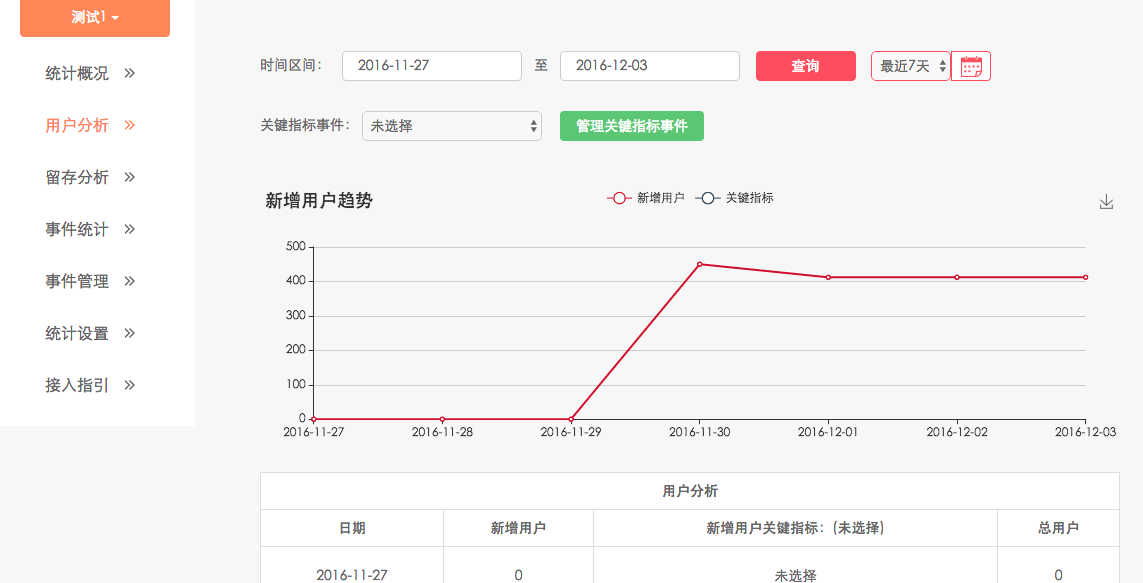 微信小程序數據監控:HotApp 小程序統計能補足微信後台的哪些空白?
小程序也需要自己的統計工具 做 Android 與 iOS 開發的人對友盟統計不陌生,App 上線後每天盯著新增、活躍、留存看。微信小程序其實處境相同,同樣需要一套能即時
 SwipeMenuListView 源碼全解析:滑動菜單背後的事件分發邏輯
關於這個框架 SwipeMenuListView 是一個為 ListView 加上側滑菜單的開源專案,作者 baoyz。它篇幅不大,但把自定義 View 與事件分發的幾個