

編輯:關於 Android 開發
相信許多開發者在 Android 開發過程中,都遇到過這樣的錯誤:Could not find class 'org.apache.commons.httpclient.HttpClient'。
這個問題尤其容易在 Eclipse 的 ADT 插件升級之後出現。有一次 Google 發布了 ADT 升級包,我順手升級了開發環境,沒想到前兩天還運行正常的程式,隔天突然就不工作了。檢查 log 才發現 HttpClient 找不到,但在普通的 Java 運行環境下卻能正常執行。
原因在於:Apache 的 HttpClient 開發包,Google 自己也定制了一份並內置到開發環境中。因此如果我們使用純粹的 Apache 原生態 HttpClient 開發包,就可能發生衝突——每當 Google 升級 ADT 之後,程式說不定就掛了。
實在沒有更好的辦法,那就把基於 Apache 原生態的 HttpClient 完全替換成 Google 定制後的類型吧。轉換前後的關鍵差異如下。
【基於 Apache 原生態的 HttpClient】
原生態寫法使用 org.apache.commons.httpclient 套件,透過 GetMethod 與 PostMethod 發送請求,並以 executeMethod() 執行、getResponseBodyAsString() 取得回應:
import org.apache.commons.httpclient.HttpClient;
import org.apache.commons.httpclient.HttpStatus;
import org.apache.commons.httpclient.methods.ByteArrayRequestEntity;
import org.apache.commons.httpclient.methods.GetMethod;
import org.apache.commons.httpclient.methods.PostMethod;

public final class HSHttpClient {

    private static final int CONNECTION_TIMEOUT = 20000;
    private static HSHttpClient mHSHttpClient;

    private HSHttpClient() {
    }

    public static synchronized HSHttpClient getInstance() {
        if (mHSHttpClient == null) {
            mHSHttpClient = new HSHttpClient();
        }
        return mHSHttpClient;
    }

    public String httpGet(String url, String queryString) throws Exception {
        String responseData = null;
        if (queryString != null && !queryString.equals("")) {
            url += "?" + queryString;
        }
        HttpClient httpClient = new HttpClient();
        GetMethod httpGet = new GetMethod(url);
        httpGet.getParams().setParameter("http.socket.timeout", new Integer(CONNECTION_TIMEOUT));
        try {
            int statusCode = httpClient.executeMethod(httpGet);
            if (statusCode != HttpStatus.SC_OK) {
                System.err.println("HttpGet Method failed: " + httpGet.getStatusLine());
            }
            responseData = httpGet.getResponseBodyAsString();
        } catch (Exception e) {
            throw new Exception(e);
        } finally {
            httpGet.releaseConnection();
            httpClient = null;
        }
        return responseData;
    }

    public String httpPost(String url, String queryString) throws Exception {
        String responseData = null;
        HttpClient httpClient = new HttpClient();
        PostMethod httpPost = new PostMethod(url);
        httpPost.addParameter("Content-Type", "application/x-www-form-urlencoded");
        httpPost.getParams().setParameter("http.socket.timeout", new Integer(CONNECTION_TIMEOUT));
        if (queryString != null && !queryString.equals("")) {
            httpPost.setRequestEntity(new ByteArrayRequestEntity(queryString.getBytes()));
        }
        try {
            int statusCode = httpClient.executeMethod(httpPost);
            if (statusCode != HttpStatus.SC_OK) {
                System.err.println("HttpPost Method failed: " + httpPost.getStatusLine());
            }
            responseData = httpPost.getResponseBodyAsString();
        } catch (Exception e) {
            throw new Exception(e);
        } finally {
            httpPost.releaseConnection();
            httpClient = null;
        }
        return responseData;
    }
}
【基於 Google 定制的 HttpClient】
Google 定制版改用 org.apache.http 套件,透過 DefaultHttpClient 搭配 HttpParams 設定逾時,以 HttpGet/HttpPost 發送請求,並用 EntityUtils.toString() 解析回應實體:
import org.apache.http.HttpResponse;
import org.apache.http.HttpStatus;
import org.apache.http.client.HttpClient;
import org.apache.http.client.methods.HttpGet;
import org.apache.http.client.methods.HttpPost;
import org.apache.http.entity.StringEntity;
import org.apache.http.impl.client.DefaultHttpClient;
import org.apache.http.params.BasicHttpParams;
import org.apache.http.params.HttpConnectionParams;
import org.apache.http.params.HttpParams;
import org.apache.http.util.EntityUtils;

public final class BBHttpClient {

    private static final int CONNECTION_TIMEOUT = 20000;
    private static BBHttpClient mHSHttpClient;

    private BBHttpClient() {
    }

    public static synchronized BBHttpClient getInstance() {
        if (mHSHttpClient == null) {
            mHSHttpClient = new BBHttpClient();
        }
        return mHSHttpClient;
    }

    public String httpGet(String url, String queryString) throws Exception {
        if (queryString != null && !queryString.equals("")) {
            url += "?" + queryString;
        }
        HttpGet httpGet = new HttpGet(url);

        HttpParams params = new BasicHttpParams();
        HttpConnectionParams.setConnectionTimeout(params, CONNECTION_TIMEOUT);
        HttpConnectionParams.setSoTimeout(params, CONNECTION_TIMEOUT);
        HttpClient httpClient = new DefaultHttpClient(params);

        try {
            HttpResponse response = httpClient.execute(httpGet);
            if (response.getStatusLine().getStatusCode() != HttpStatus.SC_OK) {
                System.err.println("HttpGet Method failed: " + response.getStatusLine().toString());
                httpGet.abort();
            }
            return EntityUtils.toString(response.getEntity());
        } catch (Exception e) {
            throw new Exception(e);
        } finally {
            httpClient.getConnectionManager().shutdown();
        }
    }

    public String httpPost(String url, String queryString) throws Exception {
        HttpPost httpPost = new HttpPost(url);
        if (queryString != null && !queryString.equals("")) {
            StringEntity se = new StringEntity(queryString);
            httpPost.setHeader("Content-Type", "application/x-www-form-urlencoded");
            httpPost.setEntity(se);
        }

        HttpParams params = new BasicHttpParams();
        HttpConnectionParams.setConnectionTimeout(params, CONNECTION_TIMEOUT);
        HttpConnectionParams.setSoTimeout(params, CONNECTION_TIMEOUT);
        HttpClient httpClient = new DefaultHttpClient(params);

        try {
            HttpResponse response = httpClient.execute(httpPost);
            if (response.getStatusLine().getStatusCode() != HttpStatus.SC_OK) {
                System.err.println("HttpPost Method failed: " + response.getStatusLine().toString());
                httpPost.abort();
            }
            return EntityUtils.toString(response.getEntity());
        } catch (Exception e) {
            throw new Exception(e);
        } finally {
            httpClient.getConnectionManager().shutdown();
        }
    }
}
總結來說,這個問題的根源是套件命名空間的衝突。只要把程式碼從 org.apache.commons.httpclient 遷移到 Google 定制的 org.apache.http,就能避免 ADT 升級後出現找不到類別的錯誤。
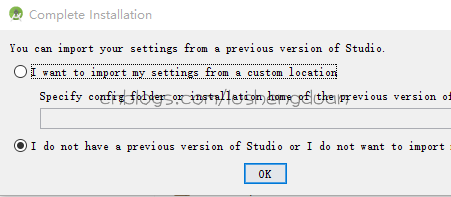 從零建置 Android App 開發環境並寫出第一支 HelloWorld
一、建置開發環境 1、先搞定 JDK 環境變數 JDK 是 Java 開發的基礎,Android 自然也不例外。下載完成後,開啟「計算機 → 內容 → 進階系統設定 →
 Android Studio 打包並發布簽名應用完整流程
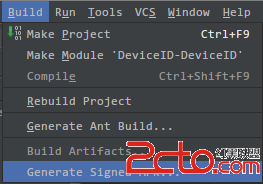
 (1)開啟 Android Studio 選單 Build -> Generate Signed APK。
 如何將 Tab 欄平均置中的實作方法
 使用 SlidingTabLayout 時,預設的 Tab 會靠左排列。若希望讓各個 Tab 平均佔滿水平空間、呈現置中效果,可以對
 安卓開源專案週報精選:26 個值得收藏的元件與工具
OpenDigg 安卓開源週報 本期彙整了 OpenDigg 一週內新收錄的優質 Android 開源專案,涵蓋 UI 元件、網路診斷、檔案傳輸與動畫效果等方向,方便開發