

編輯:關於 Android 開發
本篇以「手機安全衛士」的設置中心為例,示範如何封裝可重複使用的自定義組合控件,並透過自定義屬性簡化布局檔的維護。
1. 自定義一個 View,繼承 ViewGroup(本文使用 RelativeLayout),例如 SettingItemView。
2. 編寫組合控件的布局檔,並在自定義 View 中載入:
// 將自定義好的布局檔設定給當前的 SettingItemView
View.inflate(getContext(), R.layout.view_setting_item, this);
3. 自定義屬性:刪除程式碼中對文字的動態設定,改為在布局檔中設定;在布局檔中增加新的命名空間;建立 attrs.xml 定義相關屬性;讀取自定義的值並更新內容。
<?xml version="1.0" encoding="utf-8"?> <LinearLayout xmlns:android="https://schemas.android.com/apk/res/android" xmlns:mobilesafe="https://schemas.android.com/apk/res/com.mxn.mobilesafe" android:layout_width="match_parent" android:layout_height="match_parent" android:orientation="vertical" > <TextView style="@style/TitleStyle" android:text="設置中心" /> <com.mxn.mobilesafe.view.SettingItemView android:id="@+id/siv_update" android:layout_width="match_parent" android:layout_height="wrap_content" mobilesafe:title="自動更新設置" mobilesafe:desc_on="自動更新已開啟" mobilesafe:desc_off="自動更新已關閉" > </com.mxn.mobilesafe.view.SettingItemView> <com.mxn.mobilesafe.view.SettingItemView android:id="@+id/siv_address" android:layout_width="match_parent" android:layout_height="wrap_content" mobilesafe:title="歸屬地顯示設置" mobilesafe:desc_on="歸屬地顯示已開啟" mobilesafe:desc_off="歸屬地顯示已關閉" > </com.mxn.mobilesafe.view.SettingItemView> <com.mxn.mobilesafe.view.SettingClickView android:id="@+id/scv_address_style" android:layout_width="match_parent" android:layout_height="wrap_content" > </com.mxn.mobilesafe.view.SettingClickView> <com.mxn.mobilesafe.view.SettingItemView android:id="@+id/siv_watchdog" android:layout_width="match_parent" android:layout_height="wrap_content" mobilesafe:title="看門狗設置" mobilesafe:desc_on="看門狗已開啟" mobilesafe:desc_off="看門狗已關閉" > </com.mxn.mobilesafe.view.SettingItemView> </LinearLayout>
<?xml version="1.0" encoding="utf-8"?> <resources> <declare-styleable name="SettingItemView"> <attr name="title" format="string"></attr> <attr name="desc_on" format="string"></attr> <attr name="desc_off" format="string"></attr> </declare-styleable> </resources>
public class SettingItemView extends RelativeLayout { TextView tvTitle; TextView tvDesc; CheckBox cbStatus; private String mtitle; private String mdescon; private String mdescoff; String namespace = "https://schemas.android.com/apk/res/com.mxn.mobilesafe"; public SettingItemView(Context context, AttributeSet attrs, int defStyleAttr, int defStyleRes) { super(context, attrs, defStyleAttr, defStyleRes); initView(); } public SettingItemView(Context context, AttributeSet attrs, int defStyleAttr) { super(context, attrs, defStyleAttr); initView(); } public SettingItemView(Context context, AttributeSet attrs) { super(context, attrs); // 讀取自定義的值,更新相關內容 mtitle = attrs.getAttributeValue(namespace, "title"); mdescon = attrs.getAttributeValue(namespace, "desc_on"); mdescoff = attrs.getAttributeValue(namespace, "desc_off"); initView(); } public SettingItemView(Context context) { super(context); initView(); } // 初始化布局 private void initView() { View.inflate(getContext(), R.layout.view_setting_item, this); tvTitle = (TextView) findViewById(R.id.tv_title); tvDesc = (TextView) findViewById(R.id.tv_desc); cbStatus = (CheckBox) findViewById(R.id.cb_status); setTitle(mtitle); } public void setTitle(String title) { tvTitle.setText(title); } public void setDesc(String desc) { tvDesc.setText(desc); } public boolean isChecked() { return cbStatus.isChecked(); } public void setChecked(boolean check){ cbStatus.setChecked(check); if(check){ setDesc(mdescon); }else{ setDesc(mdescoff); } } }
<?xml version="1.0" encoding="utf-8"?> <RelativeLayout xmlns:android="https://schemas.android.com/apk/res/android" android:layout_width="match_parent" android:layout_height="80dp" android:padding="10dp"> <TextView android:id="@+id/tv_title" android:layout_width="match_parent" android:layout_height="wrap_content" android:textColor="@color/black" android:textSize="20sp"/> <TextView android:id="@+id/tv_desc" android:layout_width="match_parent" android:layout_height="wrap_content" android:layout_marginTop="5dp" android:textColor="#a000" android:layout_below="@id/tv_title" android:textSize="15sp"/> <CheckBox android:id="@+id/cb_status" android:layout_width="wrap_content" android:layout_height="wrap_content" android:layout_alignParentRight="true" android:layout_centerVertical="true" android:clickable="false" android:focusable="false" android:focusableInTouchMode="false" /> <View android:layout_width="match_parent" android:layout_height="0.2dp" android:background="#a000" android:layout_alignParentBottom="true" /> </RelativeLayout>
public class SettingClickView extends RelativeLayout { private TextView tvTitle; private TextView tvDesc; public SettingClickView(Context context, AttributeSet attrs, int defStyle) { super(context, attrs, defStyle); initView(); } public SettingClickView(Context context, AttributeSet attrs) { super(context, attrs); initView(); } public SettingClickView(Context context) { super(context); initView(); } private void initView() { View.inflate(getContext(), R.layout.view_setting_click, this); tvTitle = (TextView) findViewById(R.id.tv_title); tvDesc = (TextView) findViewById(R.id.tv_desc); } public void setTitle(String title) { tvTitle.setText(title); } public void setDesc(String desc) { tvDesc.setText(desc); } }
<?xml version="1.0" encoding="utf-8"?> <RelativeLayout xmlns:android="https://schemas.android.com/apk/res/android" android:layout_width="match_parent" android:layout_height="80dp" android:padding="10dp"> <TextView android:id="@+id/tv_title" android:layout_width="match_parent" android:layout_height="wrap_content" android:textColor="@color/black" android:textSize="20sp"/> <TextView android:id="@+id/tv_desc" android:layout_width="match_parent" android:layout_height="wrap_content" android:layout_marginTop="5dp" android:textColor="#a000" android:layout_below="@id/tv_title" android:textSize="15sp"/> <ImageView android:src="@drawable/jiantou1_pressed" android:layout_width="wrap_content" android:layout_height="wrap_content" android:layout_alignParentRight="true" android:layout_centerVertical="true" android:id="@+id/iv_jt" /> <View android:layout_width="match_parent" android:layout_height="0.2dp" android:background="#a000" android:layout_alignParentBottom="true" /> </RelativeLayout>
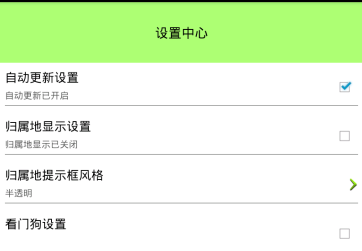
運行界面:
public class SettingActivity extends Activity { private SettingItemView sivUpdate; private SettingItemView sivAddress; private SettingClickView scvAddressStyle; private SettingClickView scvAddressLocation; private SharedPreferences mPref; @Override protected void onCreate(Bundle savedInstanceState) { super.onCreate(savedInstanceState); setContentView(R.layout.activity_setting); mPref = getSharedPreferences("config", MODE_PRIVATE); initUpdateView(); initAddressView(); initAddressStyle(); } private void initUpdateView() { sivUpdate = (SettingItemView) findViewById(R.id.siv_update); boolean autoUpdate = mPref.getBoolean("auto_update", true); if (autoUpdate) { sivUpdate.setChecked(true); } else { sivUpdate.setChecked(false); } sivUpdate.setOnClickListener(new OnClickListener() { @Override public void onClick(View v) { if (sivUpdate.isChecked()) { sivUpdate.setChecked(false); mPref.edit().putBoolean("auto_update", false).commit(); } else { sivUpdate.setChecked(true); mPref.edit().putBoolean("auto_update", true).commit(); } } }); } private void initAddressView() { sivAddress = (SettingItemView) findViewById(R.id.siv_address); boolean serviceRunning = ServiceStatusUtils.isServiceRunning(this, "com.itheima52.mobilesafe.service.AddressService"); if (serviceRunning) { sivAddress.setChecked(true); } else { sivAddress.setChecked(false); } sivAddress.setOnClickListener(new OnClickListener() { @Override public void onClick(View v) { if (sivAddress.isChecked()) { sivAddress.setChecked(false); stopService(new Intent(SettingActivity.this, AddressService.class)); } else { sivAddress.setChecked(true); startService(new Intent(SettingActivity.this, AddressService.class)); } } }); } final String[] items = new String[] { "半透明", "活力橙", "衛士藍", "金屬灰", "蘋果綠" }; private void initAddressStyle() { scvAddressStyle = (SettingClickView) findViewById(R.id.scv_address_style); scvAddressStyle.setTitle("歸屬地提示框風格"); int style = mPref.getInt("address_style", 0); scvAddressStyle.setDesc(items[style]); scvAddressStyle.setOnClickListener(new OnClickListener() { @Override public void onClick(View v) { showSingleChooseDailog(); } }); } protected void showSingleChooseDailog() { AlertDialog.Builder builder = new AlertDialog.Builder(this); builder.setTitle("歸屬地提示框風格"); int style = mPref.getInt("address_style", 0); builder.setSingleChoiceItems(items, style, new DialogInterface.OnClickListener() { @Override public void onClick(DialogInterface dialog, int which) { mPref.edit().putInt("address_style", which).commit(); dialog.dismiss(); scvAddressStyle.setDesc(items[which]); } }); builder.setNegativeButton("取消", null); builder.show(); } }
透過以上封裝,設置中心的每一項都能以聲明式的方式在布局檔中描述標題與開關文字,大幅提升了程式碼的可讀性與可維護性。
 ScrollView 監聽滑到底部的方法
 在 Android 中,若希望使用者捲動到 ScrollView 底部時觸發載入更多、顯示按鈕或執行其他行為,可以透過觸控事件與
 WebView 的使用:在應用內直接嵌入網頁
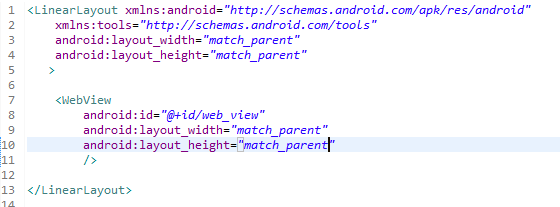
借助 WebView,我們可以在應用裡直接嵌入並展示網頁內容,無需跳出應用以調用系統瀏覽器。整個實現過程可以分為以下幾步。 1. 首先修改 activity.xml 中的
 Android shape 標籤入門:圓角、邊框與填充色一次搞定
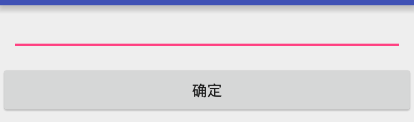
 先看看系統預設的 EditText 與 Button 長什麼樣子: 加上自訂 shape 之後,效果變
 手機衛士實戰:安裝過程中處理回退與取消操作
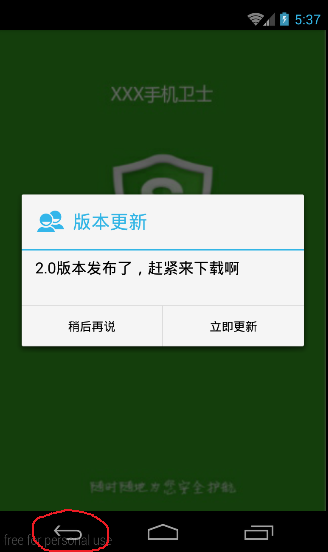
優化升級安裝中的回退與取消體驗 在手機衛士的版本升級流程中,用戶的操作路徑需要被妥善處理。本文將解決兩個常見的體驗問題:點擊回退鍵時的頁面跳轉,以及取消安裝後的返回邏輯。