

編輯:關於 Android 開發
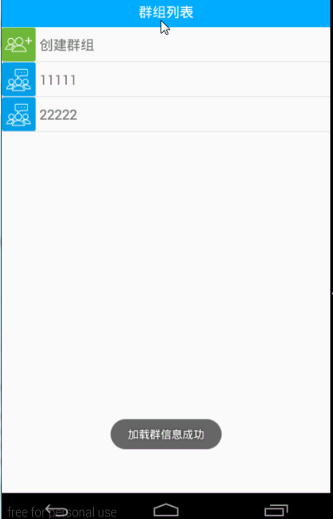
群列表是使用者進入群聊的入口。它需要解決三件事:把資料渲染成列表、從環信伺服器拉取最新群組、以及在點擊後帶著正確參數跳轉到聊天頁。下面按實作順序逐步拆解。
界面由標題欄與 ListView 組成,標題欄直接複用 EaseUI 的 EaseTitleBar,可以省下大量樣式工作。
<?xml version="1.0" encoding="utf-8"?>
<LinearLayout xmlns:android="https://schemas.android.com/apk/res/android"
    xmlns:tools="https://schemas.android.com/tools"
    xmlns:app="https://schemas.android.com/apk/res-auto"
    android:layout_width="match_parent"
    android:layout_height="match_parent"
    android:orientation="vertical">

    <com.hyphenate.easeui.widget.EaseTitleBar
        app:titleBarTitle="群組列表"
        android:layout_width="match_parent"
        android:layout_height="wrap_content">
    </com.hyphenate.easeui.widget.EaseTitleBar>

    <ListView
        android:id="@+id/lv_grouplist"
        android:layout_width="match_parent"
        android:layout_height="match_parent">
    </ListView>
</LinearLayout>
頭部通常放「創建群組」入口,用 addHeaderView 實現最為直觀。
// 獲取頭布局view
View headerView = View.inflate(GroupListActivity.this, R.layout.header_group_list, null);
// 添加頭布局view
lv_group_list.addHeaderView(headerView);
// 創建適配器
mGroupListAdapter = new GroupListAdapter(GroupListActivity.this);
// 將適配器添加到listview中
lv_group_list.setAdapter(mGroupListAdapter);
這裡採用經典的 ViewHolder 模式:只在 convertView 為空時 inflate 布局並 findViewById,其後直接複用 tag 中快取的引用,避免列表滑動時反覆查找控件。
public class GroupListAdapter extends BaseAdapter {
    private Context mContext;
    private List<EMGroup> mEMGroups = new ArrayList<>();

    public GroupListAdapter(Context context) {
        mContext = context;
    }

    // 刷新方法
    public void refresh(List<EMGroup> eMGroups){
        if(eMGroups != null && eMGroups.size() >= 0) {
            // 加載數據
            mEMGroups.clear();
            mEMGroups.addAll(eMGroups);
            // 通知刷新頁面
            notifyDataSetChanged();
        }
    }

    @Override
    public int getCount() {
        return mEMGroups == null? 0:mEMGroups.size();
    }

    @Override
    public Object getItem(int position) {
        return mEMGroups.get(position);
    }

    @Override
    public long getItemId(int position) {
        return position;
    }

    @Override
    public View getView(int position, View convertView, ViewGroup parent) {
        // 創建或獲取viewhoder
        ViewHolder holder = null;
        if(convertView == null) {
            holder = new ViewHolder();
            convertView = View.inflate(mContext, R.layout.item_group_list, null);
            holder.tv_name = (TextView) convertView.findViewById(R.id.tv_group_list_name);
            convertView.setTag(holder);
        }else {
            holder = (ViewHolder) convertView.getTag();
        }

        // 獲取當前item數據
        EMGroup emGroup = mEMGroups.get(position);
        // 顯示數據
        holder.tv_name.setText(emGroup.getGroupName());
        // 返回convertview
        return convertView;
    }

    static class ViewHolder{
        TextView tv_name;
    }
}
本地快取可能過期,因此需要在子執行緒中呼叫 getJoinedGroupsFromServer(),成功後再切回主線程刷新界面。注意此方法會拋出 HyphenateException,必須被捕獲。
// 聯網獲取群信息
private void getGroupFromHxServier() {
    Model.getInstace().getGolbalThreadPool().execute(new Runnable() {
        @Override
        public void run() {
            try {
                // 聯網獲取群信息
                EMClient.getInstance().groupManager().getJoinedGroupsFromServer();
                runOnUiThread(new Runnable() {
                    @Override
                    public void run() {
                        Toast.makeText(GroupListActivity.this, "加載群信息成功", Toast.LENGTH_SHORT).show();
                        // 刷新顯示
                        mGroupListAdapter.refresh(EMClient.getInstance().groupManager().getAllGroups());
                    }
                });
            } catch (HyphenateException e) {
                e.printStackTrace();
                runOnUiThread(new Runnable() {
                    @Override
                    public void run() {
                        Toast.makeText(GroupListActivity.this, "加載群信息失敗", Toast.LENGTH_SHORT).show();
                    }
                });
            }
        }
    });
}
// 刷新顯示
mGroupListAdapter.refresh(EMClient.getInstance().groupManager().getAllGroups());
由於添加了頭布局,真實資料的位置需要減去 1,這是使用 addHeaderView 後最容易犯下的位移錯誤。
// 群列表的點擊事件
lv_group_list.setOnItemClickListener(new AdapterView.OnItemClickListener() {
    @Override
    public void onItemClick(AdapterView<?> parent, View view, int position, long id) {
        // 跳轉到聊天頁面
        Intent intent = new Intent(GroupListActivity.this, ChatActivity.class);
        // 獲取群id
        String groupId = EMClient.getInstance().groupManager().getAllGroups().get(position - 1).getGroupId();
        intent.putExtra(EaseConstant.EXTRA_USER_ID, groupId);
        // 保存群聊天類型
        intent.putExtra(EaseConstant.EXTRA_CHAT_TYPE, EaseConstant.CHATTYPE_GROUP);
        startActivity(intent);
    }
});
// 群組條目的點擊事件
ll_group_list.setOnClickListener(new View.OnClickListener() {
    @Override
    public void onClick(View v) {
        // 跳轉到新建群頁面
        Intent intent = new Intent(GroupListActivity.this, NewGroupActivity.class);
        startActivity(intent);
    }
});
把刷新邏輯放在 onResume() 中,可以保證使用者從「創建群組」或「群設置」頁返回時,看到的始終是最新資料。
@Override
protected void onResume() {
    super.onResume();
    // 刷新頁面
    mGroupListAdapter.refresh(EMClient.getInstance().groupManager().getAllGroups());
}
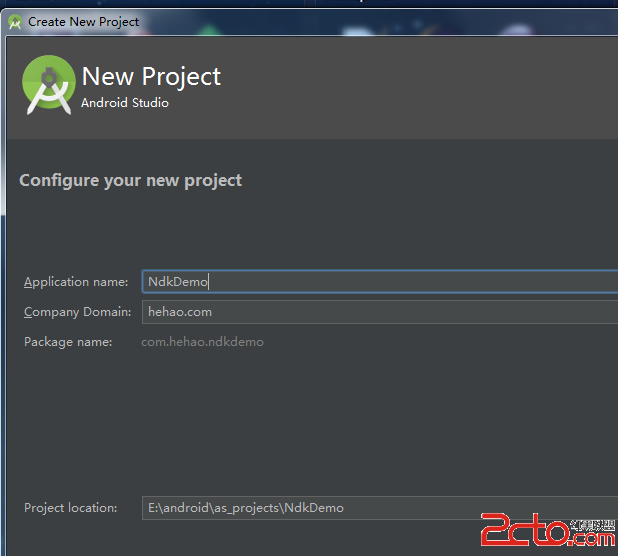 Android Studio 中 NDK 開發的完整入門指南
 在我們開發 Android 應用的過程中,有時候需要程式去呼叫底層硬體。為此,Android 官方提供了 N
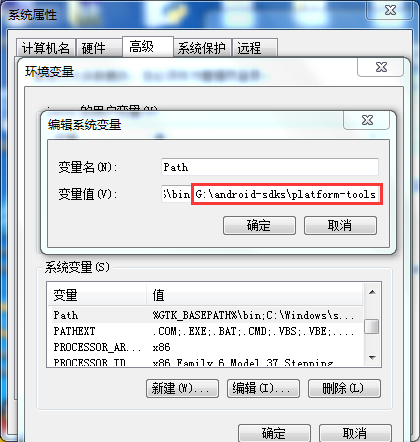 ADB 常用指令整理:從安裝、日誌到壓力測試
 日常開發裡 ADB 幾乎每天都要用到,把常用指令整理成一份,翻起來比查文件快。 一、ADB 是什麼 ADB 全名 Andro
 取得手機螢幕密度:三種寫法與 density 換算公式完整整理
 螢幕密度(density)是 Android 自適應開發的基礎。本篇以一個可執行的範例,示範三種取得螢幕密
 免 ROOT、免改 hosts:在本機測試 Android、iOS App 與 H5 應用
開發手機 App 與 H5 應用時,常常需要把本機與線上環境分開測試。一般直覺都是去改 hosts,我也一直是這麼做的,但手機改 hosts 需要 ROOT 權限,既麻煩